GSM Gateway Setup for Business Calling in India (Using Mobile Number for Telecom in India)
Learn why businesses in India usually receive landline-based telecom allocations, where GSM gateways fit, how mobile-number based calling works technically, and why legal compliance matters before using such setups.
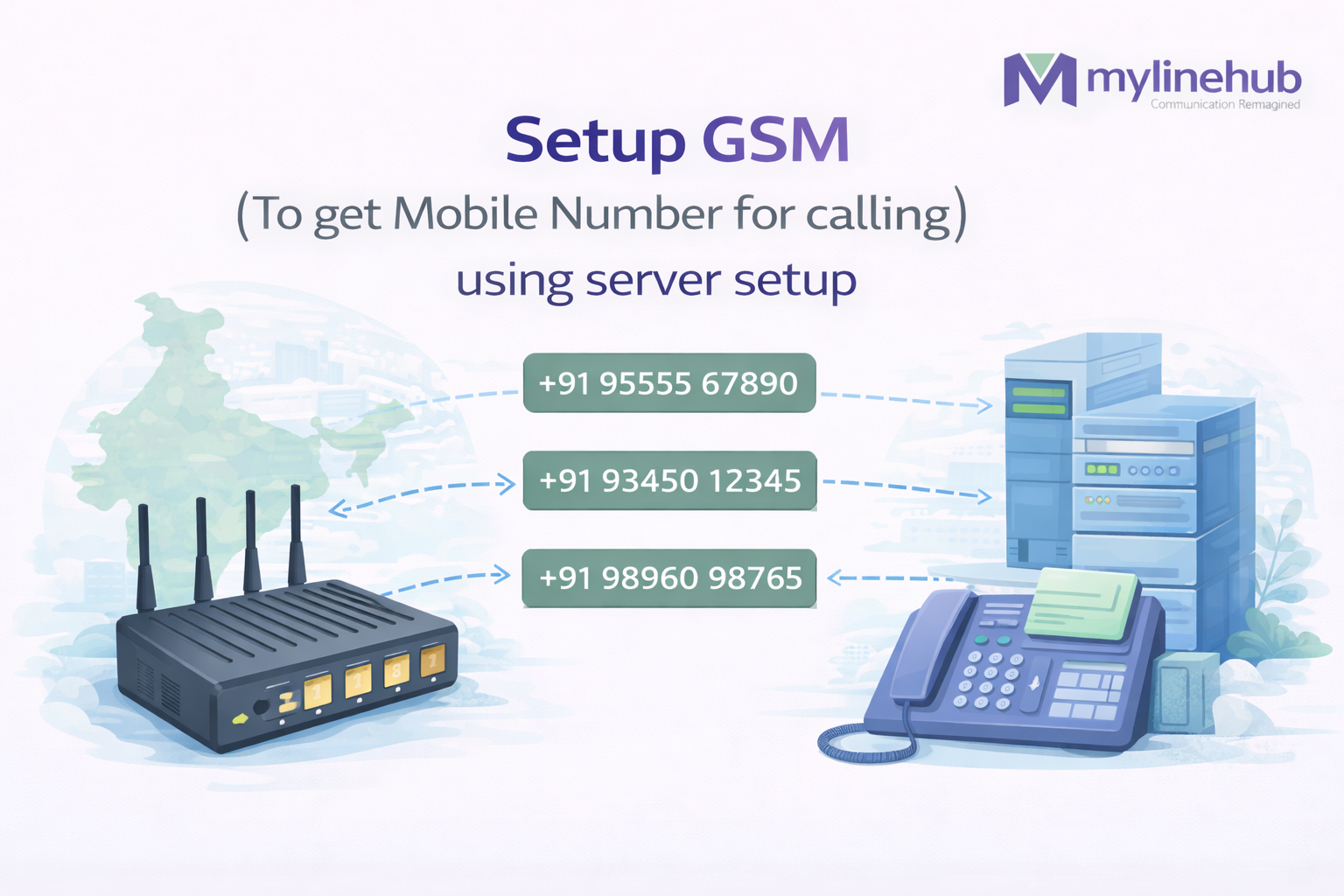
✨ How GSM Gateway Endpoints, Routing, and PBX Connectivity Work in Real Deployments
⚠️ Important note: This guide explains the technical setup of a GSM gateway device (commonly based on OpenVox hardware or similar OEM platforms). Menu labels may vary slightly depending on firmware version or vendor branding, but the configuration principles remain the same.
🇮🇳 In India, many businesses want outbound calls to originate from a mobile number instead of a landline-style telecom number. However, most enterprise-grade telephony services (SIP trunks, PRI lines) provide numbers that appear as fixed-line connections.
To bridge this gap, organizations deploy a GSM Gateway — a hardware device that connects physical SIM cards to IP telephony systems such as Asterisk, FreePBX, cloud PBXs, or CRM-integrated dialing platforms.
Each SIM inserted into the gateway behaves like an independent mobile line, but instead of being used from a handset, it is controlled programmatically through SIP signaling.
Once integrated, the gateway allows mobile network connectivity to function as part of a centralized telecom infrastructure with routing, monitoring, and automation.
📞 GSM vs SIP Lines — When and Why GSM Gateways Are Used
Modern enterprise telephony is primarily based on SIP (Session Initiation Protocol), which enables voice communication over IP networks. SIP trunks replace traditional copper lines and allow large-scale concurrent calling.
SIP trunks provide:
- High concurrency capacity (dozens or hundreds of simultaneous calls)
- Geographic DID numbers (e.g., 080, 079, 011)
- Integration with IVR, queues, recording, analytics
- Centralized management through PBX systems
- Predictable call quality over stable internet links
However, SIP lines typically present caller IDs that resemble landline numbers, which may not be suitable for certain workflows where a mobile identity is desired.
GSM gateways are used when:
- Calls must originate from mobile network numbers
- SIM-based connectivity is required
- Deployment is in regions where SIP reliability is limited
- Hybrid telecom architecture is needed
- Backup connectivity for SIP outages is required
In most professional deployments, GSM gateways complement SIP trunks rather than replace them.
⚖️ Regulatory and Compliance Awareness
Telecom regulations in India are strict regarding unsolicited calls, telemarketing activity, and caller identification. The rules vary depending on whether communication is transactional, service-related, or promotional.
This article focuses only on technical configuration.
Before deploying any outbound calling system, organizations should:
- Review current TRAI regulations
- Confirm policies with telecom operators
- Ensure lawful usage of SIM-based communication
- Implement consent-based calling practices where required
Always follow official guidelines and legal advice for production use.
📡 How a GSM Gateway Integrates Into a PBX System
A GSM gateway bridges two fundamentally different networks:
- Cellular network (GSM/4G/5G via SIM cards)
- IP telephony network (SIP-based VoIP)
Outbound call flow:
PBX / Dialer → SIP signaling → GSM Gateway → Selected SIM Port → Mobile Network → Destination
Inbound call flow:
Caller → Mobile Network → SIM Port → Gateway → SIP signaling → PBX → IVR / Agent / Application
The gateway therefore acts as a protocol translator and traffic controller.
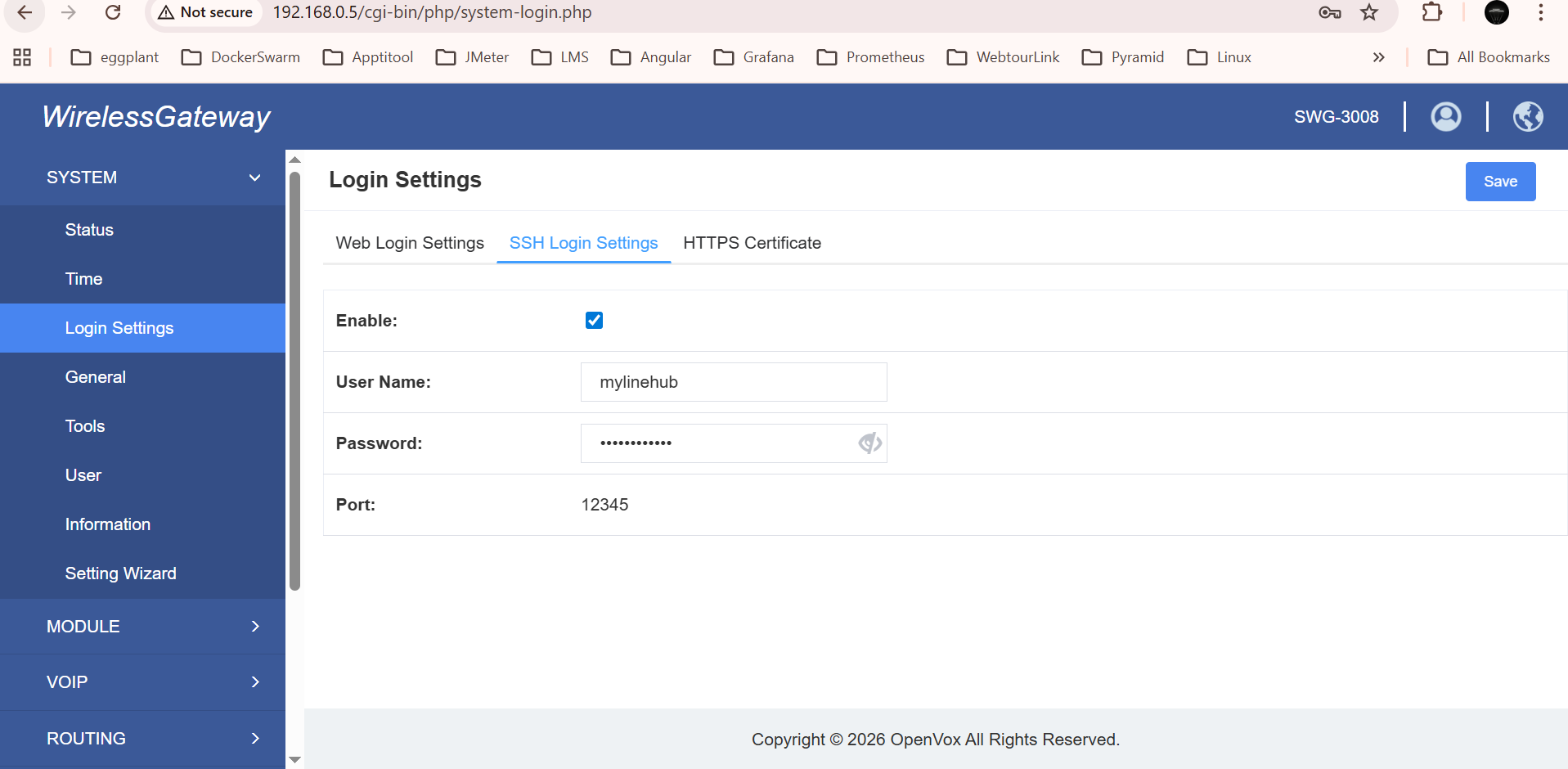
🔐 Step 1 — Configure Administrative Login Settings
The login settings screen controls who can access the device management interface.
Because GSM gateways can initiate real calls and consume telecom resources, securing access is critical.
Typical options on this screen include:
- Username and password configuration
- Session timeout controls
- Access restrictions by IP
- Password complexity rules
Best practices:
- Change default credentials immediately
- Restrict management access to internal networks
- Avoid exposing the web interface directly to the internet
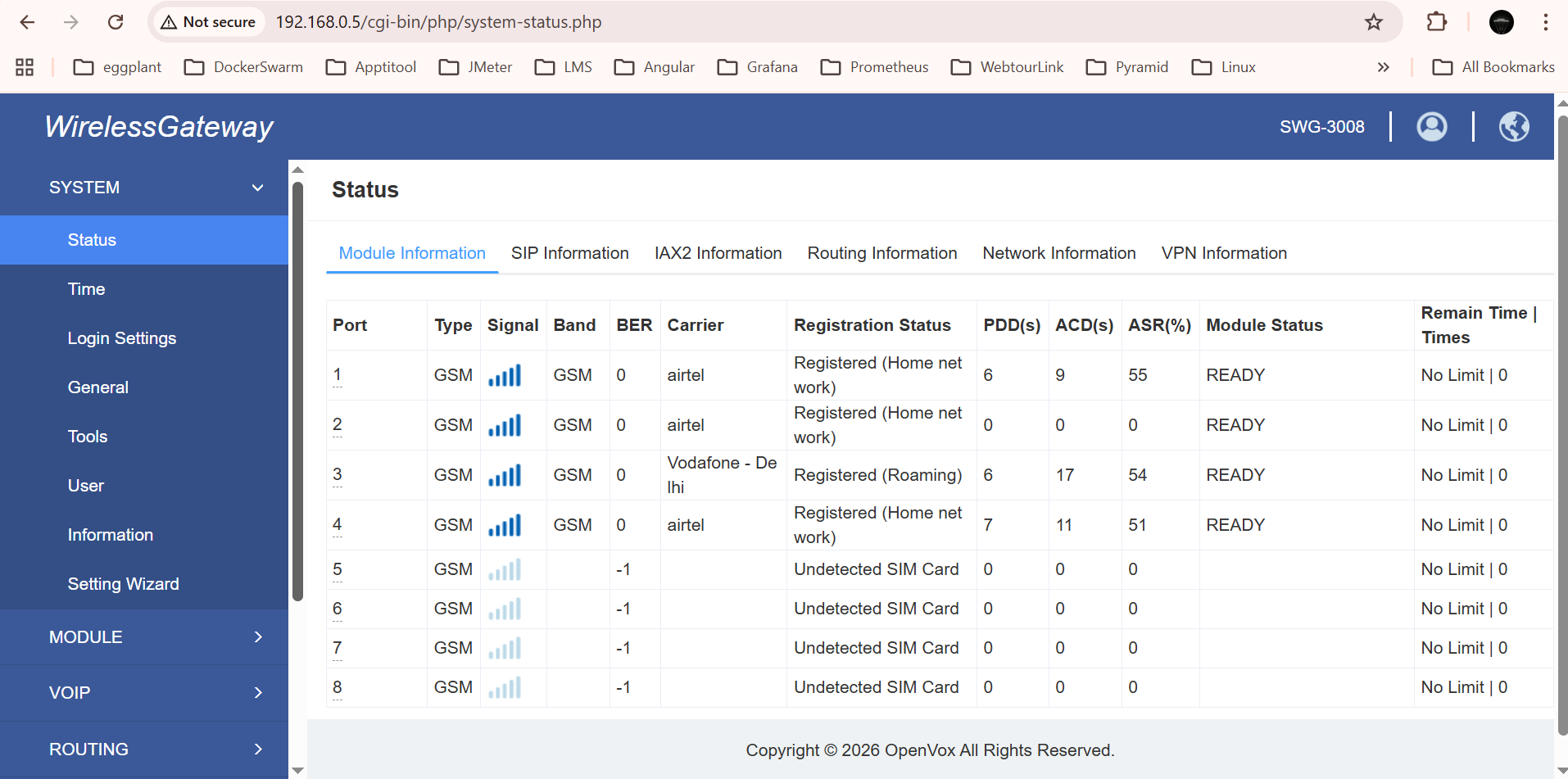
📶 Step 2 — Verify SIM Status and Signal Quality
This screen provides a real-time overview of all SIM ports installed in the device.
Typical indicators include:
- SIM presence detection
- Network registration status
- Signal strength (RSSI)
- Operator name
- Port availability
- Active call indicators
A SIM showing "not registered" or very low signal will not reliably handle calls.
Physical antenna placement often has a significant impact on performance.
🌐 Step 3 — Create VoIP Endpoint for PBX Connectivity
To integrate with an IP telephony system, the gateway must communicate using SIP. This is achieved by defining VoIP endpoints.
A VoIP endpoint represents a logical connection between the gateway and a SIP server such as Asterisk or FreePBX.
Common parameters:
- SIP server IP address or domain
- Authentication username and password
- SIP port (usually 5060 or custom)
- Transport protocol (UDP/TCP/TLS)
- Codec preferences
Multiple endpoints can be configured for redundancy or multi-PBX deployments.
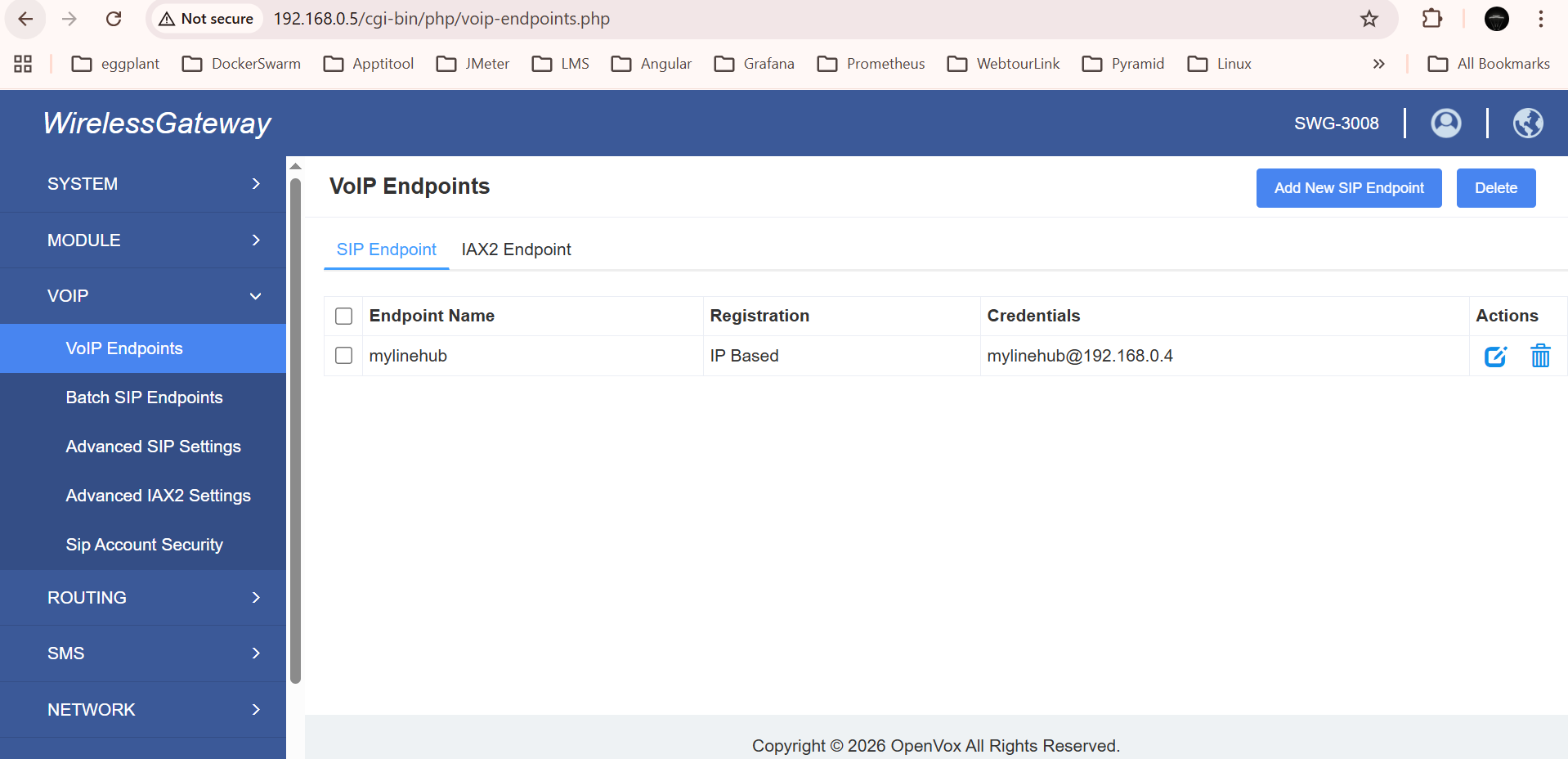
🧠 What an endpoint really means
In practical terms, an endpoint is the SIP identity or SIP connection profile that tells the gateway where to send calls, how to register, and how to authenticate. Without an endpoint, the GSM side and the PBX side remain disconnected.
Think of it as the “VoIP doorway” between the hardware gateway and the software telephony platform.
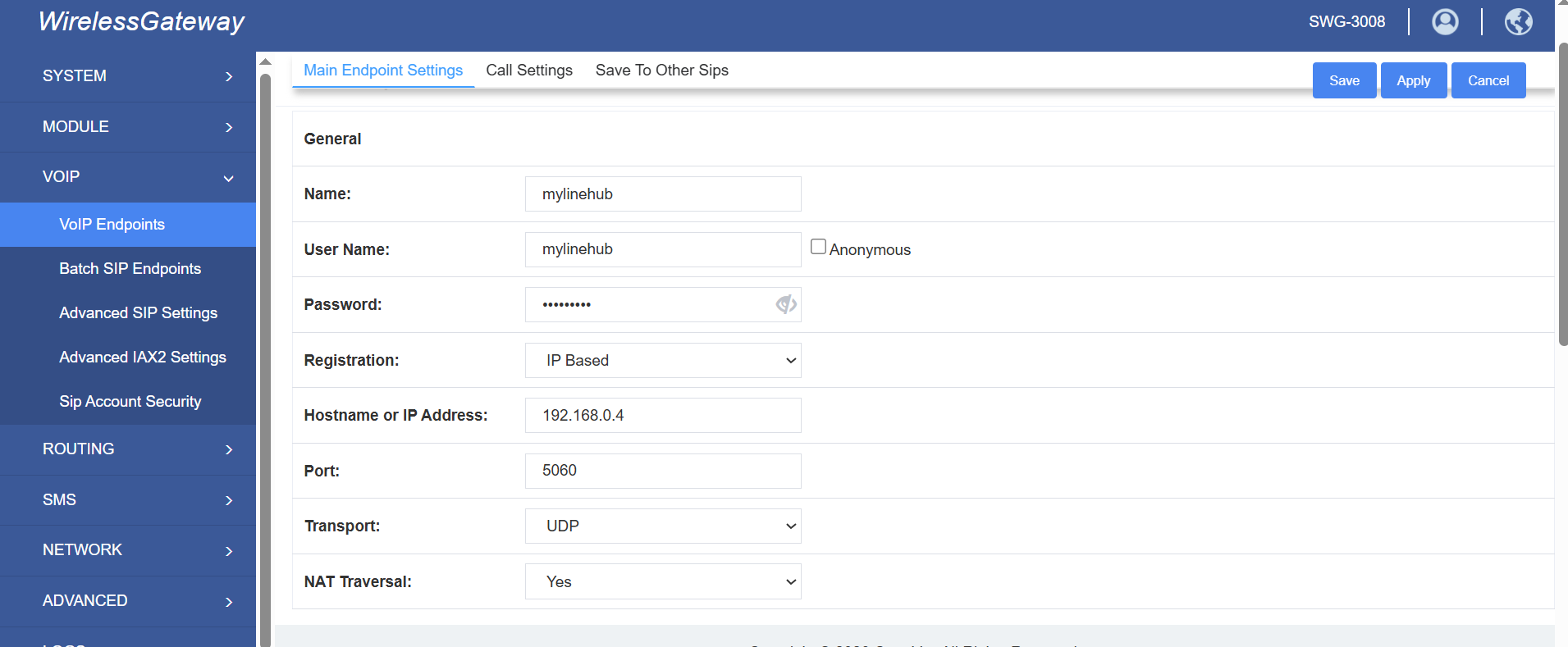
⚙️ Step 4 — Configure Endpoint Details
Editing an endpoint reveals detailed connection parameters.
These settings determine how the gateway authenticates and exchanges SIP messages.
Important fields often include:
- Registrar address
- Outbound proxy
- Authentication credentials
- NAT handling options
- Registration interval
Incorrect configuration here can prevent calls entirely, even if SIM ports are healthy.
📌 Short note for FreePBX / Asterisk linking
When linking to FreePBX or Asterisk, the endpoint values on the gateway must match the peer or trunk configuration on the PBX side. In simple terms, both sides must agree on:
- IP address or domain
- SIP port
- Authentication username
- Authentication secret or password
- Codec compatibility
- Whether registration is expected and which side performs it
If one side expects registration while the other side expects direct IP calls only, the connection may never come up correctly.
🔄 Step 5 — Select Registration Mode
Registration mode determines how SIP connectivity is established.
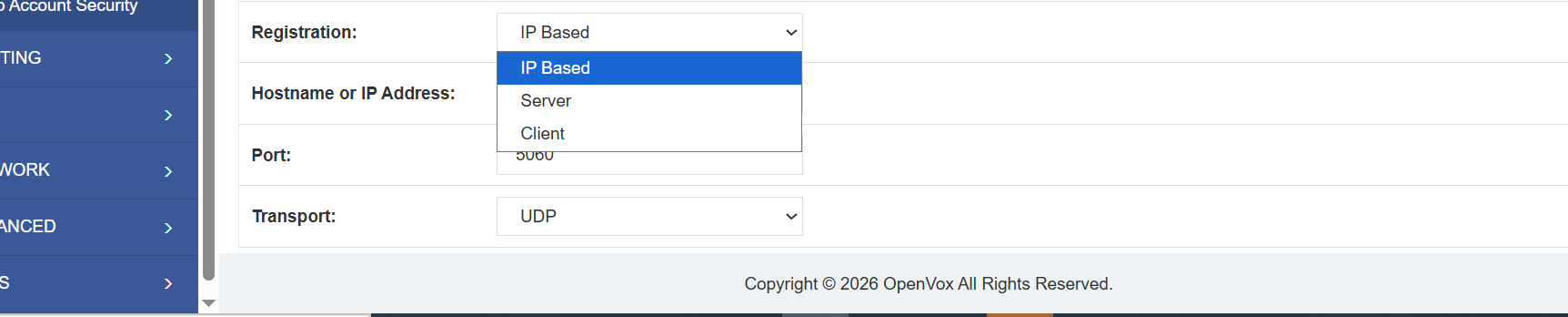
🧭 Client Mode
The gateway registers to the PBX. This is one of the most common approaches in enterprise environments, especially when the PBX is treated as the central SIP server.
🖥️ Server Mode
The gateway behaves like the SIP server side, and the PBX or another SIP device registers to it. This can be useful in some isolated or vendor-specific topologies.
🌍 IP / Direct IP Mode
Calls are exchanged directly between IP addresses without SIP registration. This is often used in tightly controlled private networks.
🧩 What Client Mode means
In Client Mode, the gateway behaves like a SIP client or SIP peer that actively registers to a PBX. The PBX becomes the system receiving that registration.
This is commonly used when:
- FreePBX or Asterisk is the central call-control system
- The gateway should appear like a trunk or SIP peer under the PBX
- You want the PBX to manage routing centrally
In this setup, the gateway sends registration requests to the PBX using the configured credentials. Once successful, the PBX can route calls to and from the gateway.
🧩 What Server Mode means
In Server Mode, the gateway acts more like the SIP service endpoint that waits for another device — such as a PBX — to register to it.
This is less common in standard enterprise deployments, but it can be useful where:
- The gateway vendor expects registration toward the gateway
- The PBX is configured as the registering side
- A simpler or isolated gateway-first architecture is preferred
In short, the direction of trust and registration is reversed compared to Client Mode.
🧩 What Direct IP / IP-Based Mode means
In Direct IP Mode, there is no SIP registration exchange at all. Instead, the gateway and PBX trust each other based on IP address and port-level configuration.
This is often used when:
- Both devices are on the same private network
- The environment is controlled and predictable
- You want to avoid registration handling entirely
This can work very well, but it generally requires clean network design, stable addressing, and clear routing rules on both sides.
🔌 How These Endpoint Types Can Link With FreePBX, Asterisk, or Other SIP PBXs
A GSM gateway is not tied to only one PBX product. It can work with FreePBX, raw Asterisk, many hosted PBXs, and other SIP-capable telecom systems, as long as both sides support compatible SIP behavior.
📍 With FreePBX
FreePBX typically manages trunks, routes, inbound destinations, IVRs, ring groups, and extensions through a web interface. The GSM gateway usually appears to FreePBX as a SIP trunk or peer.
In simple operational terms:
- FreePBX sends outbound calls to the GSM gateway trunk
- The gateway chooses the SIM port or SIM group based on its own routing rules
- Incoming calls from SIM ports can be sent back into FreePBX for IVR, queue, or extension routing
📍 With raw Asterisk
Asterisk provides more manual flexibility. The same GSM gateway can be linked as a SIP peer, endpoint, or trunk, depending on whether the deployment uses chan_sip or PJSIP and how the administrator prefers to model the integration.
In Asterisk-heavy environments, the gateway often becomes one part of a larger dialplan logic where:
- certain numbers are routed through GSM
- certain prefixes use particular SIM groups
- inbound GSM calls are pushed into custom dialplans or applications
📍 With other cloud PBXs or dialers
If the platform supports standard SIP trunking or SIP peer configuration, the GSM gateway can usually be integrated in a similar way. The exact labels may differ, but the main concepts remain the same: endpoint definition, routing, authentication, and media compatibility.
📤 Step 6 — Create Call Routing Rules
Routing rules define how calls move between SIP endpoints and SIM ports.
Outbound routing determines:
- Which SIM handles a call
- Which endpoint originates the call
- Prefix or number pattern matching
- Priority order
Inbound routing determines where incoming mobile calls are delivered inside the PBX.
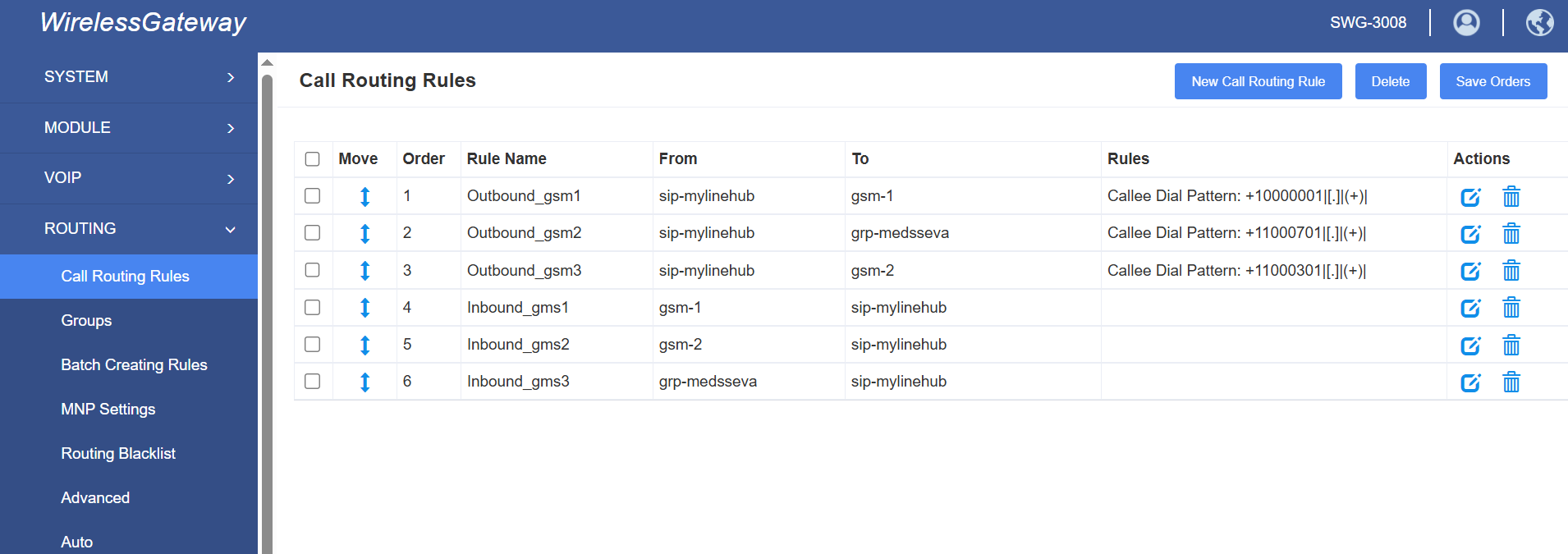
🛠️ Step 7 — Configure Basic Routing Rule
A basic routing rule maps a source to a destination.
Example scenarios:
- Calls from PBX → send via SIM Group A
- Calls from specific endpoint → use particular ports
- Incoming calls → forward to PBX trunk
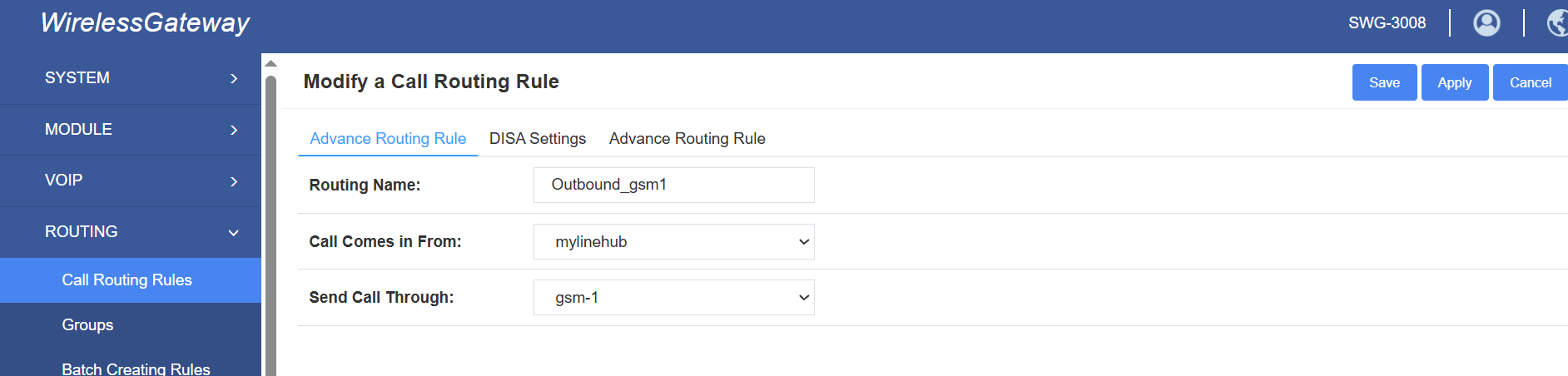
Basic routing is often enough for smaller setups where all calls are handled in roughly the same way. As deployments grow, additional rules are usually added to separate traffic by source, destination pattern, campaign type, or port group.
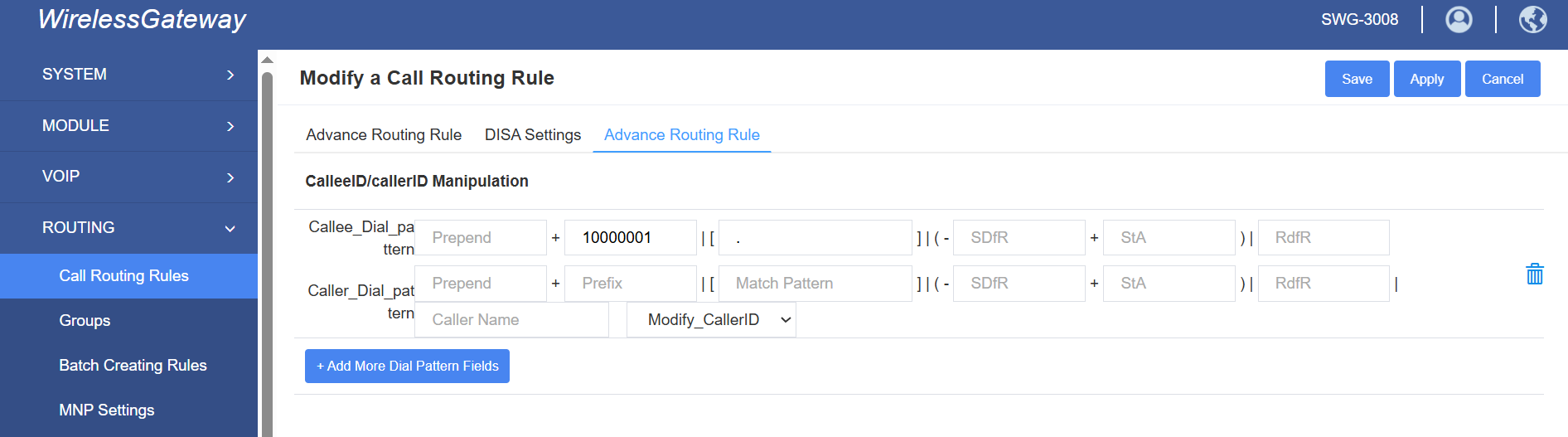
📊 Step 8 — Configure Detailed Routing Behavior
Advanced rule settings allow precise control over call handling.
Possible options include:
- Prefix stripping or addition
- Time-based routing
- Load balancing across SIMs
- Failover logic
- Port priority sequences
👥 Step 9 — Organize SIM Ports Into Groups
Groups allow multiple SIM ports to be treated as a single logical resource.
Benefits include:
- Automatic distribution of calls across ports
- Simplified routing configuration
- Improved redundancy
- Better resource utilization
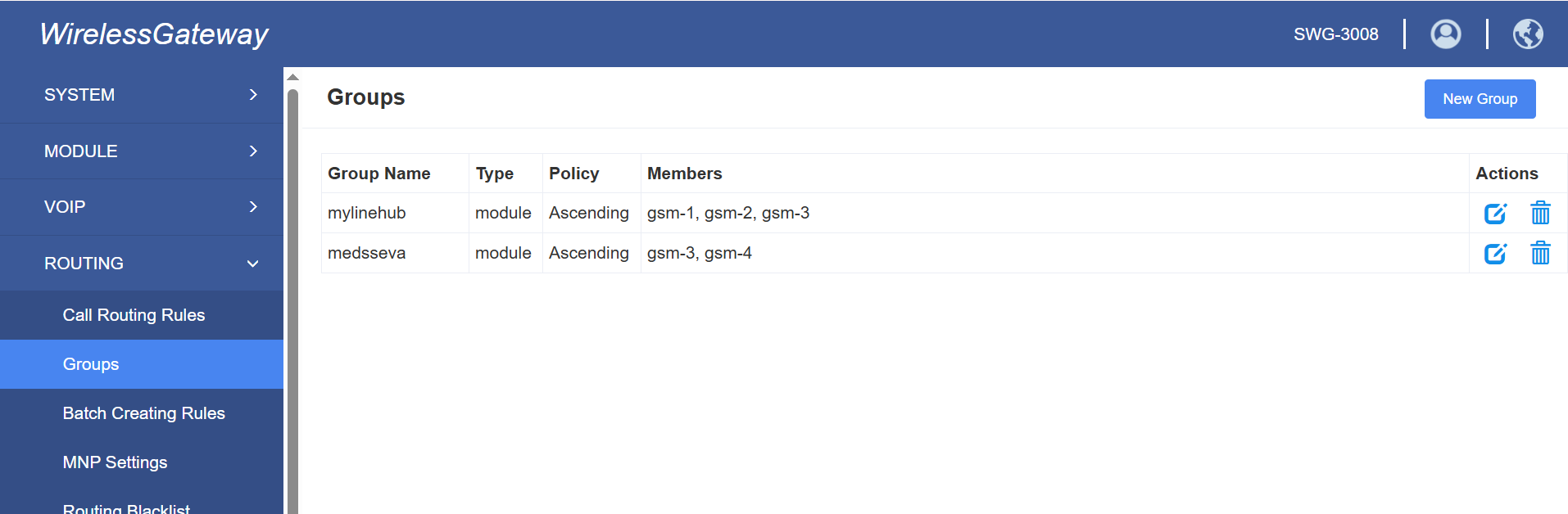
Groups are especially useful when several SIMs serve the same purpose, such as outbound campaigns, regional usage, or overflow capacity. Rather than create one route per port, the administrator can route toward the group.
🧾 Step 10 — Enable Logging for Monitoring
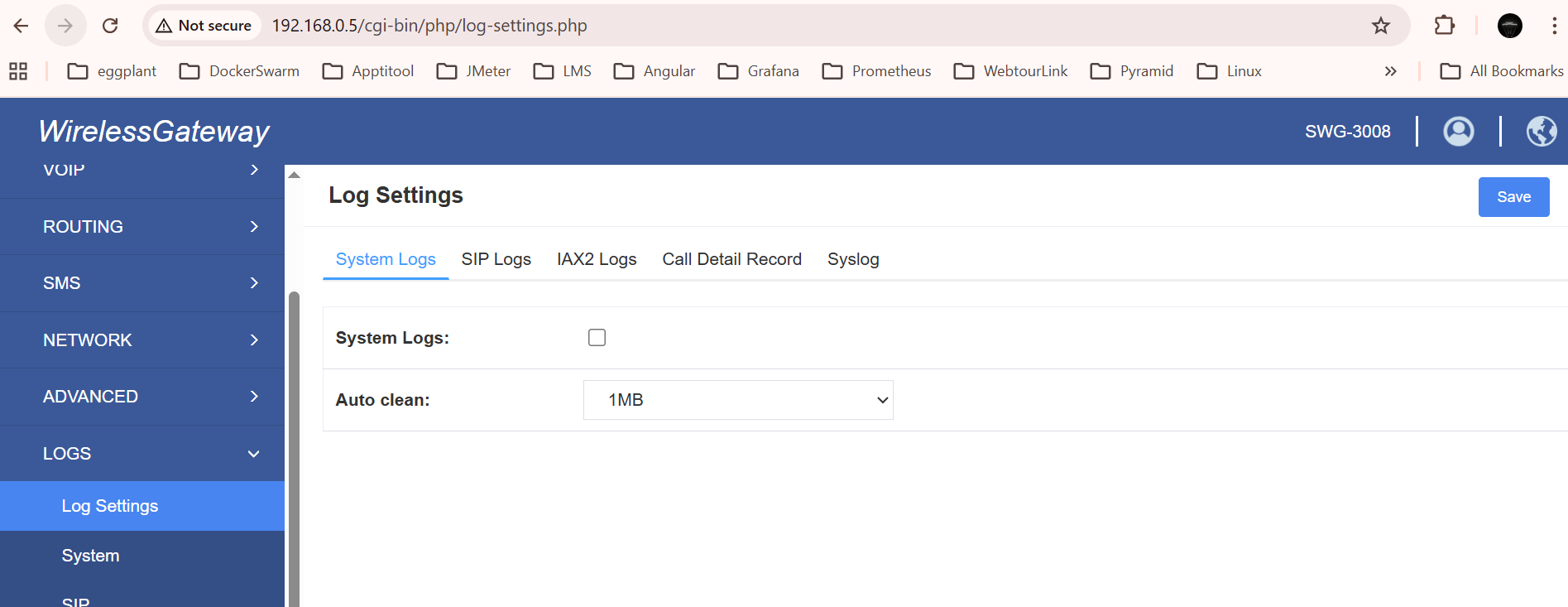
Logging provides visibility into system activity and is essential for troubleshooting.
Logs can capture:
- SIP registration events
- Call attempts and outcomes
- Network errors
- Authentication failures
- Hardware issues
🧱 Step 11 — Configure Port-Level Settings
Each SIM port can be individually configured to fine-tune behavior.
Typical options:
- Enable or disable specific ports
- Assign ports to groups
- Configure call handling parameters
- Control limits or restrictions per channel
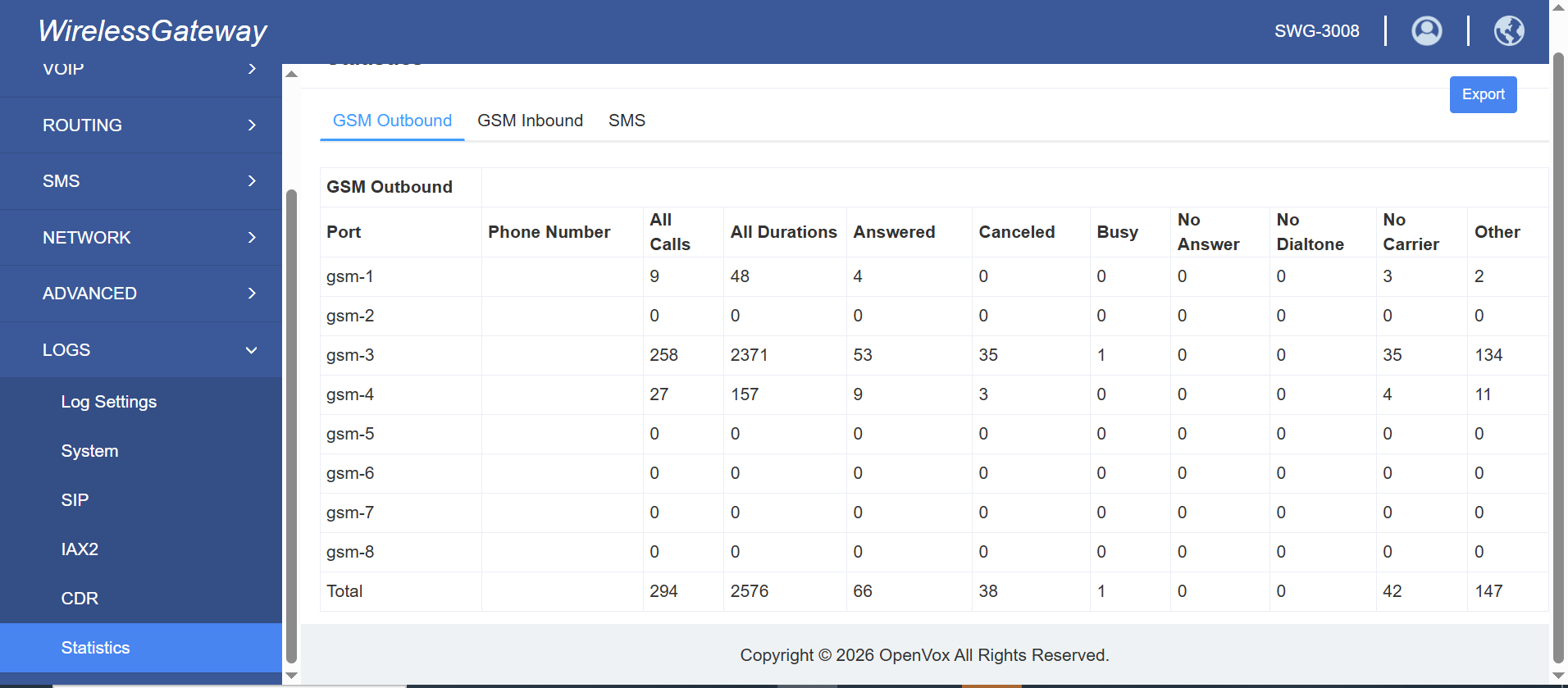
This matters because not all SIMs are always intended for the same workload. Some may be assigned to special routes, some to backup usage, and some may require temporary disabling during maintenance or carrier-related issues.
🧭 How to Think About the Whole Configuration as One System
A common source of confusion is seeing each screen separately without understanding how they fit together. In practice, the gateway configuration usually follows this logic:
- Login settings protect administration access
- SIM status confirms mobile-side readiness
- VoIP endpoints define SIP-side connectivity
- Registration mode determines how PBX and gateway recognize each other
- Routing rules determine call movement
- Groups organize SIM resources
- Logs show what is happening during operation
- Port settings fine-tune behavior at channel level
⚠️ Deployment Considerations
GSM gateways require careful planning for production use:
- Hardware concurrency limits
- SIM lifecycle management
- Signal strength dependencies
- Network variability
- Regulatory compliance
In addition, long-term stability depends on operational discipline. Even if the initial setup works, production success usually requires monitoring carrier behavior, maintaining spare SIM capacity, documenting routes, and keeping PBX-side configuration aligned with gateway-side changes.
✅ Conclusion
A GSM gateway enables mobile-network integration within enterprise telephony systems, allowing SIM-based communication to be centrally managed alongside SIP infrastructure.
In most large-scale deployments, GSM gateways are used as part of a hybrid architecture rather than as a complete replacement for SIP trunks.
When properly configured, the gateway becomes a bridge between the mobile network and the PBX layer. The SIM side provides mobile-origin or mobile-terminated connectivity, while the SIP side connects that capability to business logic such as IVR, queues, agents, routing, recording, campaigns, and applications.
Understanding endpoint types such as Client Mode, Server Mode, and Direct IP Mode is important because those settings define how the gateway and PBX establish trust and exchange SIP traffic. Once endpoint connectivity is stable, routing rules, SIM groups, and port controls determine how the system behaves operationally.
In other words, the screenshots are not just menu pages — they represent the layered building blocks of a full mobile-to-SIP telecom bridge.
Want to see API-driven CRM + Telecom workflows in action? Try the WhatsApp bot or explore the demos.
Comments (0)
Be the first to comment.