G.711 u-law (PCMU) vs PCM16 vs A-law (PCMA) vs Opus: Deep Technical Audio Explanation (ASCII Safe)
A deep, practical explanation of telephony audio formats: PCM16, G.711 u-law (PCMU), G.711 A-law (PCMA), and Opus. Includes bit layouts, sample rates, payload sizes, hex view tips, and how VoiceBridge converts PCMU<->PCM16 in RTP pipelines.
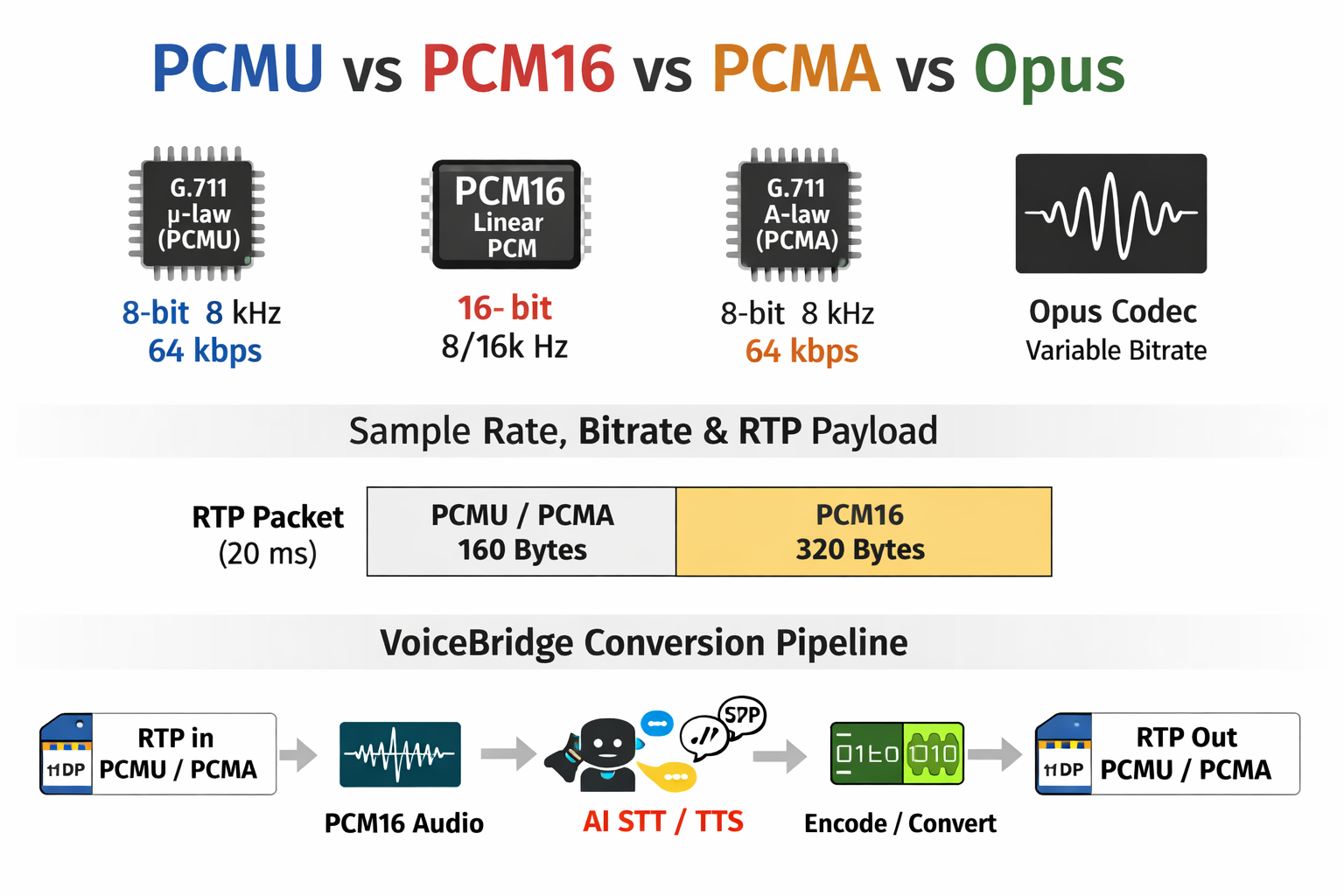
G.711 u-law (PCMU) vs PCM16 vs A-law (PCMA) vs Opus: Deep Technical Audio Explanation (ASCII Safe)
This article is intentionally ASCII-only. Safe for Linux, Windows, macOS, Git, IntelliJ, and Markdown renderers.
0) Quick definitions (terms you must know)
- Codec: An algorithm that encodes/decodes audio. Examples: G.711 u-law, G.711 A-law, Opus.
- Format: How audio samples are represented in memory. Example: PCM16 little-endian.
- PCM: Pulse Code Modulation. "Raw" sampled waveform amplitudes.
- PCM16: Signed 16-bit linear PCM. 2 bytes per sample.
- Sample rate (Hz): Samples per second. 8000 Hz = 8000 samples/sec.
- Frame / packet duration (ms): How much audio is grouped per packet. Common in RTP: 20 ms.
- Bitrate: Bits per second. Example: PCMU at 8 kHz is 64 kbps.
- RTP: Real-time Transport Protocol. Carries audio payloads over UDP (or SRTP).
- Payload type: RTP header field telling codec mapping (dynamic or static types).
- Hex: A display format of bytes (base-16). Useful for debugging payload bytes.
1) What is PCM16 (linear PCM) and why it matters
PCM16 is the most common "raw" audio format used inside applications and AI pipelines. Each sample is a signed 16-bit integer (two's complement). It stores the waveform amplitude directly.
- Bits per sample: 16
- Bytes per sample: 2
- Typical sample rates: 8000, 16000, 24000, 48000 Hz
- Endianness in memory: often little-endian on x86
PCM16 bit layout
PCM16 sample (16 bits):
  [S][B14 B13 B12 B11 B10 B9 B8 B7 B6 B5 B4 B3 B2 B1 B0]
   ^
   sign bit (1 = negative, 0 = positive)

Range:
  -32768 .. +32767
PCM16 bandwidth example
PCM16 at 8000 Hz:
  8000 samples/sec * 16 bits/sample = 128000 bits/sec = 128 kbps
2) What is G.711 u-law (PCMU)
G.711 u-law (often called PCMU) is a classic telephony codec. It compresses linear PCM into 8 bits per sample using a nonlinear companding curve. The goal is to preserve more resolution near zero (speech) while reducing bandwidth.
- Codec name: G.711 u-law
- RTP name: PCMU
- Bits per sample: 8
- Sample rate: 8000 Hz (telephony standard)
- Bitrate: 8000 * 8 = 64000 bps = 64 kbps
- Lossy: yes (cannot perfectly recover original PCM16)
u-law (PCMU) bit layout
u-law byte (8 bits) conceptually:
  [S][E2 E1 E0][M3 M2 M1 M0]

Where:
  S  = sign
  E  = exponent/segment (0..7)
  M  = mantissa (0..15)

Note:
  In real G.711 u-law encoding, the final stored byte is bit-inverted (~).
3) What is G.711 A-law (PCMA) and how it differs
G.711 A-law (PCMA) is another 8-bit companded telephony codec. It is used heavily in Europe and many carriers. It is similar to u-law but with a different companding curve and a different bit-level mapping.
- Codec name: G.711 A-law
- RTP name: PCMA
- Bits per sample: 8
- Sample rate: 8000 Hz
- Bitrate: 64 kbps
- Lossy: yes
Practical meaning: If your SIP trunk sends PCMA but your app expects PCMU, audio will sound like noise unless you decode correctly. PCMU and PCMA are NOT interchangeable bytes.
4) What is Opus and why WebRTC uses it
Opus is a modern, highly efficient codec used by WebRTC. It can adapt bitrate and quality dynamically and supports wideband/fullband audio. Unlike G.711, Opus is not "1 byte per sample". It is packet-based compressed audio.
- Codec name: Opus
- Common sample rate in WebRTC: 48000 Hz (internal)
- Frame sizes: 10 ms, 20 ms, 40 ms, 60 ms (commonly 20 ms)
- Bitrate: variable (example 16 kbps to 64 kbps or more)
- Very different from PCM/G.711: compressed frames, not per-sample bytes
If your browser sends Opus over WebRTC, your backend cannot treat it like PCM16 or PCMU. You must decode Opus into PCM (PCM16) first, then you can convert to PCMU/PCMA if needed for Asterisk/RTP.
5) Sample rate, packet duration, and payload sizes (real numbers)
Telephony baseline: 8000 Hz
- 8000 samples/sec means each sample is 0.125 ms apart
Common RTP packetization: 20 ms
At 8000 Hz:
  20 ms = 0.020 sec
  samples per packet = 8000 * 0.020 = 160 samples
Payload size per RTP packet
PCMU (8-bit):
  160 samples * 1 byte/sample = 160 bytes payload per 20 ms

PCM16 (16-bit):
  160 samples * 2 bytes/sample = 320 bytes payload per 20 ms
This is why G.711 (PCMU/PCMA) is used in telephony: it halves bandwidth vs PCM16 at 8 kHz.
6) What is "HEX" in audio debugging, and why it helps
Audio packets are bytes. When debugging, you often view bytes as hex. Hex lets you see exact byte values and verify:
- Are we receiving 160 bytes per 20 ms for PCMU?
- Are bytes changing (not all 0xFF or 0x00)?
- Are we accidentally sending PCM16 bytes while the other side expects PCMU?
Hex example (illustration)
RTP payload (PCMU) 20 ms might look like:
  7f 80 7e 81 82 80 7f 7d 7c 80 83 81 ...

This does NOT mean "text". It is companded audio bytes.
7) Deep transformation: PCM16 to u-law (PCMU) and what is lost
PCM16 is linear. u-law is companded (log-like). The conversion preserves the sign but reduces precision. That is why u-law is lossy.
PCM16 to u-law field mapping
PCM16:
  [sign][15-bit magnitude (two's complement)]

u-law:
  [sign][3-bit exponent][4-bit mantissa]

Preserved:
  sign bit

Created:
  exponent (segment) from magnitude range
  mantissa (detail within the segment)

Destroyed (lost forever):
  fine-grained lower magnitude detail
  exact original waveform amplitude
8) PCM16 - bit-level view
PCM16 uses 16 bits (2 bytes) per sample.

  [S][B14 B13 B12 B11 B10 B9 B8 B7 B6 B5 B4 B3 B2 B1 B0]

Details:
- 1 bit  = sign
- 15 bits = magnitude using two's complement
- Range  = -32768 to +32767

Example: +1000 decimal
  0000 0011 1110 1000

Example: -1000 decimal (two's complement)
  1111 1100 0001 1000
9) u-law (PCMU) - bit-level view
u-law uses 8 bits per sample.

  [S][E2 E1 E0][M3 M2 M1 M0]

Where:
- Bit 7    : sign (1 = negative, 0 = positive)
- Bits 6-4 : exponent/segment (0..7)
- Bits 3-0 : mantissa (0..15)

Important:
- G.711 u-law applies a final bit inversion (~) when storing the byte.
10) Step-by-step: PCM16 to u-law (PCMU) encoding
Given a PCM16 sample (signed 16-bit short):

Step 1: Extract sign
  sign = (sample >> 8) & 0x80

Step 2: If negative, make magnitude positive
  if (sign != 0) sample = -sample

Step 3: Add bias (132 decimal, 0x84 hex)
  magnitude = sample + 0x84

Step 4: Clip magnitude
  if (magnitude > 0x7FFF) magnitude = 0x7FFF

Step 5: Determine exponent/segment
  exponent chosen based on magnitude range (log-like)

Step 6: Extract mantissa (4 bits)
  mantissa = (magnitude >> 8) & 0x0F

Step 7: Compose the byte (before inversion)
  raw = sign | (exponent << 4) | mantissa

Step 8: Invert all bits (one's complement)
  mu = ~raw

Result:
  mu is the final u-law byte (PCMU payload byte)
11) Step-by-step: u-law (PCMU) to PCM16 decoding
Given a u-law byte:

Step 1: Undo the final inversion
  mu = ~mu

Step 2: Extract fields
  sign     = mu & 0x80
  exponent = (mu & 0x70) >> 4
  mantissa = mu & 0x0F

Step 3: Reconstruct magnitude (approximate)
  magnitude = (((mantissa << 3) + 0x84) << exponent) - 0x84

Step 4: Apply sign
  if (sign != 0) magnitude = -magnitude

Step 5: Return as PCM16 sample (short)
12) Full bit-path diagram (ASCII)
PCM16 to u-law:

16-bit PCM:
  [S][M14 M13 ... M1 M0]
   |   \
   |    \__ magnitude loses low precision
   |
   +----> u-law bit7 (sign)

u-law (8 bits):
  [S][E2 E1 E0][M3 M2 M1 M0]

Destroyed:
- fine lower bits of PCM magnitude
- exact waveform detail

u-law to PCM16:

stored u-law:
  ~( S E2 E1 E0 M3 M2 M1 M0 )

after inversion:
  [S][E2 E1 E0][M3 M2 M1 M0]

approx magnitude:
  (((mantissa << 3) + 132) << exponent) - 132
13) How this fits in VoiceBridge (real pipeline)
In many Asterisk RTP calls (classic SIP), audio arrives as PCMU or PCMA. AI pipelines typically want PCM16. So VoiceBridge commonly does:
RTP (PCMU payload bytes)
  -> muLawToPcm16()
  -> PCM16 bytes (linear audio)
  -> (optional) resample 8000 -> 16000 or 24000 for AI
  -> AI STT / AI TTS
  -> PCM16 bytes from TTS
  -> (optional) resample back to 8000
  -> pcm16ToMuLaw()
  -> RTP (PCMU payload bytes)
Important: If the call is WebRTC (Opus), you must decode Opus to PCM first. Opus is packet-compressed and not 1-byte-per-sample.
14) Common mistakes (why audio becomes noise)
- Sending PCM16 bytes when the other side expects PCMU (sounds like loud noise)
- Decoding PCMA bytes as PCMU (also noise)
- Wrong sample rate assumption (audio speed/pitch issues)
- Wrong packet size (20 ms vs 30 ms mismatch in RTP timing)
- Endianness bug when building PCM16 shorts from bytes
15) Summary
- PCM16 is linear, exact, 16-bit per sample. Great for AI pipelines.
- G.711 u-law (PCMU) is 8-bit companded telephony audio at 8000 Hz, 64 kbps.
- G.711 A-law (PCMA) is similar to u-law but different mapping. Not interchangeable.
- Opus is a modern compressed codec used by WebRTC. Must be decoded to PCM.
- Conversion PCMU/PCMA <-> PCM16 is normal in telecom applications like VoiceBridge.
Featured image path suggestion:
/images/docs-g711-pcm16.png
Want to see API-driven CRM + Telecom workflows in action? Try the WhatsApp bot or explore the demos.
Comments (0)
Be the first to comment.