MYLINEHUB VoiceBridge Architecture (Asterisk/FreePBX + ARI + RTP + AI Bot)
A complete, practical architecture guide for MYLINEHUB VoiceBridge: how it connects to Asterisk/FreePBX via ARI, streams RTP audio, bridges to AI (OpenAI/Google), handles barge-in, recording, queues, and DB-driven stasis app configuration.
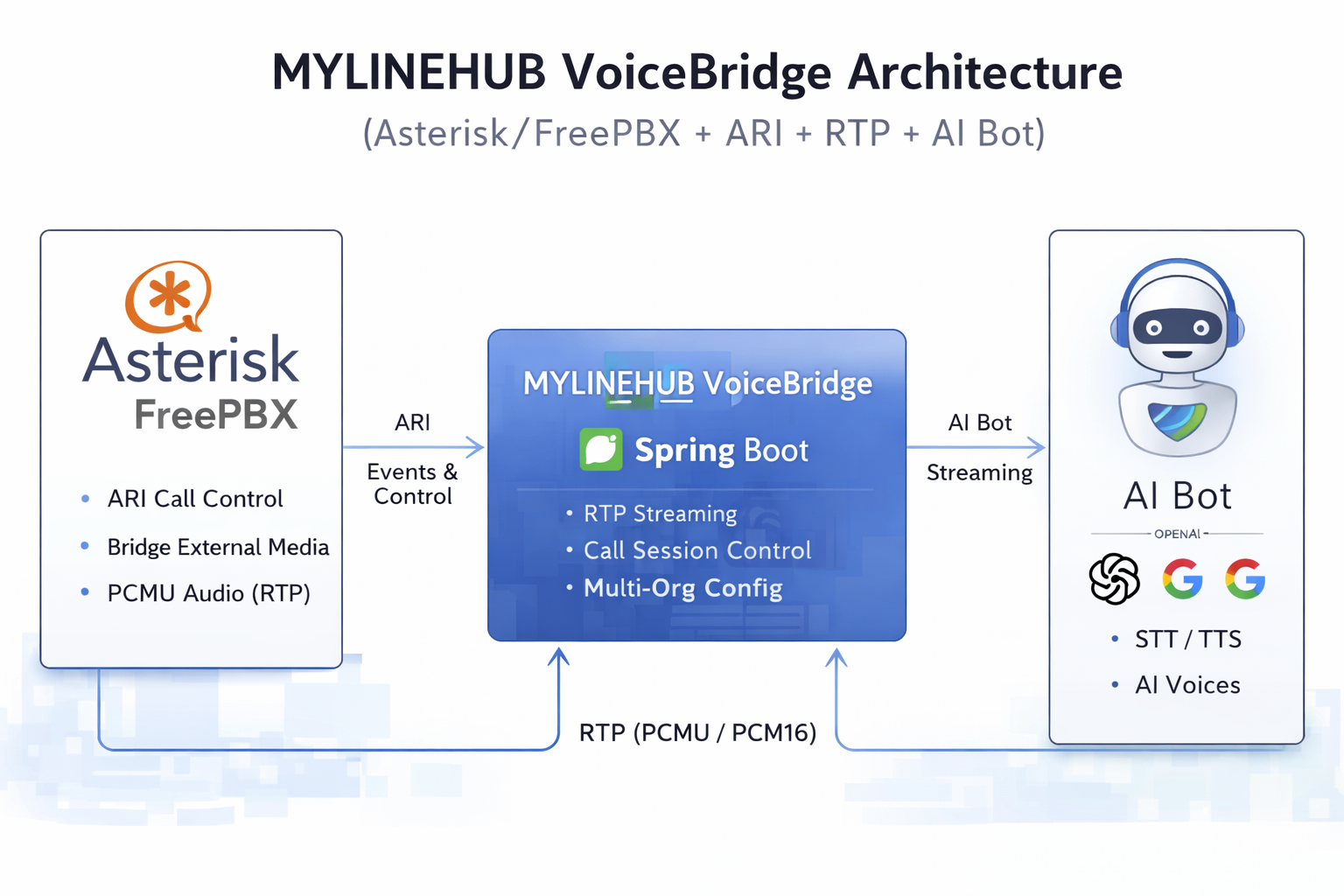
MYLINEHUB VoiceBridge Architecture (Asterisk/FreePBX + ARI + RTP + AI Bot)
MYLINEHUB VoiceBridge is a Spring Boot service that acts as a Control + Audio Bridge between Asterisk/FreePBX calls and AI voice engines. It uses ARI (Stasis) to control call legs (bridges/channels) and uses External Media + RTP to move audio to/from the bot.
Repository: https://github.com/mylinehub/omnichannel-crm
Module path:
omnichannel-crm/mylinehub-voicebridge/src/main/java/com/mylinehub/voicebridge/
- FreePBX stays stable: you keep routing (Inbound Routes / IVR / Queues) as-is.
- Voice automation attaches safely: VoiceBridge attaches via Stasis + External Media.
- Real-time AI audio: RTP (telephony) ⇄ PCM16 (AI) ⇄ RTP back into the call.
- Multi-tenant: different Stasis apps (per org) with DB-driven behavior and prompts.
Architecture Diagram (Hero)
This is the runtime flow: ARI event/control plane + RTP audio plane + AI bot plane.
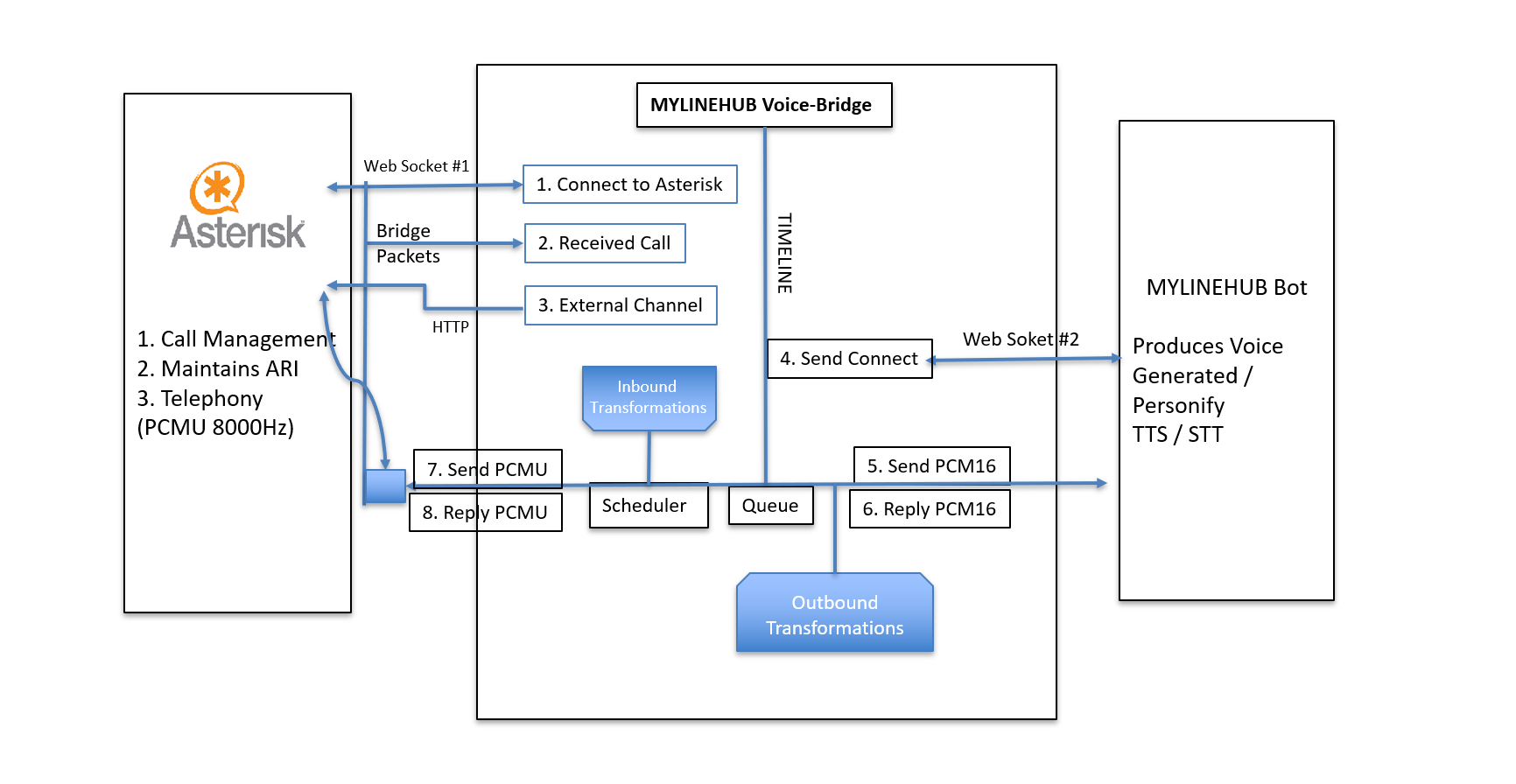
How VoiceBridge Works (High-Level)
VoiceBridge connects to Asterisk ARI (HTTP + WebSocket). It receives events (StasisStart, ChannelStateChange, DTMF, Hangup) and issues ARI REST commands to create bridges, add/remove channels, and create External Media channels.
Asterisk sends/receives RTP to a VoiceBridge RTP endpoint created for each call. Telephony is typically PCMU (G.711 μ-law) 8kHz. VoiceBridge converts audio into PCM16 for AI engines and back again for the call.
VoiceBridge opens a streaming connection to the AI engine (WebSocket / provider SDK). It sends audio frames and receives generated audio. A PlayoutScheduler prevents burst playback and stabilizes jitter, and barge-in can interrupt bot audio when the user speaks.
Call Lifecycle (Step-by-Step, Real Operations)
- Inbound call hits FreePBX routing (Inbound Route → IVR / Queue / Extension / Ring Group).
- FreePBX sends the call into a Stasis application (ARI App Name). This App Name is your tenant key (org-level mapping).
- VoiceBridge receives StasisStart over the ARI WebSocket and creates a CallSession containing all runtime state (call legs, RTP ports, peer IP/port learning, AI connection state, recording flags).
- VoiceBridge creates an ARI bridge, attaches the inbound channel to the bridge, then creates an External Media channel (Asterisk will send RTP to VoiceBridge).
- Inbound audio: Asterisk → RTP (PCMU/PCMA) → VoiceBridge decodes → PCM16 framing → optional DSP → AI stream.
- Outbound audio: AI returns PCM16 → queue/scheduler → encode PCMU → RTP packetizer → Asterisk → caller hears bot.
- Barge-in (optional): VoiceBridge detects caller speech energy and stops bot playout immediately, returning to listen mode.
- Call termination: VoiceBridge closes ARI channels/bridge, releases RTP ports, finalizes recordings, writes call logs/history.
What You Must Configure in Asterisk / FreePBX (Production Checklist)
- Enable HTTP in Asterisk (needed for ARI REST + ARI WebSocket).
- Enable ARI and create an ARI user (username/password).
- Confirm you can reach ARI from the VoiceBridge host (curl test).
/etc/asterisk/http.conf[general] enabled=yes bindaddr=0.0.0.0 bindport=8088
/etc/asterisk/ari.conf[general] enabled = yes [mylinehub] type = user read_only = no password = CHANGE_ME_STRONG_PASSWORD
curl -u mylinehub:CHANGE_ME_STRONG_PASSWORD http://ASTERISK_IP:8088/ari/api-docs/resources.json
If this fails: firewall/port, wrong credentials, HTTP not enabled, or bind address issue.
There are multiple ways to route to Stasis from FreePBX. Use whichever you prefer operationally:
- Custom Destination → point it to a custom dialplan target that calls Stasis.
-
extensions_custom.conf → create a custom context/extension that runs
Stasis(APPNAME). - Direct Dialplan include in your inbound route flow (advanced users).
; /etc/asterisk/extensions_custom.conf
[mylinehub-stasis]
exten => s,1,NoOp(Entering MYLINEHUB VoiceBridge)
 same => n,Stasis(MYLINEHUB_ORG_APP)
 same => n,Hangup()
Replace MYLINEHUB_ORG_APP with the Stasis app name that VoiceBridge listens to (per org).
- Allow ARI port (8088/8089 or whatever your Asterisk uses) from VoiceBridge host.
- Allow RTP port ranges for both Asterisk and the VoiceBridge external media endpoints.
- If NAT is involved, set correct External Address + Local Networks in FreePBX SIP Settings.
- One-way audio is almost always NAT/RTP/port-range mismatch.
- Keep SIP/telephony stable with G.711 PCMU/PCMA.
- VoiceBridge converts telephony audio to PCM16 for AI engines (STT/TTS / speech-to-speech).
- If your trunk negotiates wideband codecs, ensure VoiceBridge path remains consistent (avoid random codec surprises).
Multi-Organization Design (Why Stasis App Name Matters)
VoiceBridge is designed for multi-tenant operations. The typical pattern is:
-
Each organization has a unique Stasis app name (example:
MYLINEHUB_PRObroker). - VoiceBridge maintains a map: stasisAppName → org config/instructions.
- Behavior (bot prompts, routing rules, recording policy, campaign mode) is read from PostgreSQL and cached for fast startup.
- You can change an org’s bot flow without redeploying VoiceBridge.
- You can run multiple orgs on one VoiceBridge instance (safe isolation by app name + session state).
- It supports “same code, different behavior” — ideal for franchise / multi-customer deployments.
Project Structure (Deep: what each package actually does)
Path:
omnichannel-crm/mylinehub-voicebridge/src/main/java/com/mylinehub/voicebridge/
(root) — Bootstrapping
VoiceBridgeApplication— Spring Boot entrypoint; starts web server, scheduling, and initializes beans for ARI + AI + RTP processing.
ari — ARI integration & call control
This package is the “call control engine”. It owns WebSocket event handling and the ARI REST actions used to create bridges, external media channels, and manage call lifecycle.
AriWsClient— Maintains ARI WebSocket connection, subscribes to events, and routes them to handlers (StasisStart/Hangup/DTMF).AriBridgeImpl— Implements the bridge operations: create bridge, add channels, remove channels, cleanup safely.ExternalMediaManager/ExternalMediaManagerImpl— Creates External Media channel and binds RTP to the VoiceBridge endpoint; also handles teardown.CallerManageService— Higher-level call management helpers (state transitions, safety cleanup patterns).
Think: “ARI is the remote control of Asterisk.” This package is that remote control + safety cleanup.
session — per-call runtime state
A call is not “one variable” — it’s a moving system (channels, RTP ports, peer IP learning, AI state, timers). This package owns that call state reliably.
CallSession— Central state object: org/stasis app mapping, inbound/outbound channel IDs, RTP in/out ports, learned peers, timestamps, flags (recording/barge-in).CallSessionManager— Creates, stores, and destroys sessions; indexes sessions by ARI channel IDs; ensures cleanup on hangup.
If you debug “wrong audio went to wrong caller”, you debug session mapping first.
rtp — RTP endpoints, port allocation, symmetric RTP
This package is the “audio transport layer”. It decides which UDP ports to open, how to learn the peer, and how to write/read RTP packets. It is the most common place where NAT and one-way audio bugs appear.
RtpPortAllocator— Allocates RTP ports safely across concurrent sessions (no collisions).RtpSymmetricEndpoint— Handles “learn peer” vs “fixed peer” behavior (important behind NAT).RtpPacketizer— Converts raw audio frames into RTP packets (sequence/timestamp) and parses inbound RTP.RtpPacket/RtpHeader(if present) — Represents RTP structure and helpers.
Key idea: telephony RTP is continuous 20ms-ish packets; VoiceBridge must keep timings stable or audio becomes robotic/choppy.
audio — codecs, framing, conversion utilities
Asterisk often delivers G.711 (PCMU/PCMA). AI engines usually want PCM16. This package performs those conversions and ensures frames align properly.
MuLaw— G.711 μ-law encode/decode utilities (telephony standard).ALaw— G.711 A-law encode/decode utilities (alternate region/codec).AudioTranscoder— Converts between PCMU/PCMA and PCM16; may normalize frame sizes.AlignedPcmChunker/PcmChunker— Ensures PCM is cut into consistent chunk sizes for streaming stability.CodecFactory— Chooses codec based on configuration / negotiation policy.
dsp — audio processing pipeline
Optional processing: echo cancellation, noise suppression, 10ms framing (WebRTC-Audio-Processing style). This improves STT accuracy and makes TTS sound cleaner on calls.
Pcm10msFramer— Converts PCM into 10ms frames (common DSP requirement).WebRtcApmProcessor— DSP processor wrapper (AEC/NS/AGC style processing).
ai — AI bot client integrations
This package owns how VoiceBridge speaks to AI: connect, stream audio, receive audio, reconnect safely, and emit events back to the call engine.
RealtimeAiClient/RealtimeAiClientImpl— Streaming client for realtime engines (speech-to-speech / STT+TTS pipelines).GoogleLiveAiClientImpl— Google Live voice client integration (if enabled in your build).ExternalBotWsClientImpl— Generic WebSocket-based bot connector (your own bot server).AiClientFactory— Chooses AI provider implementation per org/config.
This is where “voice personality”, “system instructions”, and “provider selection” become real behavior.
queue — outbound audio pacing & jitter control
AI audio is often returned in bursts. Telephony audio must be played in steady time. This package prevents “fast playback”, “robot burst”, and “stutter”.
OutboundQueue— Buffer queue for bot audio frames; supports backpressure and safe consumption.PlayoutScheduler— Time-based scheduler that releases frames at the correct interval (crucial for natural speech).
barge — barge-in detection and control
Barge-in means: if the caller speaks while the bot is talking, stop bot audio instantly and return to listening. This is essential for a “natural conversation” feel.
AudioEnergy— Computes speech energy / simple VAD-like signal.BargeInController— Policy engine: thresholds, stop conditions, switching bot-to-listen mode.
recording — call recording and mixing
Recording is not just “write one stream”. You may record caller + bot separately, or mix stereo/mono. This package owns those writers/mixers safely.
CallRecordingManager— Coordinates when recording starts/stops and where files are written.MonoWavFileWriter/StereoWavFileWriter— Writes WAV audio properly with headers and correct sampling.JavacppFfmpegPlatformMixer— Mixer implementation for combining streams if needed.
service — business services around calls
This package converts “audio automation” into real product outcomes: completion status, reporting, transfers, CRM linkage, and history ingestion.
CallCompletionService— Marks call outcome, completion reason, next-step actions.CallTransferService— Transfers calls to dialplan/agents; manages timing and safety (avoid orphan bridges).CallReportingService— Aggregates runtime metrics/logs and stores reporting.CallHistoryIngestService— Persists call events/segments for analytics, billing, and CRM.
api — internal/admin REST endpoints
Operational endpoints for admins and internal systems: stasis app admin, call history retrieval, health hooks. These endpoints help your CRM/ops manage live runtime without SSH.
ApiController— Basic API entry endpoints (health/ops hooks depending on implementation).StasisAppAdminController— Admin endpoints for stasis app configs/instructions.InternalCallHistoryController— Call history retrieval / internal analytics endpoints.
models / repository / dto — data model layer
These packages represent the “data backbone” for multi-org configs and call history. They define JPA entities, repositories, and DTO conversions used by services/controllers.
StasisAppConfig— Per-app runtime configuration (org + app mapping, feature flags, bot provider selection).StasisAppInstruction— Per-app instructions/prompts (system instructions, personality, scripts).- Repositories — Load configs/instructions and store call history/errors with Spring Data JPA.
- DTOs — Convert runtime session → CRM/billing objects (CDR-style records).
config — Spring configuration and runtime properties
Centralizes configurable behavior: ports, scheduling, API docs, secondary HTTP, and property binding. This keeps “deployment differences” out of code.
ConfigProperties— Strongly-typed config binding (reads application-*.properties).SchedulingConfig— Scheduler thread configuration (playout timing and periodic tasks).SecondaryHttpPortTomcatCustomizer— Optional second HTTP port exposure for internal traffic.
ivr / agi — IVR helpers and dialplan integration
Provides IVR/AGI bridging helpers for advanced dialplan flows (when you want to interact with Asterisk dialplan logic more deeply).
IvrService— IVR flow helpers (DTMF, menu actions, step transitions).MinimalAgiExample— Reference implementation showing how AGI can be used if needed.
billing / crm — mapping calls to business outcomes
Converts raw telephony sessions into “business data”: duration, disposition, cost, CRM records, and tracking. This is where you implement monetization logic and reporting outputs.
CallBillingInfo— Holds computed billing details.CdrDTO— Call-detail record representation for CRM.CallSessionToCdrDTO— Mapping logic: session → CDR fields.
util — utilities used everywhere
OkHttpLoggerUtils— HTTP client logging helpers (useful while debugging AI streams).PcmUtil— PCM helper utilities (normalize, chunking helpers, conversions).SystemJwtTokenHolder— Internal JWT holder for service-to-service auth (if enabled).
Deployment Notes (Real Production)
- Run as systemd (recommended). Keep logs structured and rotate properly.
- PostgreSQL: store stasis app configs + instructions + call history. Use indices for fast lookup by stasis app + time.
- RTP ports: explicitly configure port ranges and allow them in firewall (Asterisk RTP and VoiceBridge RTP).
- CPU: DSP + AI streaming can be CPU-heavy; scale horizontally by org (multiple VoiceBridge instances) if needed.
- Secrets: do not store ARI passwords or AI keys in DB dumps. Use environment vars / vault-style storage.
Common Failure Modes (and where to look)
- Wrong ARI credentials or ARI not enabled.
- FreePBX/Asterisk HTTP bind not reachable from VoiceBridge.
- Inbound provider IP does not match identify (classic PJSIP issue).
ari.conf, http.conf, firewall, ARI URL, and Asterisk logs.
- NAT External Address / Local Networks incorrect in FreePBX.
- RTP port range blocked in firewall.
- Symmetric RTP not handled (peer learning needed).
- Missing scheduler pacing (frames played as soon as they arrive).
- Wrong frame sizing (PCM chunk mismatch).
- Codec conversion mismatch (PCMU vs PCM16 alignment).
OutboundQueue, PlayoutScheduler, and chunker configuration.
Next Improvements (Recommended for Knowledge Hub)
- Minimal Working Setup: add exact FreePBX click-steps + screenshots (ARI enable, firewall, custom destination).
- Troubleshooting playbook: “If X then check Y” with log examples.
- Multi-org naming standard: recommended stasis app naming + DB schema notes + caching strategy.
- Security hardening: ARI behind reverse proxy, IP allowlist, TLS for ARI, least-privilege credentials.
Want to see API-driven CRM + Telecom workflows in action? Try the WhatsApp bot or explore the demos.
Comments (0)
Be the first to comment.