VoiceBridge DB-Driven Configuration: stasis_app_config + Instructions (Safe Initial Data)
VoiceBridge does not use config JSON files. It loads everything from PostgreSQL: Stasis app config, runtime parameters, and prompt/instructions. This guide shows the correct DB insert templates with placeholders and explains how each field is used in Java.
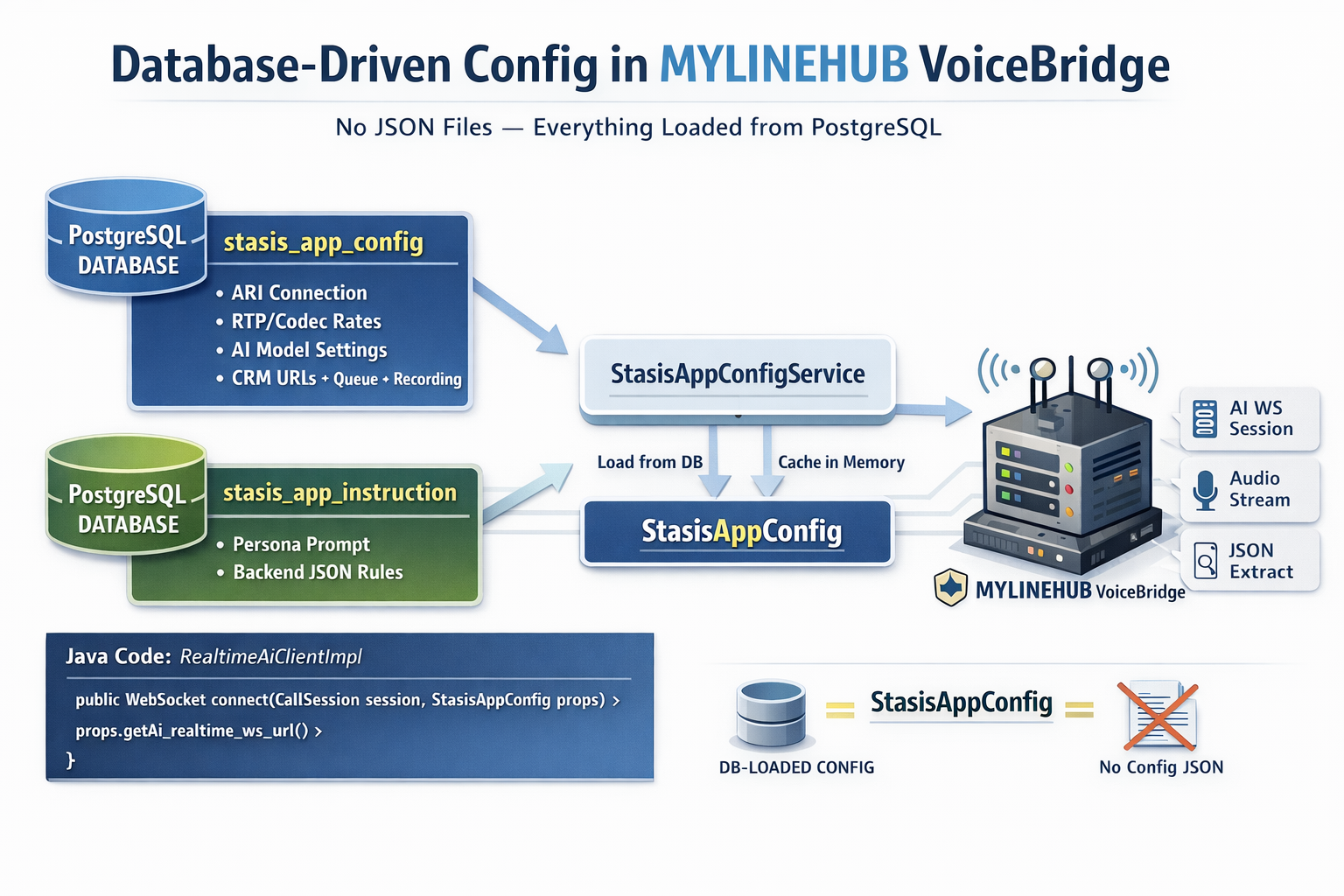
VoiceBridge DB-Driven Configuration (No JSON File): stasis_app_config + stasis_app_instruction
In MYLINEHUB VoiceBridge, we do not use a config JSON file on disk. VoiceBridge loads everything from PostgreSQL at runtime.
This means your initial data load must insert two core records:
- stasis_app_config → runtime technical configuration (ARI, RTP, AI, CRM URLs, queue, recording, RAG)
- stasis_app_instruction → instruction prompts (call persona rules + completion extraction rules)
Important: Do NOT Put Secrets or Real Customer Data in SQL Templates
Seed SQL often gets shared in Git, tickets, WhatsApp, or email. That is risky. Always use placeholders and inject secrets during deployment.
- Never commit: API keys, passwords, tokens, real phone numbers, real emails, private endpoints
- Use placeholders:
<OPENAI_API_KEY>,<ARI_PASSWORD>,<CRM_PASSWORD>,<INTERNAL_IP>,<ORG_NAME> - Best practice: store secrets in env/systemd/vault and update DB using secure scripts
How VoiceBridge Loads Config (Mental Model)
- Call enters Asterisk → routed to Stasis app name
- VoiceBridge reads DB row from stasis_app_config using
stasis_app_name - VoiceBridge reads the call persona + completion extractor from stasis_app_instruction
- VoiceBridge creates AI WS session and starts streaming audio based on DB config
So, the key that ties everything together is: stasis_app_name. It must match in Asterisk, DB, and VoiceBridge runtime.
DB Record #1: stasis_app_instruction (Persona + Completion Extractor)
The instructions field is what the AI uses while speaking on a call. The completion_instructions field is used for backend-only extraction rules (JSON output schema).
VoiceBridge loads these instructions and uses them to build the session configuration for AI.
This is why you see placeholders like {{agentName}}, {{organization}},
{{callerNumber}} inside the prompt.
Safe SQL Template (placeholders only)
INSERT INTO public.stasis_app_instruction
(stasis_app_name, active, instructions, completion_instructions)
VALUES (
  '<STASIS_APP_NAME>',
  true,
$PROMPT$
<VOICE_PERSONA_PROMPT_WITH_PLACEHOLDERS>
$PROMPT$,
$COMPLETION$
<BACKEND_ONLY_JSON_EXTRACTION_RULES_WITH_PLACEHOLDERS>
$COMPLETION$
);
What must be consistent
- stasis_app_name must match Asterisk ARI Stasis app name
- Use only placeholders in stored prompts (avoid real phone/email/keys)
Where it is used in Java
- Your code generates the final persona using something like:
crmCustomerService.buildInstructionsWithExistingCustomerInfoOnTop(...) - The final combined instructions are sent via Realtime:
session.update→instructions
DB Record #2: stasis_app_config (Runtime Technical Config)
This row contains the complete runtime config used by VoiceBridge: ARI connectivity, RTP parameters, OpenAI Realtime settings, CRM endpoints, queue tuning, recording, reconnection policy, RAG flags, and more.
Again: No JSON config file is required. This is the source of truth.
Safe SQL Template (placeholders, no secrets)
INSERT INTO public.stasis_app_config (
  stasis_app_name,
  active,
  organization,
  agent_name,
  agent_defaultlanguage,
  ai_barge_in_enabled,

  ari_ws_url,
  ari_rest_base_url,
  ari_username,
  ari_password,

  rtp_codec,
  rtp_payload_pt,
  rtp_bind_ip,
  rtp_clock_rate,
  rtp_frame_ms,
  rtp_bind_port,
  rtp_external_host,

  ai_realtime_ws_url,
  ai_model_completion,
  ai_model_realtime,
  ai_model_transcribe,
  ai_model_tts,
  ai_openai_api_key,
  ai_realtime_session_url,
  ai_concurrency_max_calls_per_instance,
  ai_temperature,
  ai_pcm_sample_rate_hz,
  ai_voice,
  ai_voice_options,
  ai_voice_input,
  ai_voice_output,
  ai_inbound_chunk_ms,
  call_max_seconds,
  barge_in_energy_threshold,

  mylinehub_login_url,
  mylinehub_login_username,
  mylinehub_login_password,
  mylinehub_org_lookup_url,
  mylinehub_base_url,
  mylinehub_crm_cdr_url,
  mylinehub_crm_customer_get_by_phone_url,
  mylinehub_crm_customer_update_by_org_url,
  mylinehub_crm_deduct_ai_amount_url,

  bot_mode,
  bot_external_ws_url,
  bot_auth_required,
  bot_auth_ws_type,
  bot_external_basic_user,
  bot_external_basic_pass,
  bot_external_token,
  bot_external_mode,
  bot_external_lang,

  rag_vector_store_url,
  rag_topk,
  rag_max_context_tokens,

  fetch_customer,
  savePropertyInventory,
  save_call_details,
  do_rag,
  do_json_summarization,
  json_summarization_meta_data,

  recording_enabled,
  recording_mode,
  recording_s3_bucket,
  recording_s3_endpoint,
  recording_local_base_path,

  queue_max_ms,
  queue_pause_ms,
  queue_watermark_high_percent,
  queue_watermark_low_percent,

  resilience_retry_max_attempts,
  resilience_circuitbreaker_failure_threshold,
  ws_reconnect_initial_delay_ms,
  ws_reconnect_max_delay_ms,

  metrics_namespace,
  performance_mouth_to_ear_ms_target,
  performance_jitter_msp95,

  executor_media_pool_size,
  executor_io_pool_size
)
VALUES (
  '<STASIS_APP_NAME>',
  TRUE,

  '<ORG_NAME>',
  '<AGENT_NAME>',
  '<DEFAULT_LANGUAGE>',
  FALSE,

  '<ARI_WS_URL>',
  '<ARI_REST_BASE_URL>',
  '<ARI_USERNAME>',
  '<ARI_PASSWORD>',

  'pcmu',
  0,
  '0.0.0.0',
  8000,
  20,
  40000,
  '<RTP_EXTERNAL_HOST_OR_PUBLIC_IP>',

  'wss://api.openai.com/v1/realtime?model=<REALTIME_MODEL>',
  '<COMPLETION_MODEL>',
  '<REALTIME_MODEL>',
  '<TRANSCRIBE_MODEL>',
  '<TTS_MODEL>',
  '<OPENAI_API_KEY>',
  'https://api.openai.com/v1/realtime/sessions',
  50,
  0.7,
  24000,
  'alloy',
  'alloy,echo,shimmer,ash,ballad,coral,sage,verse',
  'pcm16',
  'pcm16',
  20,
  120,
  2000,

  '/login',
  '<CRM_USERNAME_OR_EMAIL>',
  '<CRM_PASSWORD>',
  '/api/v1/organization/getOrganizationalDataAsPerARI',
  '<CRM_BASE_URL>',
  '/callDetail/insertCdrFromVoiceBridge',
  '/api/v1/customers/getByPhoneNumberAndOrganizationByParent',
  '/api/v1/customers/updateCustomerByOrganizationByParent',
  '/api/v1/calldetail/deductAiAmountInMemory',

  'openai',
  '<OPTIONAL_EXTERNAL_BOT_WS_URL>',
  FALSE,
  'basic',
  '',
  '',
  '',
  '',
  '',

  '<RAG_VECTOR_STORE_URL>',
  5,
  2000,

  NULL,
  TRUE,
  TRUE,
  TRUE,
  TRUE,
  '{}'::text,

  TRUE,
  'mixed',
  '<S3_BUCKET_OR_EMPTY>',
  '<S3_ENDPOINT_OR_EMPTY>',
  '/var/lib/voicebridge/ai-recording',

  80000,
  2500,
  80,
  50,

  3,
  50,
  500,
  30000,

  'mylinehub-voicebridge',
  400,
  30,

  4,
  32
);
What Must Match Asterisk (Most Common Setup Points)
ARI (Asterisk REST Interface)
- ari_rest_base_url must point to Asterisk ARI base, e.g.
http://<ASTERISK_IP>:8088/ari - ari_ws_url must use the same host/port and include
?app=<STASIS_APP_NAME> - ari_username/password must match Asterisk
ari.conf
RTP + Codec
- rtp_codec should match the call leg codec (example:
pcmu) - rtp_clock_rate must match codec clock rate (PCMU = 8000)
- rtp_frame_ms controls packet duration (20ms common)
- rtp_external_host is important when VoiceBridge is behind NAT
How This DB Config is Used in Your Java Code (RealtimeAiClientImpl)
Your RealtimeAiClientImpl uses values from the DB-loaded StasisAppConfig like this:
- ai_openai_api_key → used to create WS headers:
Authorization: Bearer ... - ai_realtime_ws_url + ai_model_realtime → builds/uses the Realtime WS URL
- ai_voice, ai_voice_input, ai_voice_output → sent via
session.update - ai_pcm_sample_rate_hz + rtp_frame_ms → used by
AlignedPcmChunker - rtp_clock_rate is derived per call from packetizer and used for resampling output
- do_rag controls whether RAG fetch triggers (and whether STT config is sent in your session.update)
Correct Insert Order for Fresh Deployment
- Insert stasis_app_config (technical runtime config)
- Insert stasis_app_instruction (persona + completion extractor)
- Restart VoiceBridge (or reload config cache) so it picks up the new rows
- Make a test call to that Stasis app and verify logs
Golden Rules for DB-Only Configuration
- stasis_app_name is the primary key of runtime behavior
- Keep SQL templates safe (placeholders only)
- Secrets must be injected securely during deployment
- If something fails, check mismatch between: ARI URL, Stasis app name, ARI auth, codec clock rate, NAT external host
Next Steps
- Create one config row per organization/Stasis app (multi-tenant supported)
- Enable RAG only after basic AI calling works
- Keep “prompt” and “completion extractor” versioned carefully (changes affect runtime behavior)
Want to see API-driven CRM + Telecom workflows in action? Try the WhatsApp bot or explore the demos.
Comments (0)
Be the first to comment.