Using Janus to Create WebRTC Button for Website (Allows Anonymous Concurrent Users)
Complete practical guide to build a public website WebRTC call button using Janus, coturn, Asterisk, FreePBX, and ARI/Stasis so anonymous concurrent users can call your bot from the browser without creating SIP extensions per user.
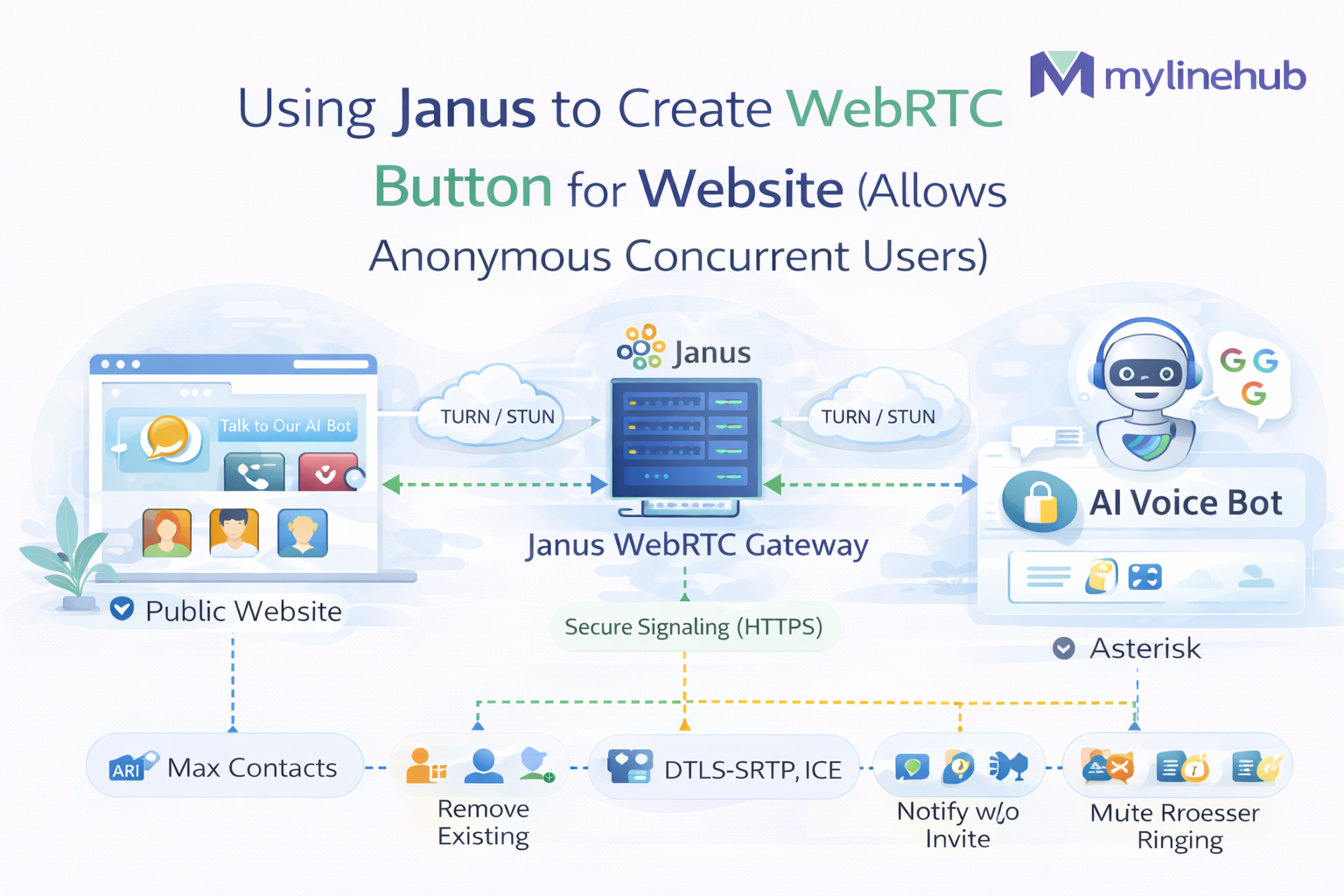
Using Janus to Create a WebRTC Button for Website Visitors 🚀
This guide explains how to build a public website voice button that lets anonymous users click and talk to your bot directly from the browser, without creating a SIP extension or account for every visitor.
The architecture uses Janus for browser WebRTC handling, coturn for relay fallback, FreePBX / Asterisk for SIP and dialplan entry, and ARI via Stasis for handing control to your bot application.
🎯 Core idea:
the browser user talks to Janus as a WebRTC session,
Janus creates the SIP call toward Asterisk,
and Asterisk routes that call into your bot using Stasis(...).
Ideal for a website button where visitors are temporary, anonymous, and should not become PBX users.
Janus handles browser WebRTC, Asterisk handles SIP routing, and ARI handles bot logic.
TURN is often essential because some public users will fail direct WebRTC connectivity.
The real milestone is Janus call → custom context → Stasis(...) — not a green FreePBX status bubble.
📌 Scope: this article focuses on the production direction where Janus lives on
192.168.0.3, FreePBX / Asterisk lives on 192.168.0.4,
public traffic enters via https://app.mylinehub.com,
Janus bridges website WebRTC traffic into SIP,
and Asterisk routes the call into an ARI Stasis application.
📚 What this guide covers
The article below is split into collapsible sections so it stays easier to read on desktop and mobile. Tap any section header or triangle arrow to expand it.
Section 1
Why Janus is the right model for a public website voice button
The best fit when visitors are anonymous, temporary, and highly concurrent.
▶
Why Janus is the right model for a public website voice button
If your website has a public “Call” or “Talk to Bot” button, you usually do not want to create one SIP extension per website visitor. That model does not scale well, creates unnecessary account management overhead, and makes anonymous browser calling much harder than it needs to be.
Browser users are temporary
Public website visitors appear for a single session and leave. They are not long-lived PBX users like agents, operators, or employees.
Janus manages WebRTC sessions
Janus can accept browser WebRTC traffic and bridge it into SIP without forcing every visitor to become a first-class PBX extension.
Concurrent anonymous calling
Many users can click the voice button and start calls concurrently, while your backend handles each media session independently.
Core design decision:
for this use case, Janus is the browser-facing WebRTC gateway, not FreePBX.
Janus terminates browser WebRTC, then creates SIP calls toward Asterisk / FreePBX.
Asterisk then hands the call into your bot through Stasis(...).
Section 2
End-to-end architecture
How the browser, Janus, FreePBX, Asterisk, and ARI connect together.
▶
End-to-end architecture
This is the practical architecture for the public website voice button pattern. Each layer has a clear responsibility, which makes debugging easier and scaling cleaner.
Browser visitor
   │
   │ HTTPS / WSS / WebRTC
   ▼
Website + frontend app
   │
   │ Janus API / WebSocket signaling
   ▼
Janus WebRTC Gateway (192.168.0.3)
   │
   │ SIP INVITE + RTP over LAN
   ▼
FreePBX / Asterisk (192.168.0.4)
   │
   │ context: from-janus
   │ exten: 70000
   ▼
Stasis(sixhats-webrtc)
   │
   ▼
VoiceBridge / ARI application
It does not need its own FreePBX extension or SIP credentials.
It terminates the WebRTC side and creates a SIP-side call toward Asterisk.
It identifies Janus, routes the call into a safe custom context, and hands it to ARI.
Section 3
Where TURN fits into the design
TURN is what keeps real-world public WebRTC reliable.
▶
Where TURN fits into the design
WebRTC does not always connect directly. Browser users can sit behind symmetric NAT, strict firewalls, carrier NAT, office NAT, hotel Wi-Fi, or mobile networks. That is exactly where ICE, STUN, and TURN become critical.
🧭 ICE
ICE is the connectivity process. It gathers possible network paths and decides which candidate pair actually works.
🌍 STUN
STUN helps the browser or server discover its public-facing address through NAT.
🧊 TURN
TURN relays media when direct connectivity fails. In production public calling, TURN is often essential.
Operational truth: if your website voice button is public and anonymous, you should plan for TURN from the beginning. Some users simply will not connect reliably without relay media.
In this deployment model, coturn runs on the Ubuntu application machine and provides TURN relay fallback. Google STUN or another STUN source may help with address discovery, but TURN is what saves difficult real-world networks.
Practical takeaway: STUN helps you try direct routes. TURN is the safety net when those routes fail.
Related reading: ICE vs STUN vs TURN — Complete WebRTC Networking Guide and Why WebRTC Calls Fail Behind NAT (And How TURN Fixes It).
Section 4
Production environment used in this flow
The exact role of each server in the deployment.
▶
Production environment used in this flow
The practical environment this article is based on has the following confirmed direction:
| Component | Value / role | Why it matters |
|---|---|---|
| Public domain | app.mylinehub.com |
Browser-facing HTTPS and WSS entry point |
| Ubuntu application machine | 192.168.0.3 |
Hosts Janus, web app stack, and TURN-related logic |
| FreePBX machine | 192.168.0.4 |
Handles PBX-side SIP, dialplan, and ARI entry |
| Web frontend | Angular via nginx | Renders the website voice button UI |
| Voice bot backend | VoiceBridge / ARI app | Handles the bot side after Stasis(...) |
Janus and FreePBX are on separate machines. That matters because browser WebRTC stays on the Janus side, while SIP routing and ARI handoff stay on the PBX side.
Section 5
What Janus does in this architecture
Janus is the bridge, not the final PBX and not the final bot.
▶
What Janus does in this architecture
Janus is the WebRTC gateway between your website visitor and your PBX-side bot stack. In this design it is not the final bot brain and not the final PBX. It is the media and signaling bridge that makes anonymous browser access practical.
✅ Janus responsibilities
- Accept browser WebRTC connections
- Expose HTTP / WebSocket APIs to the frontend or backend
- Handle ICE, DTLS-SRTP, and browser media negotiation
- Create SIP-side calls using the SIP plugin
- Bridge WebRTC-side users to PBX-side routing
🚫 What Janus is not doing here
- It is not your final ARI app
- It is not replacing Asterisk dialplan
- It is not the main business logic layer
- It is not a substitute for TURN in difficult NAT scenarios
Related reading: Janus WebRTC Gateway Installation on Ubuntu (Production Guide).
Section 6
How FreePBX / Asterisk should treat Janus
The PBX-side design choice that makes the whole integration clean.
▶
How FreePBX / Asterisk should treat Janus
This is the most important PBX-side design decision: Janus should be treated like a plain inbound PJSIP endpoint identified by IP, not as a traditional provider trunk that depends on outbound route logic.
Correct model:
Janus sends SIP INVITE into Asterisk,
Asterisk identifies Janus by source IP,
that endpoint lands in a dedicated custom context such as from-janus,
and only allowed extensions from that context can enter your ARI application.
This matters because the FreePBX trunk UI can become misleading in this kind of integration. It encourages provider-style thinking, but your Janus path is really:
Janus SIP INVITE
  -> identify by IP
  -> endpoint janus
  -> context from-janus
  -> extension 70000
  -> Stasis(sixhats-webrtc)
Practical note: the trunk page can still exist, but the real source of truth for this integration is your custom PJSIP endpoint config, custom dialplan, and CLI verification.
Section 7
The FreePBX / Asterisk configuration pattern
The two config files that matter most for Janus-originated calls.
▶
The FreePBX / Asterisk configuration pattern
There are two file-level control points that matter most:
pjsip_custom_post.conf
Defines the Janus endpoint, AOR, and identify rule so Asterisk knows:
“If SIP traffic comes from 192.168.0.3, treat it as endpoint janus.”
extensions_custom.conf
Defines the from-janus context so only intended dialed numbers are allowed,
and the correct extension can enter Stasis(...).
🧱 Example: pjsip_custom_post.conf
[janus]
type=endpoint
context=from-janus
disallow=all
allow=ulaw,alaw
direct_media=no
rtp_symmetric=yes
rewrite_contact=yes
force_rport=yes
transport=0.0.0.0-udp
aors=janus

[janus]
type=aor
max_contacts=10

[janus]
type=identify
endpoint=janus
match=192.168.0.3
📘 Why each line matters
| Setting | Purpose |
|---|---|
context=from-janus |
Places inbound Janus calls into a dedicated custom dialplan context |
allow=ulaw,alaw |
Restricts media to codecs used in the PBX / VoiceBridge path |
direct_media=no |
Keeps media anchored at Asterisk, important for ARI and media control |
rtp_symmetric=yes |
Helps when the RTP path is asymmetric or behind NAT |
rewrite_contact=yes |
Helps Asterisk use reachable contact details |
force_rport=yes |
Helps SIP reply path behave correctly through NAT |
max_contacts=10 |
Prevents an overly tight AOR limitation for the Janus side |
match=192.168.0.3 |
Source-IP rule that identifies Janus as endpoint janus |
🧾 Example: extensions_custom.conf
[from-janus]
exten => 70000,1,NoOp(Janus call into ARI for website WebRTC demo)
 same => n,Answer()
 same => n,Stasis(sixhats-webrtc)
 same => n,Hangup()

exten => _X.,1,Hangup(403)
This dialplan says:
if Janus dials 70000, answer the call and hand it into the ARI Stasis app.
If Janus dials anything else, reject it.
Section 8
Why Stasis(...) matters in this flow
The exact point where Asterisk hands control to your application.
▶
Why Stasis(...) matters in this flow
Stasis(...) is the handoff point where normal Asterisk dialplan execution gives control to your ARI application.
That is exactly how the PBX-side SIP call enters your custom bot logic.
same => n,Stasis(sixhats-webrtc)
In this example, the ARI app name is sixhats-webrtc.
Once the channel enters Stasis, your VoiceBridge / ARI application can inspect, bridge, stream, snoop,
or control media according to your design.
Stasis(...) is where “PBX routing” ends and “your application logic” begins.
Reference article: What Is Stasis in Asterisk ARI? How Dialplan Hands Control to Your App
Section 9
Why multiple anonymous concurrent users are possible
Concurrency comes from session handling, not extension creation.
▶
Why multiple anonymous concurrent users are possible
This design supports concurrency because the browser visitors are handled as Janus-side WebRTC sessions, not as permanent PBX user extensions.
🌐 Browser side scales as sessions
Each website visitor creates a Janus-side WebRTC session rather than a dedicated PBX login.
📞 PBX entry is controlled
Asterisk only needs to accept Janus-originated SIP calls through the allowed endpoint and context.
🤖 Bot side scales independently
ARI / VoiceBridge can treat each Stasis call as a separate session without exposing PBX internals to website visitors.
Important nuance: concurrent capacity is not determined by one config file alone. It also depends on Janus plugin behavior, TURN relay load, Asterisk resources, ARI app logic, RTP allocation, CPU, and network capacity.
Related scaling article: Scaling a Public “Talk to Bot” Button to Thousands of Concurrent Users.
Section 10
Exact verification commands
Use the CLI to verify the Janus path from config to dialplan.
▶
Exact verification commands
After saving config and reloading FreePBX / Asterisk, use the CLI to verify each layer.
# Reload configuration
fwconsole reload

# Enter CLI
asterisk -rvvvvv

# Verify endpoint and identify rule
pjsip show endpoint janus
pjsip show identifies

# Verify custom dialplan
dialplan show from-janus
✅ Expected output direction
Endpoint:  janus
  Context: from-janus
  Transport: 0.0.0.0-udp

Identify: janus/janus
  Match: 192.168.0.3/32

[from-janus]
70000 => 1. NoOp(Janus call into ARI for website WebRTC demo)
         2. Answer()
         3. Stasis(sixhats-webrtc)
         4. Hangup()
✅ What this proves: Janus is being identified correctly, the call is landing in the correct context, and the extension is ready to hand off into ARI.
Section 11
Expected live logs when Janus calls in
The real log sequence that proves the routing path is working.
▶
Expected live logs when Janus calls in
Turn on SIP logging and place a real browser call through Janus. You want to see the call hit the Janus-matched endpoint and enter the custom context.
asterisk -rvvvvv
pjsip set logger on
Expected SIP direction:
<--- Received SIP request (INVITE) from 192.168.0.3:5060 --->
INVITE sip:70000@192.168.0.4 SIP/2.0
...
From: ...
To: <sip:70000@192.168.0.4>
Expected dialplan execution:
Executing [70000@from-janus:1] NoOp("PJSIP/janus-00000012", "Janus call into ARI for website WebRTC demo") in new stack
Executing [70000@from-janus:2] Answer("PJSIP/janus-00000012", "") in new stack
Executing [70000@from-janus:3] Stasis("PJSIP/janus-00000012", "sixhats-webrtc") in new stack
If you see that sequence, the Janus → FreePBX → custom context → Stasis routing path is working.
Section 12
What it means if Janus shows “Unavailable” in FreePBX
Why the trunk page can look wrong even when the call path works.
▶
What it means if Janus shows “Unavailable” in FreePBX
This confuses many teams. The Janus endpoint can appear Unavailable in FreePBX-style status views even when the Janus-to-Stasis call path is functioning correctly.
Asterisk may send OPTIONS to Janus for qualify-style status checks,
but Janus SIP plugin behavior does not always look like a traditional registered endpoint
that responds the same way a normal SIP phone or provider would.
So for this integration, the real test is not: “Do I see a green status bubble in the trunk page?”
The real test is:
- ✅ Does Asterisk identify Janus by source IP?
- ✅ Does the call enter
from-janus? - ✅ Does extension
70000execute? - ✅ Does
Stasis(sixhats-webrtc)run?
Source of truth for this integration: custom PJSIP config, custom dialplan, CLI verification, and live call logs — not trunk-page cosmetics.
Section 13
What is already working vs what remains to be solved
Separate routing success from media-path problems.
▶
What is already working vs what remains to be solved
It is important to separate call-entry success from media-path success. These are related, but they are not the same troubleshooting layer.
| Layer | Status direction | Meaning |
|---|---|---|
| Janus to FreePBX SIP entry | Working | Janus-originated SIP call reaches Asterisk |
| IP-based identify match | Working | Source IP maps to endpoint janus |
| Custom context routing | Working | Call lands in from-janus |
| Stasis handoff | Working | Dialplan enters Stasis(sixhats-webrtc) |
| Remaining issue | Media-side troubleshooting | One-way audio or input-path issues after ARI handoff belong to media bridging, RTP, or bot-side flow — not basic Janus to FreePBX routing |
Important closing distinction:
once Janus calls reach Stasis(...),
the remaining problem is no longer
“How do I make FreePBX accept Janus calls?”
It becomes a media-path / ARI / bridge / RTP problem.
Section 14
Practical build order for this project
A clean implementation sequence from infrastructure to live testing.
▶
Practical build order for this project
from-janus custom context and extension 70000.Stasis(sixhats-webrtc) for ARI handoff.Janus WebRTC Gateway Installation on Ubuntu (Production Guide)
ICE vs STUN vs TURN — Complete WebRTC Networking Guide
How to Connect Janus to Asterisk Extension 7000 (SIP Plugin + ARI)
What Is Stasis in Asterisk ARI?
📋 Copy-paste command block
# Reload FreePBX / Asterisk safely
fwconsole reload

# Enter Asterisk CLI
asterisk -rvvvvv

# Verify Janus endpoint objects
pjsip show endpoint janus
pjsip show identifies

# Verify custom dialplan
dialplan show from-janus

# Enable SIP logging for live test
pjsip set logger onWant to see API-driven CRM + Telecom workflows in action? Try the WhatsApp bot or explore the demos.
Comments (0)
Be the first to comment.