Why WebRTC Calls Fail Behind NAT (And How TURN Fixes It)
Deep troubleshooting guide explaining why WebRTC calls fail behind NAT, how ICE breaks, and how TURN relay restores connectivity in real networks.
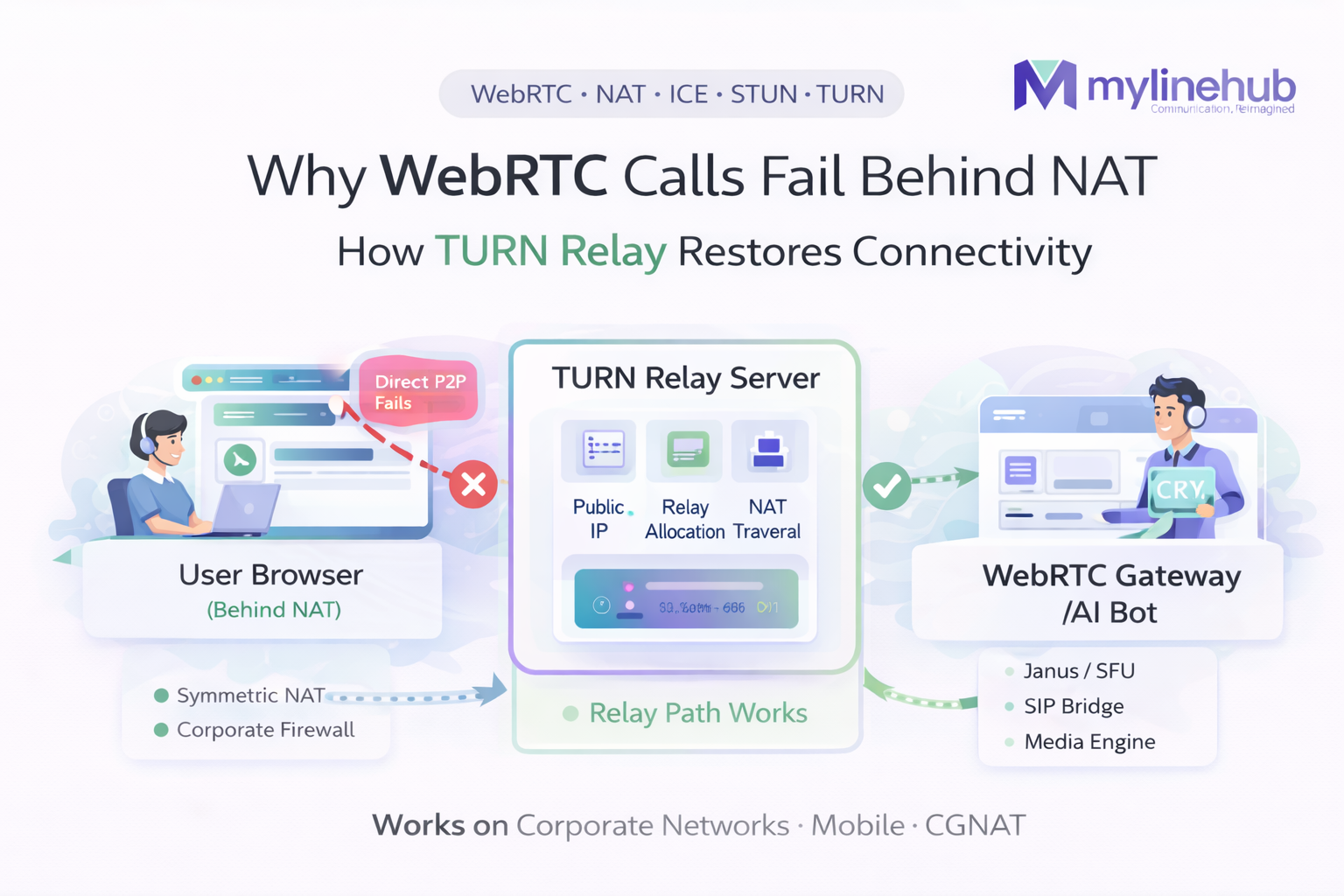
WebRTC • NAT • ICE • STUN • TURN • Coturn • Production Debugging
Why WebRTC Calls Fail Behind NAT (and How TURN Fixes It)
You build a WebRTC “click-to-call” button. It works on your laptop at home. Then your customer tries it from a company office, or a mobile network, or a different country… and it fails. Or it connects but has no audio. Or it rings forever.
This is not “a random WebRTC bug”. It’s almost always the same root cause: NAT + firewall rules prevent a direct peer-to-peer path. The fix is not magic — it’s deploying and correctly using a TURN relay.
Plain English summary:
- NAT hides devices behind a router and blocks unsolicited inbound traffic.
- STUN helps discover your public address, but doesn’t guarantee connectivity.
- TURN is a public relay that both sides can reach, so the call works anyway.
- ICE is the negotiation system that tries options and picks what works.
If your app must work on corporate networks and mobile carriers, TURN is part of your product.
Contents
1) Symptoms: how NAT failures look in real life 2) NAT explained for non-technical people 3) Why STUN is not enough 4) What TURN actually does 5) ICE flow step-by-step (what the browser tries) 6) Common network scenarios (home, mobile, corporate) 7) Tables: NAT types, candidate types, failure patterns 8) TURN design for production (coturn best practices) 9) Port & firewall checklist (copy/paste rules) 10) Debugging guide (Chrome, logs, tcpdump) 11) TURN cost model (bandwidth math) 12) Common mistakes and “why it still fails” 13) What this means for click-to-call + AI bot + SIP 14) References & further readingQuick links (your required format)
- ICE vs STUN vs TURN — Complete WebRTC Networking Guide
- WebRTC Website Voice Button AI Bot Architecture
- Janus WebRTC Gateway Installation on Ubuntu (Production)
- Best Choice for Click-to-Call AI Bot (Janus vs LiveKit vs mediasoup)
This article explains the NAT/TURN layer. If you’re bridging to SIP (Asterisk), you still need this layer to be correct or audio will fail for some users.
1) Symptoms: how NAT failures look in real life
Symptom A
Call never connects / “Connecting…” forever.
- ICE keeps checking candidates but never finds a working pair.
- Often happens when both sides are behind strict NAT and TURN is missing.
Symptom B
Call connects, but audio is one-way or silent.
- Signaling worked (WebSocket/HTTPS), but media (UDP) is blocked.
- Sometimes you get srflx candidates but the path is not actually usable.
Symptom C
Works at home, fails at office.
- Enterprise firewalls block UDP or random ports.
- TURN/TLS 443 usually fixes this (because it looks like normal HTTPS traffic).
Symptom D
Works on Wi-Fi, fails on mobile (or the reverse).
- Carrier NAT policies can be more aggressive than home routers.
- TURN is the stable option across network types.
Important: If you only test on your own network, you will miss these failures. Production WebRTC must be designed for “unknown networks”.
2) NAT explained for non-technical people
NAT (Network Address Translation) is what your Wi-Fi router does. It lets many devices share one public internet address.
Layman analogy: an apartment building
Imagine an apartment building with one street address (the router’s public IP), and many apartments inside (your devices). The building receptionist (the router) says:
- If you call out to someone, the receptionist remembers and allows the reply back.
- If a stranger calls the building randomly, the receptionist says “I don’t know who that is for” and blocks it.
WebRTC needs the media stream (audio/video) to flow both ways. NAT often blocks the “random inbound” part unless it was opened correctly.
What NAT breaks (simple)
- Direct inbound UDP packets from the internet to a device.
- Predictability of which public port maps to which internal port.
- “Peer-to-peer” assumptions (browser-to-browser, browser-to-server).
That’s why WebRTC uses ICE/STUN/TURN instead of “just connect to my IP”.
3) Why STUN is not enough
STUN tells you your public-facing address/port. That helps peers attempt a direct connection, but it doesn’t guarantee the NAT will accept it.
STUN helps with discovery
- The browser asks a STUN server: “What IP/port do you see me as?”
- The STUN server replies with a “server reflexive” (srflx) candidate.
- ICE tries to connect using that candidate.
But STUN cannot change policies
- If the network blocks UDP, srflx candidates are useless.
- If NAT is symmetric, srflx candidates often fail when paired with another NAT’d peer.
- If firewall rules require “only traffic to approved destinations”, direct peer-to-peer can fail.
Common misconception: “We added Google STUN, so WebRTC should work.”
STUN is helpful but not sufficient. TURN is the reliability solution. STUN is the “try direct first” step to reduce relay costs.
4) What TURN actually does
TURN (Traversal Using Relays around NAT) provides a relay address on a public server. Both peers connect to the TURN server. The TURN server forwards packets between them.
Layman analogy: a conference operator
If two people can’t call each other directly, they both call a trusted operator. The operator connects the call and passes audio both ways.
- Each side can usually make outbound connections.
- So each side can reach TURN (outbound is allowed).
- TURN handles the “inbound to the other side” problem by relaying.
Technical view
- TURN allocates a relay (IP:port) on the TURN server.
- Media flows: Peer A ↔ TURN ↔ Peer B.
- Works through symmetric NAT and strict firewalls (especially TURN/TLS 443).
TURN is defined in an IETF RFC (standardized behavior). ([rfc-editor.org](https://www.rfc-editor.org/rfc/rfc5766?utm_source=chatgpt.com))
5) ICE flow step-by-step (what the browser tries)
ICE (Interactive Connectivity Establishment) is the “decision engine”. It gathers candidate addresses, exchanges them with the other side, tests which pairs can pass packets, and then locks onto the best working pair.
5.1 ICE steps (simple but accurate)
- Gather candidates:
- host: your local network address (often useless across the internet)
- srflx: discovered via STUN (your public-mapped address)
- relay: allocated via TURN (your relay address)
- Exchange candidates over your signaling channel (WebSocket/HTTPS).
- Connectivity checks (STUN binding checks) probe candidate pairs.
- Select the best working pair and start media (SRTP) on it.
- Maintain the selected path, possibly switching if network changes.
When TURN exists, ICE almost always finds a path. Without TURN, ICE can “run out of options”.
Developer hint: in Chrome, you can see exactly what ICE chose.
Open chrome://webrtc-internals and look for the selected candidate pair: host vs srflx vs relay.
6) Common network scenarios (home, mobile, corporate)
Scenario 1: Home Wi-Fi (typical)
- Often works with STUN + direct UDP
- But “works often” is not “works always”
- Some home ISPs use CGNAT (carrier-grade NAT) which makes it stricter
TURN still improves reliability, especially for users behind CGNAT.
Scenario 2: Mobile network (common failures)
- Carrier NAT policies vary
- Port mappings change quickly
- Some carriers deprioritize or block certain UDP flows
TURN is frequently required for “works everywhere” mobile support.
Scenario 3: Corporate networks (most brutal)
- UDP may be blocked entirely
- Only HTTP(S) ports allowed outbound
- Deep packet inspection can disrupt unfamiliar protocols
Fix: TURN over TLS on port 443 (TURN/TLS).
Scenario 4: Dual NAT / double routers
- Home router behind ISP router
- Multiple layers of NAT
- Increases chance direct path fails
TURN reduces the “NAT stacking” problem by moving the meeting point to the public relay.
7) Tables: NAT types, candidate types, failure patterns
7.1 ICE candidate types (what you’ll see in logs)
| Candidate type | What it means | Typical success rate | Notes |
|---|---|---|---|
| host | Local LAN address (192.168.x.x, 10.x.x.x) | Low across the internet | Works only on same LAN / special setups |
| srflx | Public-mapped address discovered via STUN | Medium | Fails on strict NAT/firewalls |
| relay | TURN relay allocation | High | Most reliable, but uses TURN bandwidth |
7.2 NAT “types” (simplified and practical)
| NAT behavior | What it does (plain) | Impact on WebRTC | TURN needed? |
|---|---|---|---|
| Full-cone / permissive | Once a mapping exists, others can send back easily | Direct paths often work | Sometimes |
| Restricted / port-restricted | Only the exact destination can send back | Direct can work but more fragile | Often |
| Symmetric NAT | Different mapping per destination | Direct peer-to-peer often fails | Usually yes |
| Enterprise firewall policy | Blocks UDP or unknown ports | Direct fails frequently | Yes (TURN/TLS 443) |
7.3 Failure pattern table (what you observe)
| What you see | Likely cause | Fix |
|---|---|---|
| ICE “failed” / no candidate pair selected | No reachable path without relay | Add TURN and confirm relay candidates appear |
| Connected, but no audio | Selected path is not actually passing RTP, or firewall blocks RTP | Force TURN (relay) for testing; verify with webrtc-internals |
| Works on home Wi-Fi only | Corporate networks block UDP / unknown ports | TURN/TLS on 443; ensure TCP/TLS listeners exist |
| Some users connect, others can’t | Different NAT types; symmetric NAT users fail | TURN for everyone or TURN as fallback with strong monitoring |
8) TURN design for production (coturn best practices)
The most common TURN implementation is coturn. It’s fast, widely deployed, and supports UDP/TCP/TLS relaying. TURN behavior is standardized in RFC 5766. ([rfc-editor.org](https://www.rfc-editor.org/rfc/rfc5766?utm_source=chatgpt.com))
8.1 Your goals
- High success rate across unknown networks
- Minimal latency (relay close to users)
- Controlled cost (TURN bandwidth can be expensive)
- Security (prevent TURN abuse)
8.2 Recommended policy
- Offer TURN over UDP (best latency)
- Offer TURN over TCP (fallback)
- Offer TURN over TLS 443 (corporate firewall escape hatch)
- Use time-limited credentials (avoid static secrets in frontend)
Security must-have: Use ephemeral TURN credentials.
Your backend issues short-lived TURN credentials after a user is authorized (even if “authorized” is just a signed token for the click-to-call session). Do NOT hardcode TURN credentials in frontend JS.
9) Port & firewall checklist (copy/paste rules)
WebRTC involves more than one port because media uses UDP and NAT traversal uses STUN/TURN. If your firewall blocks the relay ports, TURN will “exist” but still fail.
9.1 Typical ports you must allow
| Component | Port(s) | Direction | Why |
|---|---|---|---|
| Website / Signaling | 443 (HTTPS/WSS) | Inbound to your web server | Delivers UI and signaling messages |
| TURN (UDP) | 3478/udp (common), or your choice | Inbound to TURN server | Low-latency relay path |
| TURN (TCP) | 3478/tcp (common), or your choice | Inbound to TURN server | Fallback when UDP blocked |
| TURN (TLS) | 443/tcp (TURN over TLS) | Inbound to TURN server | Works through strict corporate firewalls |
| TURN relay ports | UDP port range (e.g., 49152–65535) or configured range | Inbound to TURN server | Actual relayed media uses allocated ports |
TURN “gotcha”: Opening only 3478 is not enough.
TURN uses 3478/443 for allocation/auth, but the media relay uses allocated ports from the relay range. If the relay range is blocked, sessions fail or connect with no audio.
10) Debugging guide (Chrome, logs, tcpdump)
10.1 Browser-side debug (fastest)
- Open chrome://webrtc-internals
- Find your PeerConnection
- Look for:
- Selected candidate pair (host/srflx/relay)
- ICE connection state (checking → connected)
- Packet counts increasing (inbound/outbound RTP)
If the selected pair is relay, TURN is being used and NAT should no longer block you.
10.2 Server-side packet capture
On your TURN server, confirm packets are arriving on TURN and relay ports.
# Basic: see TURN allocation traffic (adjust interface)
sudo tcpdump -n -i any port 3478 or port 443

# See relay range traffic (example range; use your actual configured range)
sudo tcpdump -n -i any udp portrange 49152-65535
If clients connect but you see no relay-range packets, the relay range is blocked or misconfigured.
10.3 “Force TURN” test
To prove NAT is the issue, temporarily force relay-only in the browser:
// Example JS: force relay candidates only for debugging
const pc = new RTCPeerConnection({
  iceServers: [{ urls: ["turn:turn.example.com:3478?transport=udp"], username: "TEMP", credential: "TEMP" }],
  iceTransportPolicy: "relay"
});
If relay-only makes it work everywhere, your issue is definitely NAT/firewall.
10.4 When it “connects but audio is dead”
- Check selected candidate pair type in webrtc-internals
- Check inbound/outbound RTP packet counters
- Confirm TURN relay port range is open
- Confirm your media server/gateway is reachable from TURN server
“Connected” does not always mean “media flowing”. Always check packet counters.
11) TURN cost model (bandwidth math)
TURN relays media, so your TURN server carries the audio traffic. This is the tradeoff: reliability vs bandwidth cost.
11.1 Simple bandwidth example (audio only)
Suppose you use Opus at ~24 kbps (just an example), plus RTP/UDP/IP overhead. Real usage might be ~40–80 kbps per direction depending on packetization and overhead.
- Two directions: caller → TURN → server, server → TURN → caller
- TURN handles both directions, so it sees the full duplex traffic
If you have 1,000 concurrent calls and 60 kbps per direction, you can quickly reach tens of Mbps of sustained TURN bandwidth.
Cost optimization approach:
- Use STUN first to get direct paths when possible
- Use TURN as fallback (or “always TURN” for strict reliability)
- Measure the percentage of sessions that end up relay
- Place TURN close to users to reduce jitter/latency
12) Common mistakes and “why it still fails”
Mistake #1: Using only public STUN
STUN does not guarantee connectivity. TURN is required for strict NAT/firewalls.
Mistake #2: TURN exists but relay range closed
The client can authenticate but can’t pass media. Open the relay port range.
Mistake #3: Static TURN credentials in frontend
Leads to abuse and unexpected bills. Use time-limited credentials.
Mistake #4: TURN too far away
Relay adds latency. If TURN is in one region and users are global, audio becomes jittery. Deploy regional TURN.
Mistake #5: Not checking what ICE selected
Teams assume TURN is used, but ICE actually selected srflx and it fails on some networks. Always inspect selected candidate pair type.
Mistake #6: Mixing SIP NAT settings with WebRTC NAT settings
SIP NAT handling (Asterisk/FreeSWITCH) is different from WebRTC ICE. Keep responsibilities clear: TURN/ICE is for WebRTC endpoints.
13) What this means for click-to-call + AI bot + SIP (Asterisk/FreeSWITCH)
When you add a “Talk to AI” button, you’re adding a WebRTC endpoint. That endpoint must survive real network conditions.
If you’re using Janus + SIP PBX
- Browser connects to Janus via WebRTC
- Janus bridges to SIP on Asterisk/FreeSWITCH
- TURN ensures the browser can reach Janus on hostile networks
Without TURN, some users will never reach the gateway reliably.
If you’re using an SFU stack (LiveKit/mediasoup)
- Browser connects to the SFU
- SIP integration is a separate bridging layer
- TURN still matters for browser reachability
TURN is not optional regardless of server choice; only the topology changes.
Operational truth:
When someone says “WebRTC doesn’t work for our customers”, the first question should be: “Do we have TURN correctly deployed and can we see relay candidates in webrtc-internals?”
14) References & further reading
- TURN specification (standard behavior): rfc-editor.org/rfc/rfc5766 ([rfc-editor.org](https://www.rfc-editor.org/rfc/rfc5766?utm_source=chatgpt.com))
- MYLINEHUB guides (your site format):
Want to see API-driven CRM + Telecom workflows in action? Try the WhatsApp bot or explore the demos.
Comments (0)
Be the first to comment.