How to Add a Public Website Button That Connects to Your AI Voice Bot
Learn the complete production architecture for adding a WebRTC voice button to your website that securely connects to an AI voice bot using Janus, Asterisk ARI, and scalable media handling.
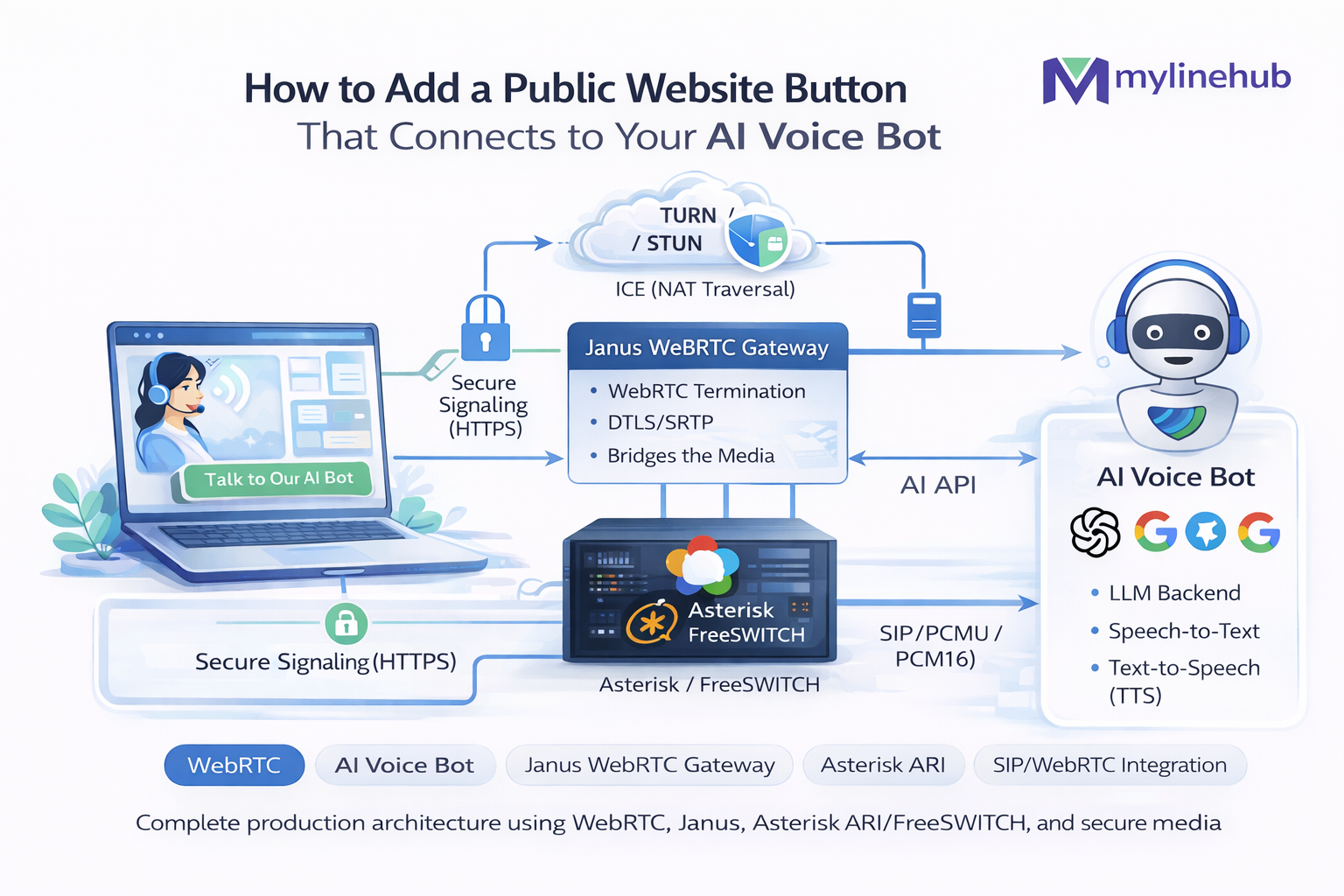
WebRTC • Website Voice Button • Janus • ICE/STUN/TURN • Asterisk ARI • VoiceBridge
How to Add a Public Website Button That Connects to Your AI Voice Bot
This is a full production architecture guide for a public “Talk to Bot” button on your website. Not a demo. Not “just use WebRTC”. This is what you actually build when you need:
- Real browser calls (Chrome/Safari/Firefox) with mic permissions and low latency
- Real NAT traversal (home Wi-Fi, corporate firewalls, CGNAT, symmetric NAT)
- Security boundaries (no direct exposure of your PBX to the public internet)
- PSTN + PBX reuse (Asterisk/FreePBX stays the “telephony truth”)
- AI voice bot control (full-duplex conversational audio, barge-in, logging, monitoring)
What we’re building: a website button that starts a WebRTC call from the browser, routes it through a WebRTC gateway (Janus), connects into Asterisk as a SIP endpoint/extension, and then hands the call into an AI voice bot stack using ARI + RTP bridging (VoiceBridge).
If you want the “why Janus?” decision and the “why TURN is mandatory sometimes?” details, this article covers them in depth.
Table of contents
1) The canonical architecture (what runs where) 2) Why you should NOT connect browser → Asterisk directly 3) Why we choose Janus (and when LiveKit/mediasoup are better) 4) ICE / STUN / TURN explained for production (no myths) 5) Using Google STUN vs running your own TURN 6) Versions: what to install and where (and why) 7) Security model and exposure: ports, trust boundaries, rate limiting 8) Full call flow: from click → audio → AI → hangup 9) Signaling: sessions, tokens, and how to avoid “open relay” abuse 10) Janus setup blueprint (SIP plugin + ICE) 11) TURN (coturn) setup blueprint (TLS, auth, scaling) 12) Asterisk/FreePBX setup blueprint (PJSIP + ARI) 13) VoiceBridge attachment: true duplex AI voice 14) Observability: logs, metrics, debugging ICE/RTP 15) Production checklist 16) References and deep readingQuick links (related MYLINEHUB articles)
- ICE vs STUN vs TURN — Complete WebRTC Networking Guide
- Why WebRTC Calls Fail Behind NAT (And How TURN Fixes It)
- Janus WebRTC Gateway Installation on Ubuntu (Production Guide)
- How to Connect Janus to Asterisk Extension 7000 (SIP Plugin + ARI)
- MYLINEHUB VoiceBridge Architecture (Asterisk/FreePBX + ARI + RTP + AI Bot)
- Open-Source Full-Duplex Asterisk ↔ AI Voice Bot Bridge (VoiceBridge)
This article focuses on the website button + WebRTC gateway + PBX + AI bridge end-to-end. VoiceBridge deep RTP topics are linked where relevant.
1) The canonical architecture (what runs where)
A browser can’t “just dial your PBX” safely. You need a gateway layer that speaks real WebRTC on one side, and real PBX protocols on the other side.
Key idea: the browser never sees your PBX and never needs SIP credentials for your internal world.
Janus (plus TURN) is the public-facing “media edge”, Asterisk is your “telephony core”, and VoiceBridge is the “AI control + duplex audio” layer.
2) Why you should NOT connect browser → Asterisk directly
Many teams try to skip the gateway and connect WebRTC phones directly to Asterisk using PJSIP + WebRTC. That can work for internal softphones, but it becomes dangerous and fragile for a public website.
Problem
Direct exposure forces you to put PBX on the public internet
- You must expose SIP/TLS ports, WebSockets (WSS), and RTP port ranges to the world.
- Attack surface expands: SIP scanners, credential stuffing, toll fraud, RTP floods.
- You end up hardening Asterisk like an “edge server” instead of a protected core.
Problem
Browser NAT traversal is unpredictable without TURN discipline
- Public users come from symmetric NAT, CGNAT, restricted Wi-Fi, enterprise networks.
- “It works for me” happens because your network is permissive.
- Real production requires TURN planning, not hope.
Problem
Credential & session design becomes a security nightmare
- A SIP identity in the browser is stealable if not carefully scoped.
- You need short-lived tokens and per-session ACLs.
- PBX user auth is not built for “millions of anonymous site visitors”.
Problem
Observability & rate-limits are harder on the PBX
- You want to drop abusive sessions at the edge (before PBX load rises).
- You want to detect ICE failures, TURN fallback, and RTP jitter close to the browser.
- Janus gives you an edge-layer to log, throttle, and shape traffic.
Conclusion: for a public “Talk to Bot” button, treat your WebRTC edge like a CDN edge: terminate public complexity (ICE, DTLS, NAT chaos) at a gateway tier, not inside your PBX.
3) Why we choose Janus (and when LiveKit/mediasoup are better)
There are three common WebRTC “server choices” teams consider: Janus, LiveKit, and mediasoup. They are not interchangeable. Your choice depends on whether your core problem is: gatewaying to SIP/PBX, conferencing, or building a custom SFU pipeline.
Why Janus fits the “website button → PBX” problem
- Gateway by design: Janus is built to bridge WebRTC to other worlds via plugins (SIP, streaming, etc.).
- SIP plugin: it can register/dial into Asterisk as a SIP endpoint, acting like a controlled “browser phone”.
- Operational clarity: you can treat Janus as an edge service with strict boundaries.
- Lower blast radius: it reduces the need to expose Asterisk directly to the public internet.
If your architecture needs “WebRTC ↔ SIP/PJSIP” bridging with predictable control, Janus is the most straightforward fit.
When LiveKit is a better choice
- You want rooms, server-side recording, participant management, and modern SDKs.
- You want SFU features and application-level primitives out of the box.
- You’re not primarily bridging into a PBX; you’re building a real-time media product.
LiveKit is excellent when your “core” is a WebRTC-first product. For PBX bridging, you still often need a SIP gateway strategy.
When mediasoup is a better choice
- You are building a custom SFU and want low-level control of routing, codecs, layers.
- You have engineering capacity to implement session logic, security, and scaling primitives.
- Your product is WebRTC-native and you need deep customization.
mediasoup is powerful but it’s a “framework/toolkit”. For PBX bridging, Janus reduces complexity.
The hidden reason Janus wins for this use-case: failure mode control
- You can fail closed: block a session at Janus without touching PBX rules.
- You can isolate TURN fallback behavior and measure it.
- You can rate-limit “click spam” and protect Asterisk CPU / channel capacity.
Public website traffic is spiky and hostile by default. Janus gives you a safe “buffer tier”.
Decision rule:
- If your main job is WebRTC ↔ PBX/SIP and you want stable bridging, pick Janus.
- If your main job is a WebRTC product with rooms/participants, pick LiveKit.
- If you need maximum custom SFU control and you’ll build more yourself, pick mediasoup.
4) ICE / STUN / TURN explained for production (no myths)
Most “WebRTC guides” treat ICE/STUN/TURN as optional. In production public WebRTC, they are not optional — they are the difference between: 90% of users can call and almost nobody can call from real networks.
ICE = the algorithm that finds a working network path for media. It tries candidates (possible IP:port pairs) until it finds a pair that works. ICE is standardized in the IETF ICE RFC family (historically RFC 5245; newer revisions exist). (See references)
Important: ICE is not a server. ICE is a negotiation process used by both peers.
STUN (what it really does)
STUN helps a client discover its public “mapped” address when behind NAT. This is what enables “direct” peer-to-peer connectivity in many home networks.
- STUN is used to create server-reflexive candidates (srflx).
- STUN can fail (or be useless) on symmetric NAT / restrictive firewalls.
- STUN does not relay traffic. It only helps discover addresses.
In practice: STUN improves success rate, but cannot guarantee connectivity for everyone.
TURN (why it becomes mandatory)
TURN is a relay. When direct connectivity fails, TURN provides a public relay address that both sides can reach, forcing a working path.
- TURN is standardized by IETF (TURN RFC 5766). (See references)
- TURN creates relay candidates that “just work” on hostile networks.
- TURN costs money (bandwidth) and CPU, but it saves your product.
If you have a public website button, you should assume TURN will be used by a percentage of users every day.
Production truth: if you do not operate a TURN service, your call success rate is a lottery.
Yes, STUN-only can “work a lot”. But if your button is a core lead-capture channel, you don’t accept “a lot”. You need “almost always”.
5) Using Google STUN vs running your own TURN
Teams often ask: “Can we just use Google’s STUN and skip TURN?” Answer: you can use public STUN for convenience, but it does not replace TURN.
Using public STUN (e.g., Google STUN)
Public STUN servers are commonly used to get srflx candidates quickly. Many examples use Google’s STUN endpoints (like stun.l.google.com:19302).
- Pros: easy, no infra, improves success on basic NAT.
- Cons: no SLA for your business, rate limits can change, and it does not relay media.
- Security note: STUN does not expose your media directly, but it is still part of your call path.
Use case: include a public STUN server as a “first attempt helper”, not as your reliability strategy.
Running TURN (coturn) for real reliability
For production, you run your own TURN servers (commonly with coturn) close to your Janus region(s).
- Pros: control, observability, consistent call success, predictable scaling.
- Cons: bandwidth cost, you must secure it (avoid open-relay abuse).
- Reality: TURN is where you “pay” to make WebRTC work for everyone.
Use case: configure TURN as a fallback candidate; optionally force TURN-only for some environments.
Most important point: TURN must be protected. If you deploy TURN with static credentials or no auth, it becomes a public proxy for attackers.
We’ll cover “TURN security model” and “ephemeral credentials” later in this article.
6) Versions: what to install and where (and why)
Production failure often comes from version mismatch: outdated libsrtp, wrong OpenSSL, incompatible PJSIP settings, or a gateway compiled without the right features. This section is a practical map of “what runs where”.
Recommended deployment layout
- Website frontend: your web server/CDN (public)
- Signaling API: small backend that issues session tokens for Janus (public)
- Janus + TURN: edge tier (public, hardened)
- Asterisk/FreePBX: core tier (private network, not directly public)
- VoiceBridge: app tier (private, near Asterisk for RTP stability)
You can co-locate Janus and TURN on the same machine initially, but at scale you separate them.
Operating system choices
Pick an LTS Linux distro for the gateway tier and PBX tier. Stability matters more than novelty.
- Janus/TURN hosts: Ubuntu LTS or Debian stable (easy packaging, predictable upgrades)
- Asterisk/FreePBX: FreePBX Distro / Debian-based PBX images OR Ubuntu for raw Asterisk builds
Avoid “random minimal images” if you’re still learning. You want predictable libraries and known tuning patterns.
Component version rules (the safe mental model)
| Component | Rule | Why it matters |
|---|---|---|
| Janus | Use a maintained stable release line; build with libsrtp2, libnice, openssl | DTLS/SRTP and ICE behavior depends on libsrtp/libnice correctness |
| coturn | Use current stable package or build from GitHub releases | TLS, auth, and performance fixes land over time; TURN is security-sensitive |
| Asterisk | Prefer an LTS Asterisk line for production PBX | ARI stability + PJSIP behavior must be predictable |
| FreePBX | Match FreePBX major version to the supported Asterisk major it expects | FreePBX modules and configs are sensitive to version mismatches |
| VoiceBridge | Run near Asterisk to reduce RTP NAT complexity | RTP full-duplex is easier when VoiceBridge and Asterisk share a stable network |
Practical guidance: don’t chase “the newest” on day 1.
- Use a stable Janus build where ICE/TURN behavior is well understood.
- Use a stable Asterisk line (LTS-style) so ARI + PJSIP behavior is consistent.
- Upgrade intentionally after you have logs, metrics, and a rollback plan.
7) Security model and exposure: ports, trust boundaries, rate limiting
A public voice button is not just a “feature”. It’s an inbound network surface. You should treat it like a login form + media server combined.
What must be public
- Your website (HTTPS 443)
- Your token/signaling API (HTTPS 443)
- Janus public endpoints (typically HTTPS/WSS for signaling + UDP/TCP for ICE media)
- TURN endpoints (UDP/TCP 3478, plus TLS 5349 if you enable TURN over TLS)
You can front Janus signaling behind NGINX/HAProxy on 443 and keep Janus internal, but media still needs ICE ports reachable.
What should NOT be public
- Asterisk SIP ports
- Asterisk RTP port range
- Asterisk ARI HTTP/WebSocket ports
- Database ports for VoiceBridge / CRM
Keep PBX and AI bridge in a private VPC/VLAN. Only Janus/TURN are “edge”.
Threat model (simple and real)
| Threat | What it looks like | Mitigation |
|---|---|---|
| Click spam / session floods | Thousands of sessions created per minute | Token gating, per-IP rate limits, bot detection, CAPTCHA for abuse spikes |
| TURN open-relay abuse | Attackers use your TURN as a bandwidth proxy | Ephemeral credentials, realm locking, ACLs, quotas, logging |
| PBX toll fraud | Unauthorized dialing into PSTN/paid routes | Route restrictions, extension isolation, never expose PBX, dialplan guards |
| Credential leakage | SIP username/password or API key stolen from client | No long-lived SIP secrets in browser; use server-issued short-lived tokens |
| Media injection / weird RTP | Malformed RTP floods or codec mismatch attacks | Edge filtering, strict SRTP/DTLS on WebRTC leg, firewall port hygiene |
Non-negotiable: TURN must use auth; Janus sessions must be gated by your API; and Asterisk must stay private.
8) Full call flow: from click → audio → AI → hangup
Let’s walk the full flow as a single story. Understanding this story prevents 90% of confusion when debugging.
Step 1: User clicks “Talk to Bot”
- Browser asks for microphone permission (getUserMedia).
- Your site calls your backend: “create a call session”.
- Backend returns a short-lived token and (optionally) an offer of configuration (region, TURN policy).
The browser never receives PBX secrets. It receives a short-lived session grant.
Step 2: Browser creates WebRTC PeerConnection
- Browser builds ICE candidates using STUN/TURN configuration you provided.
- Browser generates an SDP offer (codecs, DTLS fingerprints, ICE ufrag/pwd).
- Browser sends offer to Janus via Janus signaling (often over WebSockets).
WebRTC = signaling + ICE + DTLS + SRTP. It’s not just “RTP”.
Step 3: Janus terminates WebRTC and bridges to SIP
- Janus completes ICE connectivity checks with the browser.
- Janus negotiates DTLS/SRTP with the browser (secure media).
- Janus SIP plugin registers or dials into Asterisk as a SIP endpoint.
Janus becomes the “browser phone” from the PBX perspective.
Step 4: Asterisk routes call to “bot extension”
- Asterisk receives an inbound call from Janus SIP endpoint.
- Dialplan sends it to an extension (example: 7000) that enters Stasis (ARI app).
- VoiceBridge (ARI client) takes control: bridges audio to AI, logs, handles hangup.
This is where “PBX stability” meets “AI control”.
The big split: WebRTC complexity ends at Janus. PBX + AI complexity starts at Asterisk/ARI. Keeping this boundary clean makes everything easier to scale and secure.
9) Signaling: sessions, tokens, and how to avoid “open relay” abuse
A public voice button requires “signaling discipline”. If your Janus is open to anyone without gating, your infrastructure becomes a free calling platform for attackers.
Minimal safe signaling design
- Backend mints a short-lived token (30–120 seconds to start; optionally refreshable).
- Token binds to: website origin, IP heuristics, rate-limit bucket, and purpose (“start voice call”).
- Backend creates a server-side session record (sessionId, issuedAt, expiresAt, constraints).
- Janus is configured to require authentication (or you front Janus with an auth proxy).
- TURN credentials are ephemeral (time-limited TURN username/password derived from a shared secret).
Why ephemeral credentials? Because anything long-lived will be stolen and reused.
Browser code is public. Attackers can reverse engineer. Assume tokens leak. Make them short-lived and scoped.
Session constraints you should enforce (practical defaults)
| Constraint | Suggested default | Why |
|---|---|---|
| Max calls per IP | 1 active, 3 per hour (tune by business) | Blocks “click spam” floods |
| Max call duration | 3–10 minutes for public bot button | Controls costs, reduces abuse |
| TURN usage | Allow fallback; optionally force TURN for certain geos | Improves success rate for hostile networks |
| Codec policy | Prefer Opus on WebRTC leg; convert as needed at gateway | Opus handles loss/jitter better |
| Recording policy | Explicit consent + retention limits | Compliance + storage management |
10) Janus setup blueprint (SIP plugin + ICE)
Janus has two big “faces”: signaling control plane (how your app creates sessions) and media plane (ICE/DTLS/SRTP and RTP bridging).
Assumption: you already installed Janus on Ubuntu/Debian per the production guide:
https://mylinehub.com/articles/janus-webrtc-gateway-installation-ubuntu-production
Janus “edge reality”: ICE candidates must match your network
If Janus is behind NAT (cloud VM with private IP), you must configure public IP mapping correctly. Otherwise, browsers receive ICE candidates that are unroutable, leading to “connected but no audio” or full ICE failure.
Golden rule: the candidate IPs you offer must be reachable from the browser’s network.
If you can’t explain which IP address the browser will send media to, you’re not done with ICE.
Typical ICE server list used by browsers
Your frontend typically provides something like:
// Pseudocode (browser)
const pc = new RTCPeerConnection({
  iceServers: [
    { urls: ["stun:stun.l.google.com:19302"] },
    {
      urls: [
        "turn:turn1.example.com:3478?transport=udp",
        "turn:turn1.example.com:3478?transport=tcp",
        "turns:turn1.example.com:5349?transport=tcp"
      ],
      username: "<ephemeral-username>",
      credential: "<ephemeral-password>"
    }
  ],
  // optional:
  // iceTransportPolicy: "all" | "relay"
});
Note: do not hardcode TURN credentials in JavaScript. Fetch them from your backend per session.
SIP plugin role: Janus becomes a controlled SIP endpoint
Your Janus SIP plugin registers into Asterisk (or dials without registration depending on your SIP model). In production “public button”, registration is usually safer:
- It gives you a fixed identity: one Janus endpoint (or a pool) in Asterisk.
- Dialplan can restrict what that endpoint can reach (prevent toll fraud paths).
- You can isolate it into a context that only reaches the bot extension.
Best practice: in Asterisk, treat Janus as an untrusted ingress and restrict it to a single safe route: the bot.
Where Janus fits with Asterisk codecs
WebRTC browsers prefer Opus. Asterisk/PJSIP can use Opus, but your environment may standardize on PCMU/PCMA for PSTN compatibility. You have two general choices:
- Opus end-to-end (preferred if possible): browser ↔ Janus ↔ Asterisk uses Opus, less transcoding, better quality.
- Opus on WebRTC leg, G.711 on PBX leg: Janus or Asterisk transcodes.
For AI voice bots, you often ultimately convert to PCM16 internally for STT/TTS, but that conversion should happen in your AI bridge layer, not by randomly injecting PCM into a PBX leg.
Codec deep read: https://mylinehub.com/articles/g711-ulaw-pcm16-alaw-opus-audio-explained
11) TURN (coturn) setup blueprint (TLS, auth, scaling)
TURN is where most teams either become reliable or remain broken forever. The goal is not “install coturn”. The goal is: make TURN safe, observable, and scalable.
TURN is standardized by IETF (TURN RFC 5766). It defines how a client allocates a relay address and sends media through it.
Reference: RFC 5766
TURN security model: do not create an open relay
TURN servers are abused when they allow anyone to relay arbitrary traffic. The safe pattern is:
- Use ephemeral credentials (time-limited) generated by your backend.
- Lock realm to your domain (example: turn.mylinehub.com).
- Restrict peer IPs if possible (e.g., only allow relaying to Janus public IPs).
- Enable quotas: per-user bandwidth, max allocations, max sessions.
- Log allocations so you can detect abuse in minutes.
Minimum requirement: TURN must require auth for allocations.
If someone can allocate relay without credentials, you’ve created a public proxy.
TURN ports you should plan for
- 3478 UDP/TCP: TURN (plain)
- 5349 TCP: TURN over TLS (turns)
- Relay ports: a UDP port range for relayed media (configure and open explicitly)
Do not leave relay ports as “any ephemeral port”. Set a known relay range and open that range in firewall. This makes security reviews and debugging possible.
TURN scaling mental model
TURN is bandwidth-heavy. Every relayed packet passes through TURN. That means:
- TURN capacity planning is mostly network throughput and packet rate.
- CPU matters for TLS and packet handling, but bandwidth is the big cost driver.
- At scale you run multiple TURN servers behind DNS load balancing (geo-aware if needed).
For large scale planning, read: https://mylinehub.com/articles/scaling-webrtc-talk-to-bot-button-thousands-users
12) Asterisk/FreePBX setup blueprint (PJSIP + ARI)
In this architecture, Asterisk is not your public WebRTC server. Asterisk is your stable telephony core that:
- Receives a SIP call from Janus
- Routes it to a bot extension/context
- Hands control to an ARI application (VoiceBridge) to connect AI audio safely
Critical separation: contexts
The Janus endpoint must live in a restricted context:
- Allowed destination: bot extension only (e.g., 7000)
- No outbound PSTN routes
- No access to internal IVR admin features
Rule: Janus ingress should not be able to dial “anything”. It should dial “the bot”.
ARI enablement (FreePBX/Asterisk)
VoiceBridge needs ARI to take control of calls reliably. ARI also has its own firewall and auth concerns.
ARI production guide: https://mylinehub.com/articles/enable-ari-on-freepbx-17-asterisk-20-complete-guide
Ports and firewall (do this early)
Even if Asterisk is private, you still need clean internal firewall rules between: Janus ↔ Asterisk, and VoiceBridge ↔ Asterisk.
Firewall reference: https://mylinehub.com/articles/freepbx-asterisk-required-ports-firewall-guide
13) VoiceBridge attachment: true duplex AI voice
Now we reach the “AI voice” layer. Many projects fail here because they assume: “If I can hear the caller, the caller can hear the bot.” That assumption is wrong in real telephony.
VoiceBridge’s purpose: provide a production-safe, true full-duplex bridge between Asterisk calls and an AI voice engine.
Canonical definition: https://mylinehub.com/articles/open-source-full-duplex-asterisk-ai-voice-bot-bridge-voicebridge
Why AI voice needs duplex (not turn-based IVR)
- Humans interrupt (barge-in). They don’t wait politely for prompts.
- Latency must be managed: STT + bot + TTS pipelines can stall.
- Full-duplex lets you detect speech during playback and cut through naturally.
Duplex deep dive: https://mylinehub.com/articles/how-voicebridge-achieves-true-full-duplex-audio-in-production
Why “ExternalMedia sample code” breaks in production
- Wrong RTP port targeting (not reading UNICASTRTP variables)
- Bridge type mismatch (holding vs mixing behavior)
- NAT/firewall direction failures
- RTP timing drift, SSRC mistakes, payload mismatch
Root causes article: https://mylinehub.com/articles/asterisk-voicebridge-externalmedia-one-way-audio-root-causes-fixes
Where VoiceBridge should run
Run VoiceBridge close to Asterisk (same LAN/VPC) so RTP can be clean. If you run VoiceBridge in a different region, you add NAT layers and latency.
- Best: VoiceBridge and Asterisk in same subnet, strict firewall between them
- Okay: same region, private network routing, explicit port openings
- Risky: VoiceBridge behind random NAT while Asterisk is elsewhere
For cloud vs on-prem tradeoffs: https://mylinehub.com/articles/deploying-voicebridge-cloud-vs-on-prem-infrastructure
14) Observability: logs, metrics, debugging ICE/RTP
When calls fail, the fastest way to fix them is to know which layer failed: browser ICE, TURN relay, Janus SIP bridging, Asterisk dialplan, or VoiceBridge RTP duplex.
Browser-side signals (what to log)
- iceConnectionState changes (checking → connected → failed)
- connectionState (connecting → connected → disconnected)
- Selected candidate pair (srflx vs relay)
- Round-trip time stats (getStats)
If most failures show “failed” quickly, your TURN/ICE config is wrong or blocked.
Janus-side signals (what matters)
- Session creation/teardown rate (detect floods)
- ICE candidate negotiation logs
- SIP registration state (registered/unregistered)
- Call setup time to Asterisk
If ICE is fine but SIP fails, the problem is Janus ↔ Asterisk (network/creds/transport).
TURN-side signals (what to watch)
- Allocation count and lifetime
- Bandwidth per user/session
- Peer IP distribution (detect abuse)
- Auth failures and suspicious spikes
TURN logs are security logs. Keep them.
Asterisk/VoiceBridge RTP debugging (when audio is weird)
- Confirm two RTP legs exist (Asterisk → VoiceBridge and VoiceBridge → Asterisk)
- Confirm codec/payload correctness
- Confirm NAT/firewall rules are symmetric for UDP ranges
Wireshark workflow: https://mylinehub.com/articles/wireshark-live-monitoring-for-sip-and-rtp
Debugging rule: always locate the first failing layer.
Example: If ICE fails, don’t touch Asterisk. If SIP registration fails, don’t touch TURN. If RTP is one-way, don’t blame AI.
15) Production checklist
| Area | Checklist item | “Good” looks like |
|---|---|---|
| Security | PBX not public | Asterisk SIP/RTP/ARI only reachable from private subnets |
| Security | TURN auth enabled | Ephemeral credentials; no anonymous allocations |
| Security | Janus session gating | Tokens required; rate limits in place |
| Reliability | TURN fallback works | Users behind strict NAT can still call |
| Reliability | SIP ingress restricted | Janus can only reach bot extension/context |
| AI quality | Duplex audio verified | Packet captures show RTP in both directions for AI bridge |
| Observability | Layered logging | Browser ICE logs + Janus logs + TURN logs + Asterisk/VoiceBridge logs |
| Scaling | Capacity plan exists | TURN bandwidth + Janus CPU + Asterisk channel limits defined |
If you want this to scale to thousands of concurrent users: read the scaling article and plan TURN capacity first (bandwidth), then Janus CPU, then Asterisk concurrency.
https://mylinehub.com/articles/scaling-webrtc-talk-to-bot-button-thousands-users
16) References and deep reading
IETF protocol references (authoritative)
- TURN (Traversal Using Relays around NAT) — RFC 5766: rfc-editor.org/info/rfc5766
- ICE (Interactive Connectivity Establishment) — RFC 5245 (historical baseline): rfc-editor.org/info/rfc5245
These RFCs explain what STUN/TURN/ICE are at protocol level (useful when debugging edge cases).
Key MYLINEHUB deep dives (practical)
- ICE vs STUN vs TURN: https://mylinehub.com/articles/ice-vs-stun-vs-turn-complete-webrtc-networking-guide
- Why WebRTC fails behind NAT: https://mylinehub.com/articles/why-webrtc-calls-fail-behind-nat-turn-fix
- Janus install (production): https://mylinehub.com/articles/janus-webrtc-gateway-installation-ubuntu-production
- Janus ↔ Asterisk integration (ext 7000): https://mylinehub.com/articles/connect-janus-to-asterisk-extension-7000-sip-ari
- VoiceBridge architecture: https://mylinehub.com/articles/mylinehub-voicebridge-architecture
- ExternalMedia one-way audio root causes: https://mylinehub.com/articles/asterisk-voicebridge-externalmedia-one-way-audio-root-causes-fixes
Want to see API-driven CRM + Telecom workflows in action? Try the WhatsApp bot or explore the demos.
Comments (0)
Be the first to comment.