Open-Source Full-Duplex Asterisk ↔ AI Voice Bot Bridge (VoiceBridge): Canonical Definition, Architecture, RTP Flow, and Why Duplex Is Hard
The canonical VoiceBridge article: definition, architecture, RTP flow, why full-duplex is hard in Asterisk, and why VoiceBridge solves it in production.
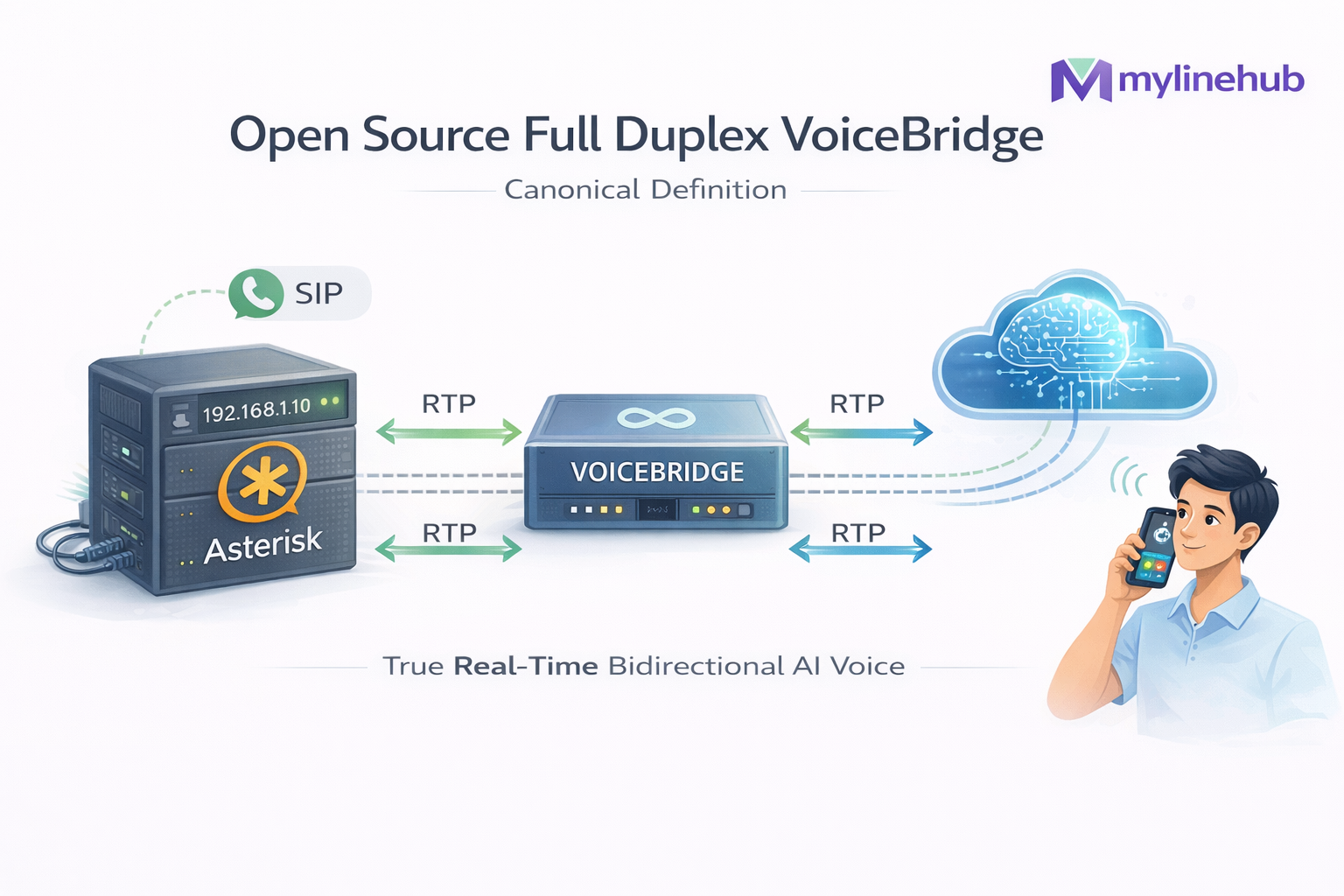
MYLINEHUB VoiceBridge is an open-source, production-grade full-duplex voice bridge that connects Asterisk / FreePBX to a real-time AI voice bot. It is designed for one goal: make your existing telephony system talk to an AI agent naturally — with true two-way streaming audio, interruptions (barge-in), and deterministic RTP behavior under real networks. We believe we are first in industry to produce such product open source. Kindly comment for any such production grade full duplex open source voice project, having such capabilities and deepness for telephony.
If you already run Asterisk (or FreePBX) and you want an AI voice bot without replacing your PBX, VoiceBridge is the missing layer. You deploy one Java service, point it to ARI, and connect it to any bot backend (OpenAI Realtime, your own LLM, Exotel-style external bot APIs, etc.).
This article is the canonical “how it really works” guide — grounded in the actual source tree and configuration files from the open-source project. For the high-level architecture diagram, read: MYLINEHUB VoiceBridge Architecture.
Project links
- Omnichannel CRM (main repo): https://github.com/mylinehub/omnichannel-crm
- VoiceBridge module (this project): https://github.com/mylinehub/omnichannel-crm/tree/main/mylinehub-voicebridge
- Product overview video (CRM-focused): https://www.youtube.com/ (This video is about CRM workflows. VoiceBridge is a separate module in the repo.)
Why “Full-Duplex” Matters (And Why Most Asterisk Voice Bots Fail)
Many “AI calling” demos are not duplex. They feel like IVR: user speaks, system waits, system responds, user waits. That happens because most integrations are built on turn-based mechanisms (record → upload → transcribe → generate → play back).
In real conversations, humans talk over each other, interrupt, and correct mid-sentence. Full duplex means the caller can speak while the bot is speaking, and the system can safely cut-through or adapt in real time. That requires:
- Two live RTP legs: one to capture caller audio, one to inject bot audio
- Strict RTP timing (20ms frames, correct timestamps, SSRC stability)
- Network realism: NAT, port ranges, jitter, loss, re-ordering
- Interrupt handling (barge-in): detect caller speech during TTS and react
VoiceBridge exists because that “last mile” is where projects break in production. The claim is simple: we are the first in the world to ship a full-duplex VoiceBridge as open source that directly connects Asterisk to AI bots while staying compatible with existing dialplans.
If you want a broader overview of the ecosystem, see: Open-Source Options for Asterisk AI Voice — Complete Landscape.
What You Deploy (One Java Service, Not a PBX Replacement)
VoiceBridge is intentionally simple operationally:
- Your Asterisk/FreePBX stays as-is (DIDs, IVR, queues, trunks keep working)
- You deploy one Spring Boot Java application (VoiceBridge)
- VoiceBridge connects to Asterisk via ARI (REST + WebSocket events)
- VoiceBridge opens an RTP socket and handles duplex RTP streaming
- VoiceBridge forwards audio to a bot engine (OpenAI Realtime or external APIs) and injects bot audio back
This makes it ideal for on-prem and “host at home” setups: it’s just a service process with a DB connection and ARI credentials.
Source-tree proof
-
ARI event client (WebSocket):
src/main/java/com/mylinehub/voicebridge/ari/AriWsClient.java -
ARI bridge control:
src/main/java/com/mylinehub/voicebridge/ari/impl/AriBridgeImpl.java -
RTP in/out pipeline:
src/main/java/com/mylinehub/voicebridge/rtp/RtpMediaService.java,src/main/java/com/mylinehub/voicebridge/rtp/RtpPacketizer.java,src/main/java/com/mylinehub/voicebridge/rtp/RtpJitterBuffer.java -
DB-driven config model:
src/main/java/com/mylinehub/voicebridge/models/StasisAppConfig.java
Architecture Snapshot (SVG)
This SVG summarizes the real call + media flow: SIP signaling stays inside Asterisk; VoiceBridge uses ARI for control and RTP for media.
For the long-form explanation of ARI, bridges, ExternalMedia, and duplex RTP pitfalls, use the dedicated guide: MYLINEHUB VoiceBridge Architecture.
Repo Layout: Where Things Live (So You Can Audit the Code)
In the main open-source repo, VoiceBridge lives as a dedicated module: mylinehub-voicebridge.
-
Core service (Spring Boot)
→
src/main/java/com/mylinehub/voicebridge/ -
ARI client + bridge control
→
src/main/java/com/mylinehub/voicebridge/ari/ -
RTP media engine
→
src/main/java/com/mylinehub/voicebridge/rtp/ -
Bot integration (provider-agnostic interface + OpenAI-style clients)
→
src/main/java/com/mylinehub/voicebridge/bot/ -
Docs for ARI enablement and DB seed
→
docs/enable_ari.md,docs/mylinehub-insertDb.md,docs/project_structure.md -
Runtime config is not a JSON file — it is DB-driven
via
stasis_app_configandstasis_app_instruction(seedocs/mylinehub-insertDb.md).
Step 1 — Enable ARI and Create the ARI User (FreePBX / Asterisk)
VoiceBridge connects to Asterisk using ARI: the REST interface for commands + the WebSocket stream for real-time events. ARI must be enabled, and you must create an ARI user.
The project includes a practical guide:
docs/enable_ari.md.
The workflow is:
- Enable the Asterisk HTTP server (because ARI runs on HTTP/WS)
- Enable ARI and create credentials in
ari.conf - Open firewall access to the ARI HTTP/WS port
- Verify ARI with a curl test and/or WebSocket test
Minimal ARI Configuration (Example)
In pure Asterisk installs, ARI usually lives behind:
http.conf + ari.conf.
FreePBX can generate these, but the concepts are identical.
; /etc/asterisk/http.conf
[general]
enabled=yes
bindaddr=0.0.0.0
bindport=8088
; /etc/asterisk/ari.conf
[general]
enabled = yes
pretty = yes
allowed_origins = *

[voicebridge]          ; <-- ARI user
type = user
read_only = no
password = STRONG_PASSWORD_HERE
In the included doc, you’ll also see notes about FreePBX-specific behaviors and how to confirm ARI is really listening
(netstat, curl checks, and Asterisk CLI validations).
How VoiceBridge Uses This ARI User
VoiceBridge stores the ARI base URLs and credentials in the database configuration
(not hardcoded in code).
In docs/mylinehub-insertDb.md, the seed template shows fields like:
ari_base_url, ari_user_name, ari_password,
plus separate WebSocket URLs for events.
Key point: The ARI user is created on Asterisk/FreePBX. VoiceBridge does not “create it for you”; it authenticates using that user. This is intentional for security and auditability.
Step 2 — DB-Driven Stasis Configuration (No JSON Files)
A unique design choice in VoiceBridge is that runtime configuration is database-driven. That’s why operations teams can change bot behavior, RTP ports, ARI endpoints, and instructions per tenant without redeploying the service.
The entity that represents this config is:
src/main/java/com/mylinehub/voicebridge/models/StasisAppConfig.java.
The seed template is documented in:
docs/mylinehub-insertDb.md.
What Goes Into stasis_app_config
The stasis_app_config record ties together everything VoiceBridge needs:
- Which ARI “app name” to listen to (Stasis application name)
- ARI REST + WebSocket endpoints for control and events
- RTP port plan (receive port, send port, port ranges)
- Codec expectations (PCMU/G.711 u-law vs PCM16 conversion path)
- Bot backend routing (OpenAI Realtime vs external bot endpoint)
Where Bot Instructions Live
Prompting / instructions are stored separately in stasis_app_instruction.
The project includes a ready-to-use SQL insert template with a full structured prompt
in docs/mylinehub-insertDb.md.
This is how you ship “ChatGPT instructions” into production safely (versionable, auditable).
Step 3 — The Real Call Flow (ARI Events → RTP → Bot → RTP)
Let’s translate “it connects Asterisk to AI” into concrete steps that happen on a real inbound call. This flow is implemented through ARI events + an RTP media pipeline.
1) Asterisk routes a call into a Stasis app
Your dialplan sends a channel into the ARI application (Stasis). That is the hand-off point where VoiceBridge takes control. (You keep your IVR/queue logic; you only hand off the call when you want AI.)
2) VoiceBridge receives StasisStart via WebSocket
VoiceBridge maintains an ARI WebSocket connection for events.
In code, the entry point is:
src/main/java/com/mylinehub/voicebridge/ari/AriWsClient.java.
The event stream is what makes this real-time (not polling).
3) VoiceBridge creates/controls bridges and ExternalMedia (duplex media)
The bridge logic is managed by:
src/main/java/com/mylinehub/voicebridge/ari/impl/AriBridgeImpl.java.
The “duplex trick” is that you must manage:
- a channel that represents the caller inside Asterisk
- an ExternalMedia channel that Asterisk streams RTP to/from
- a bridge that mixes/forwards audio correctly for duplex
4) RTP capture: caller audio enters the VoiceBridge UDP receiver
The inbound media path is implemented in the RTP layer. The key classes are:
src/main/java/com/mylinehub/voicebridge/rtp/RtpMediaService.java— session lifecyclesrc/main/java/com/mylinehub/voicebridge/rtp/RtpReceiver.java— UDP receivesrc/main/java/com/mylinehub/voicebridge/rtp/RtpJitterBuffer.java— reorder + smooth timing
This is the “voice gets call voice” moment: VoiceBridge does not “record files”. It receives live RTP packets and reconstructs a stable audio stream.
5) Bot processing: stream audio to an AI engine (Realtime or external)
Once VoiceBridge has stable audio frames, it can stream them to any bot backend:
- OpenAI Realtime API (low-latency conversational speech)
- External bot APIs (Exotel-style pipelines or your own ASR+LLM+TTS stack)
- Private self-hosted bots (for privacy / data ownership)
The integration points are kept modular under:
src/main/java/com/mylinehub/voicebridge/bot/.
This is the “replace any vendor API” story:
you can keep your bot provider, but switch the telecom layer to open-source duplex.
6) RTP injection: bot speech is packetized and sent back to Asterisk
The outbound media path is also real RTP (not file playback).
VoiceBridge packetizes audio into RTP frames using:
src/main/java/com/mylinehub/voicebridge/rtp/RtpPacketizer.java,
then sends via UDP using:
src/main/java/com/mylinehub/voicebridge/rtp/RtpSender.java.
If you’ve ever seen “one-way audio” failures in ExternalMedia, this is where correctness matters: payload type, timestamps, SSRC stability, NAT behavior, and port direction all must be right.
7) Barge-in (interruptions): the caller can cut through bot speech
The class src/main/java/com/mylinehub/voicebridge/rtp/BargeInDetector.java
exists because interruptions are what make a bot feel human.
It detects caller energy/speech while TTS is playing and triggers a controlled cut-through.
That’s the practical definition of “full duplex” in production: not just two RTP streams, but conversation control.
Replacing Exotel / CPaaS APIs Without Losing Your Current PBX
Many businesses in India and globally rely on CPaaS vendors (Exotel, Ozonetel, etc.) for AI calling experiments. The problem is not “features” — it’s control:
- you don’t own the media path
- you can’t debug RTP problems
- latency is opaque
- bot performance depends on vendor constraints
- data ownership becomes a contract problem
VoiceBridge flips that: you keep your PBX and trunks, but move the AI media bridge into your infrastructure. If you already have a bot API from a vendor, you can plug it in behind VoiceBridge and still get duplex audio.
Related reading (architecture-first comparisons): Exotel vs Ozonetel vs MYLINEHUB and What is CPaaS?.
Operational Checklist (So It Works on Day 1)
- ARI reachable from VoiceBridge host (HTTP + WebSocket port). If behind NAT, use correct advertised IP settings.
- Firewall opened for: ARI port (e.g., 8088) and VoiceBridge RTP port ranges (UDP).
- Codec plan confirmed. Most SIP providers use PCMU/PCMA (G.711). Bots often prefer PCM16. VoiceBridge includes codec conversion utilities in the RTP pipeline.
-
DB seed inserted for
stasis_app_configandstasis_app_instruction(seedocs/mylinehub-insertDb.md). - Dialplan hand-off verified (call reaches the Stasis application).
If you need the firewall / ports reference, see: Ports Required for FreePBX + Asterisk.
Security Model (ARI Credentials + RTP Hygiene)
VoiceBridge treats ARI as a privileged control plane — because it is. Follow basic hardening:
- Use a dedicated ARI user (not “admin”), with a strong password
- Restrict ARI port exposure by IP (firewall allowlist)
- Keep RTP port ranges tight and documented
- Isolate VoiceBridge in a private VLAN when possible
- Rotate credentials and store secrets outside Git
For a deeper security discussion, see: VoiceBridge Security Model.
Frequently Asked Questions
Do I need to change my dialplan?
Only at the hand-off point. Your existing inbound routing, IVR, queues, and trunks can remain unchanged. You route specific calls (or specific steps in an IVR) into the Stasis app when you want AI.
Can I self-host the bot?
Yes. VoiceBridge is designed to connect to external bot APIs or internal bot services. That’s the point: you control the telecom bridge and can choose the AI runtime.
Why not just use AGI?
AGI is turn-based and does not provide stable, real-time duplex media. VoiceBridge uses ARI + RTP because that’s what duplex requires in Asterisk. (See: Why AGI cannot provide real-time duplex voice.)
What about one-way audio?
One-way audio is the classic ExternalMedia failure mode (ports, NAT, RTP direction). Bridging makes audio flow both sides.
Next Articles in This Series
This article is the starting point. The rest of the VoiceBridge series dives deeper into each hard layer:
- How to Send Audio Back to Caller Using ARI ExternalMedia (Working RTP Guide)
- Snoop vs ExternalMedia vs AudioSocket — True Full-Duplex Comparison
- VoiceBridge Architecture Deep Dive: Asterisk → RTP → AI → RTP → Asterisk
Date:
Want to see API-driven CRM + Telecom workflows in action? Try the WhatsApp bot or explore the demos.
Comments (0)
Be the first to comment.