VoiceBridge Architecture Deep Dive: Asterisk → RTP → AI → RTP → Asterisk
A deep dive into the VoiceBridge media pipeline: capture RTP from Asterisk, process with AI, and inject RTP back—fully duplex and production-safe.
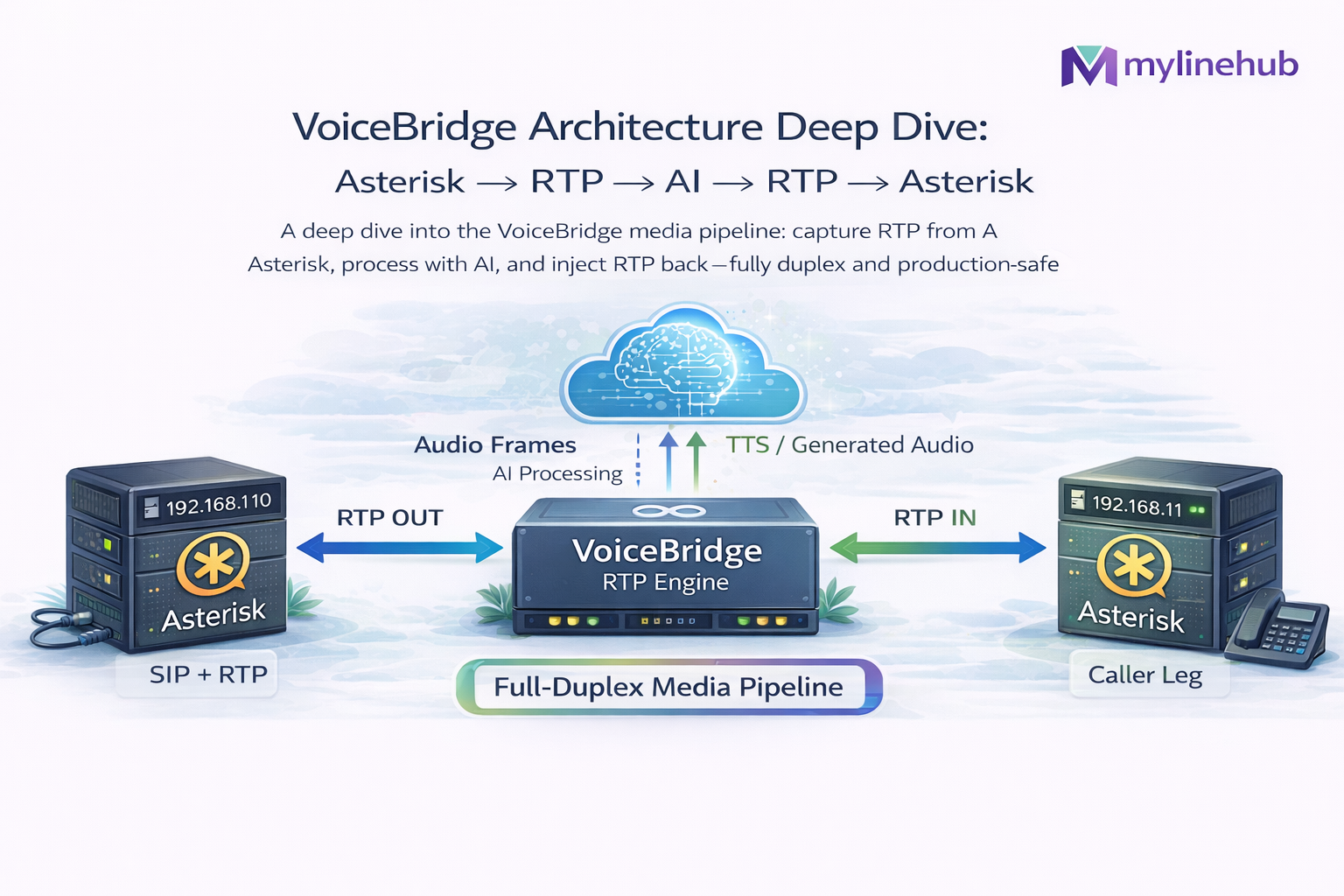
VoiceBridge Architecture Deep Dive: Asterisk → RTP → AI → RTP → Asterisk
This article is a true “under the hood” explanation of how MYLINEHUB VoiceBridge moves audio end-to-end in production: Asterisk/FreePBX captures caller audio, VoiceBridge streams it to an AI bot, then injects AI speech back into the same live call—while preserving real full-duplex behavior (barge-in, talk-over, cut-through) instead of turn-based IVR feel.
Source of truth for this write-up is the actual VoiceBridge code in the repo: GitHub: mylinehub-voicebridge. For the high-level overview, see: MYLINEHUB VoiceBridge Architecture.
The core problem: Asterisk is not an AI media engine
Asterisk can bridge channels, record calls, run IVRs, and expose ARI for control—but it does not natively provide a clean, bidirectional, low-latency “raw audio duplex API” suitable for AI real-time voice. Most demo integrations fail because they:
- Lose one direction of audio under NAT/firewall conditions.
- Send RTP back with wrong timing (timestamp drift, bad pacing, payload mismatch).
- Cannot handle talk-over (barge-in) cleanly because audio injection is not managed as a real-time stream.
- Do not pin and control two independent RTP legs (caller→AI and AI→caller) as first-class streams.
VoiceBridge solves this by building a deliberate media graph in ARI and running a strict RTP engine beside Asterisk.
High-level architecture and the real media pipeline
The pipeline is not “one ExternalMedia channel” and it’s not “just record + playback”. VoiceBridge creates a proper duplex graph:
- Inbound capture leg: caller audio is tapped and sent out to VoiceBridge RTP input.
- Outbound injection leg: VoiceBridge sends RTP back into Asterisk which is bridged to the caller.
The important detail: VoiceBridge treats inbound and outbound as two separate RTP streams with their own ports, timing, endpoints, and health signals. That’s the foundation for stable duplex.
The ARI media graph: two bridges, snoop inbound, two ExternalMedia channels
The graph assembly happens in Java inside: ari/impl/AriBridgeImpl.java and the ARI REST calls are executed by: ari/impl/ExternalMediaManagerImpl.java.
The pattern used is intentionally “dual-bridge duplex”:
- Talk Bridge (mixing): caller channel is bridged with ExternalMedia OUT (the channel that will play AI audio back to the caller).
- Tap Bridge (mixing): caller audio is captured via Snoop Inbound and bridged with ExternalMedia IN (the channel Asterisk uses to send media out).
You can see this explicitly in AriBridgeImpl where it creates two bridges (both “mixing”),
creates one snoop inbound channel, and two ExternalMedia channels—then adds them to the appropriate bridges.
This is the mechanical core of “Asterisk → RTP → AI → RTP → Asterisk”.
Why two ExternalMedia channels instead of one?
In real deployments, trying to do everything through one ExternalMedia channel tends to collapse into one-way audio or timing chaos because:
- Asterisk’s media directionality and RTP peer learning behave differently on each leg.
- Under NAT, the “correct” remote RTP endpoint may only become known after packets flow.
- Inbound capture and outbound injection have different pacing responsibilities.
VoiceBridge uses separate ports (inbound port vs outbound port) and treats them as separate engines. The port allocation is handled via: rtp/RtpPortAllocator.java, and per-call state is attached to the call session object in: session/CallSession.java.
RTP engine fundamentals: packetizer, timestamps, payload types
Sending audio back to Asterisk is not “send UDP bytes”. It must be valid RTP with correct: sequence, timestamp, SSRC, payload type, and pacing (20ms frames, stable clock increments, no bursty scheduling).
VoiceBridge’s RTP framing logic lives in: rtp/RtpPacketizer.java. This is where the system ensures it emits correct RTP packets rather than “best effort UDP”.
Production note: even if your audio bytes are correct (PCMU/PCM16), RTP that is badly timed will sound like: choppy speech, robotic jitter, random dropouts, or “it plays for 2 seconds then stops”. That’s almost always pacing and timestamp discipline.
NAT-safe behavior: symmetric RTP learning (why one-way audio happens)
One of the most common failure modes in real installations is: Asterisk sends RTP to VoiceBridge, but does not accept RTP back (or accepts it intermittently). The root cause is typically NAT and endpoint mismatch: the RTP “peer” you think you should send to is not the endpoint Asterisk ends up using once the call is live.
VoiceBridge addresses this with symmetric RTP endpoint learning: rtp/RtpSymmetricEndpoint.java. Conceptually:
- Listen on the allocated UDP port.
- Observe the actual source IP:port of inbound RTP packets.
- “Lock” the learned remote endpoint for outbound RTP replies (or keep it adaptive if your policy requires).
This single behavior is often the difference between “demo works on LAN” and “production works across NAT and firewalls”.
How VoiceBridge discovers the Asterisk RTP peer for ExternalMedia
With ARI ExternalMedia, Asterisk exposes variables like UNICASTRTP_LOCAL_ADDRESS and
UNICASTRTP_LOCAL_PORT (and related fields) once the channel is live.
VoiceBridge actively fetches this peer information after creating the ExternalMedia channel.
That “who exactly is Asterisk on the RTP side” discovery is part of the ExternalMedia manager layer: ExternalMediaManagerImpl.java and used during graph readiness in: AriBridgeImpl.java.
Why it matters: in complex networks, “the host you called ARI with” is not always the same interface Asterisk binds for RTP. If you send RTP to the wrong interface or wrong port, you get silence (classic one-way audio symptom).
Session management and lifecycle: call state, cleanup, and shutdown safety
A production duplex system must be able to stop safely: close sockets, flush audio queues, finalize recordings, and tear down ARI bridges—even if the call drops unexpectedly.
VoiceBridge tracks everything per call using: session/CallSession.java and orchestrates call lifecycle with: session/CallSessionManager.java.
On StasisEnd the system shuts down:
- Playout scheduling (queue/PlayoutScheduler.java)
- RTP endpoints (dual: inbound + outbound) via
RtpSymmetricEndpoint - DSP resources (echo/VAD helpers) via services like service/DspService.java
- Recording writers (if enabled) such as recording/StereoWavFileWriter.java
This lifecycle discipline is one of the biggest differences between “sample code” and a production system.
AI streaming integration: realtime client, truncation, and cut-through
VoiceBridge is designed to support real-time AI sessions (streaming STT/LLM/TTS) while preserving duplex. The AI side is abstracted behind factories and clients like:
- Realtime AI client implementation: ai/impl/RealtimeAiClientImpl.java
- Truncation/cut-through manager (barge-in control): ai/impl/OpenAiRealtimeTruncateManager.java
“Truncation” here is the crucial real-time behavior: when the caller starts speaking while the bot is talking, the system must stop (or cut down) bot audio output immediately. If you don’t do this, duplex exists technically but the user experience feels broken (the caller must “wait for the bot to finish talking”).
VoiceBridge does not treat barge-in as a UI feature—it treats it as a first-class media control requirement.
DB-driven runtime configuration: why production needs it
In production, you cannot hardcode RTP settings, AI configuration, recording mode, queue behavior, or retry thresholds. VoiceBridge loads these at runtime from the database, with the central entity: models/StasisAppConfig.java.
This model includes fields for:
- ARI connection parameters (host/port/app/user/pass)
- Codec + sample rate expectations
- Recording enablement and storage mode
- Queue watermarks and pacing thresholds
- Resilience settings (retry/circuit-breaker thresholds)
- AI provider selection and realtime parameters
Fetching config per call is done through a repository/service pattern such as: repository/StasisAppConfigRepository.java and service/StasisAppConfigService.java.
What makes the pipeline “production-safe” (not just working once)
“Working” in a lab is easy. Production-safe duplex requires guardrails:
- RTP pacing discipline (no burst writes, stable 20ms cadence).
- NAT endpoint learning (send replies to the real RTP peer).
- Codec correctness (payload type and actual audio format match end-to-end).
- Queue control (prevent bot playout queue from growing until conversation becomes delayed).
- Clean teardown (StasisEnd closes endpoints, stops schedulers, finalizes recordings).
VoiceBridge encodes these behaviors in the actual components we referenced above rather than relying on fragile dialplan tricks.
Deployment notes: ports, firewall, and why you must plan RTP explicitly
Duplex means at least two RTP ports per call (often more if you add monitoring/recording legs). VoiceBridge allocates and uses RTP ports explicitly via: RtpPortAllocator.
At minimum, you must ensure:
- Asterisk can reach VoiceBridge RTP port range (UDP).
- VoiceBridge can send RTP back to Asterisk RTP peer (UDP).
- ARI HTTP/WebSocket access is allowed only from trusted networks (not public internet).
The service-level bind is configured in:
src/main/resources/application.properties
(example: rtp.bind.port).
Cross-link to related VoiceBridge architecture
- MYLINEHUB VoiceBridge Architecture (big picture)
If you want to validate your deployment, read those first—then come back to this deep dive to map symptoms to architecture.
Summary: the “Asterisk → RTP → AI → RTP → Asterisk” contract
VoiceBridge is not “an AI bot inside Asterisk”. It is a dedicated duplex RTP engine that:
- Builds a correct ARI media graph (dual bridges + snoop + dual ExternalMedia).
- Runs strict RTP packetization and timing to inject audio reliably.
- Uses symmetric endpoint learning so NAT does not break duplex audio.
- Manages AI streaming and truncation so talk-over behaves like real conversation.
- Keeps everything configurable through DB-driven runtime settings.
That’s the practical difference between “a demo” and “production full-duplex voice”.
Want to see API-driven CRM + Telecom workflows in action? Try the WhatsApp bot or explore the demos.
Comments (0)
Be the first to comment.