Snoop Channel vs ExternalMedia vs AudioSocket — True Full-Duplex Comparison
A true full-duplex comparison of Snoop Channel, ExternalMedia, and AudioSocket—capabilities, limitations, latency, and production fit for AI voice.
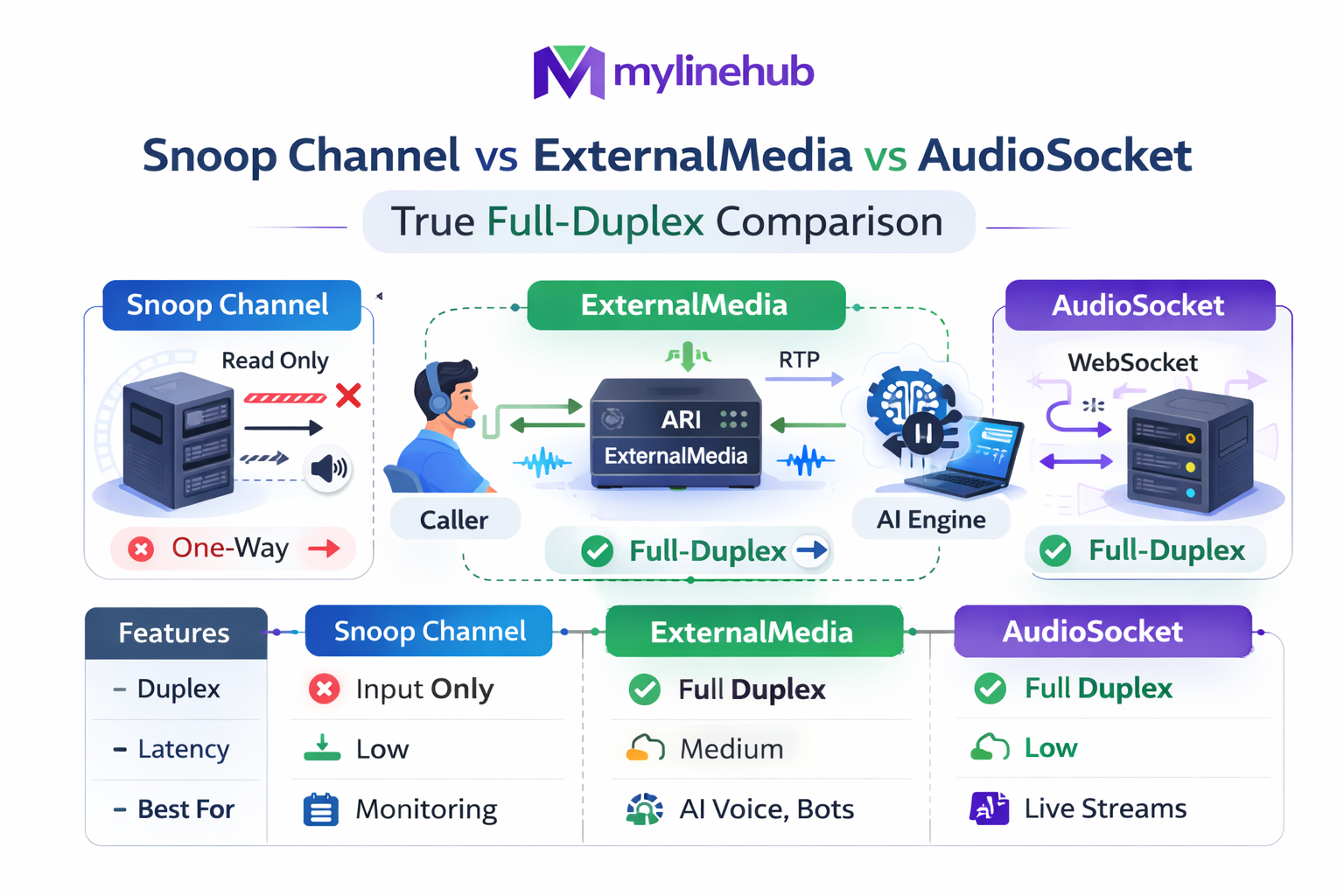
Snoop Channel vs ExternalMedia vs AudioSocket — True Full-Duplex Comparison
If you are building an Asterisk ↔ AI Voice Bot integration, the hardest part is not “getting audio out”. The hardest part is getting stable, real full-duplex media with correct timing, correct directionality, and predictable behavior under real-world RTP/NAT/bridging conditions.
In the Asterisk ecosystem, there are three common “hooks” people talk about: ARI SnoopChannel, ARI ExternalMedia, and AudioSocket. They are not the same category of tool — and most production failures happen when teams pick the wrong one for the job.
This article is written from a VoiceBridge perspective (MYLINEHUB): a production-grade, open-source full-duplex bridge that connects Asterisk/FreePBX to AI bots using ARI + RTP, while keeping your existing PBX stable. See the full system view here: MYLINEHUB VoiceBridge Architecture.
Source code reference (same codebase as the ZIP you shared): mylinehub-voicebridge (GitHub)
Quick Decision: Which One Should You Use?
If your goal is real-time AI calling (two-way conversation, interruptions/barge-in, continuous streaming), then the integration must support two-way audio that is stable and controllable.
| Method | Primary Purpose | Duplex Reality | Operational Risk | Best Use |
|---|---|---|---|---|
| SnoopChannel (ARI) | Spy/whisper on an existing channel (like ChanSpy) | Can “copy” audio, but often becomes messy for true AI duplex pipelines | Medium–High (bridge behavior, mixing, direction pitfalls) | Recording, monitoring, selective tap, side-channel analysis |
| ExternalMedia (ARI) | Create a channel that sends/receives RTP to an external host | True RTP duplex (direction=both supported) | Medium (RTP/NAT/timing must be correct) | AI voice bots, media pipelines, injection back to caller |
| AudioSocket | Stream audio to/from Asterisk via a socket-based channel | Can be duplex, but behavior depends on version/module/protocol details | Medium (module availability, framing, deployment differences) | Controlled environments, specialized gateways, custom media services |
In VoiceBridge, the production-safe path is: ExternalMedia for RTP duplex + strict timing/codec discipline + ARI call control. Then optionally use Snoop when you need a tap/monitor channel for diagnostics or recording.
The Core Problem: “Duplex” Is Not Just Two Streams
Most demos show “audio out” and assume they can “send audio back”. In production, full duplex fails because of:
- RTP direction confusion: which stream is from Asterisk to you vs from you to Asterisk
- Timing drift: incorrect packet pacing creates jitter, gaps, robotic audio, or one-way behavior
- NAT/firewall: RTP ports must be reachable both ways and consistent
- Bridge type behavior: mixing vs holding bridges change how audio is delivered
- Codec mismatch: ulaw/alaw/opus/pcm16 conversions must be intentional
That’s why VoiceBridge positions itself as “the missing piece”: it doesn’t only connect Asterisk to an AI model — it makes the duplex media path deterministic.
Architecture Overview (SVG)
The following diagram shows where each method sits in a real Asterisk ↔ AI pipeline. This is an operational view, not a marketing diagram.
1) SnoopChannel (ARI): What It Really Is
A Snoop channel is conceptually like ChanSpy: it copies audio from an existing channel, and can optionally inject audio back (whisper) depending on direction mode.
In ARI terms, you provide a channelId to spy on, and Asterisk creates a new channel (the snoop channel). That snoop channel can then be recorded, bridged elsewhere, or used as a “tap.”
How VoiceBridge Creates Snoop Channels (Real Code)
In the VoiceBridge codebase (ZIP + GitHub), snoop creation lives in:
src/main/java/com/mylinehub/voicebridge/ari/impl/ExternalMediaManagerImpl.java
- Inbound tap:
createSnoopInbound(...) - Outbound tap:
createSnoopOutbound(...)
The implementation uses the ARI endpoint:
POST /channels/{channelId}/snoop
with a deterministic snoopId naming scheme and spy=in or spy=out.
// File: src/main/java/com/mylinehub/voicebridge/ari/impl/ExternalMediaManagerImpl.java
// Method: createSnoopInbound(...)

String url = "/channels/" + channelId
    + "/snoop?snoopId=" + snoopId
    + "&app=" + stasisName
    + "&spy=in";
// Method: createSnoopOutbound(...)
String url = "/channels/" + channelId
+ "/snoop?snoopId=" + snoopId
+ "&app=" + stasisName
+ "&spy=out";Where Snoop Helps (Good Use Cases)
- Recording a channel mix (building MixMonitor-style pipelines)
- Live monitoring and debugging (tap inbound vs outbound separately)
- Side-channel analytics (voice quality, energy/VAD detection)
Where Snoop Fails for AI Duplex
Snoop is not a clean “AI media pipe.” It’s a spy/whisper tool. If you try to build a full AI bot exclusively around Snoop:
- You must still create a reliable injection path back into the caller’s audio
- Mixing rules and bridge behavior become harder to reason about at scale
- It’s easy to accidentally “double mix” or introduce echo/feedback loops
That’s why in production duplex bot systems: Snoop is a helper, not the foundation.
2) ExternalMedia (ARI): The Correct Foundation for AI Voice
ExternalMedia creates a special channel that sends/receives RTP to an external host you control. This is the cleanest way to build AI voice pipelines because it gives you a direct media leg.
Official Asterisk documentation describes ExternalMedia as a method to interact with an external media server using
/channels/externalMedia, including sending media out and injecting media back into a bridge.
(ExternalMedia was introduced in Asterisk 16.6.)
Reference: External Media and ARI (Asterisk docs)
How VoiceBridge Creates ExternalMedia (Real Code)
In VoiceBridge, ExternalMedia creation also lives in:
src/main/java/com/mylinehub/voicebridge/ari/impl/ExternalMediaManagerImpl.java
The method createExternalMedia(...) builds the ARI request exactly like production needs:
// File: src/main/java/com/mylinehub/voicebridge/ari/impl/ExternalMediaManagerImpl.java
// Method: createExternalMedia(...)

String url = "/channels/externalMedia?app=" + stasisName
  + "&external_host=" + externalHostEncoded
  + "&format=" + format
  + "&encapsulation=rtp"
  + "&transport=udp"
  + "&connection_type=client";

return asteriskClient.post(url)
  .map(JsonNode::get)
  .map(node -> node.get("id").asText());
Key details:
- encapsulation=rtp → you get real RTP packets
- transport=udp → best fit for real-time media
- connection_type=client → Asterisk initiates RTP stream to your service
- format → deterministic codec (ulaw/alaw/etc)
Why ExternalMedia Wins for Full Duplex AI
- It is a clean media leg: you can treat it like “RTP in” + “RTP out” deterministically
- It scales better: each call has an isolated media session to your worker
- Injection back into bridge is first-class: “play audio back to caller” becomes a real media pipeline
This is the production foundation of VoiceBridge, and the reason MYLINEHUB focuses on duplex RTP discipline.
If you want the full RTP injection guide (working, production-safe), see the companion article: Send Audio Back to Caller Using ARI ExternalMedia (Working RTP Guide).
3) AudioSocket: Powerful Idea, But Version/Module Reality Matters
AudioSocket (often referenced as chan_audiosocket) is a socket-based channel approach
intended to stream audio between Asterisk and an external application.
In community discussion, AudioSocket has been described as “easy bidirectional audio,” but also noted as dependent on upstream version availability (historically present in master before becoming part of later releases).
References: Asterisk Community: chan_audiosocket thread | CyCoreSystems AudioSocket (GitHub)
Why Teams Like AudioSocket
- It feels simpler than RTP for some developers (socket framing vs RTP headers)
- It can fit STT engines that already consume framed PCM streams
- It may avoid “RTP timing discipline” for some naive integrations (but you still have timing)
Why AudioSocket Is Not Always a Safe Default
- Module availability differs by Asterisk build/version
- Protocol framing can become a hidden integration tax (especially under load)
- It can still fail on “duplex realism” if your bot pipeline is not designed for interruptions/barge-in
For open-source AI voice systems that must run reliably across many environments, ExternalMedia RTP is usually the more universal and testable foundation.
How VoiceBridge Uses These Approaches Together (Practical Pattern)
In real deployments, you often want:
- ExternalMedia as the main duplex media pipe (AI conversation)
- Snoop channels as taps for monitoring/recording/debugging
- AudioSocket only when you have a strong reason (fixed environment, module present, protocol benefits)
Where This Lives in the Codebase
-
ARI media primitives:
src/main/java/com/mylinehub/voicebridge/ari/impl/ExternalMediaManagerImpl.java -
Bridge orchestration and duplex behavior:
src/main/java/com/mylinehub/voicebridge/ari/impl/AriBridgeImpl.java -
Session state management (call lifecycle, identifiers, correlation):
src/main/java/com/mylinehub/voicebridge/session/CallSession.java
VoiceBridge is intentionally built as a single Java application you can deploy next to your existing PBX, and connect it via ARI credentials + firewall rules — without rewriting your telecom system.
Deep Technical Reality: Why “ExternalMedia + RTP Discipline” Wins
Asterisk’s own ExternalMedia documentation is explicit: you create an ExternalMedia channel and add it to a bridge; media can flow both ways and can be injected back. The lack of negotiation means you must be intentional about codec and timing — which is exactly what production systems require.
Reference: External Media and ARI (Asterisk docs)
Duplex AI voice is not “play an audio file”. It’s:
- Receive RTP continuously
- Convert codec safely (often PCMU ↔ PCM16)
- Run STT streaming
- Generate response in real time
- Run TTS streaming
- Inject RTP back at correct pace and packet timing
- Handle interruptions (barge-in) without corrupting the media path
That is why most “AI Voice for Asterisk” demos die in production — and why VoiceBridge exists as a canonical, production-grade duplex bridge.
Common Mistakes (And the Correct Fix)
Mistake 1: Using Snoop as the main duplex pipe
Snoop is perfect for monitoring/recording. But for AI duplex it becomes fragile because it isn’t designed as a deterministic media leg.
Mistake 2: ExternalMedia without correct RTP injection timing
Many teams send RTP packets too fast/slow or with wrong timestamps — it “works sometimes” and then fails under jitter. Fix: treat RTP timing as a strict clocked pipeline.
Mistake 3: Thinking AudioSocket is universally available
AudioSocket can be great, but you must verify availability and protocol behavior in your target Asterisk build/version.
Conclusion: The “Right Tool” Depends on Your Goal
If your goal is AI calling with real human-like conversation (duplex, interruptions, streaming), the safest production foundation is:
- ExternalMedia (ARI) for the duplex RTP leg
- Strong RTP timing/codec discipline inside your bridge worker
- SnoopChannel for monitoring/recording, not as the primary AI pipe
- AudioSocket only when your environment and module availability are controlled
VoiceBridge implements this approach as open source and deployable as a single Java application — giving you production duplex AI voice without breaking your existing telephony.
Repo: mylinehub-voicebridge (GitHub)
Next recommended reading:
Want to see API-driven CRM + Telecom workflows in action? Try the WhatsApp bot or explore the demos.
Comments (0)
Be the first to comment.