Janus vs LiveKit vs mediasoup — Which WebRTC Server Should You Choose?
Architect-level comparison of Janus, LiveKit, and mediasoup covering SFU behavior, scaling models, PSTN integration, and which server fits AI voice workloads.
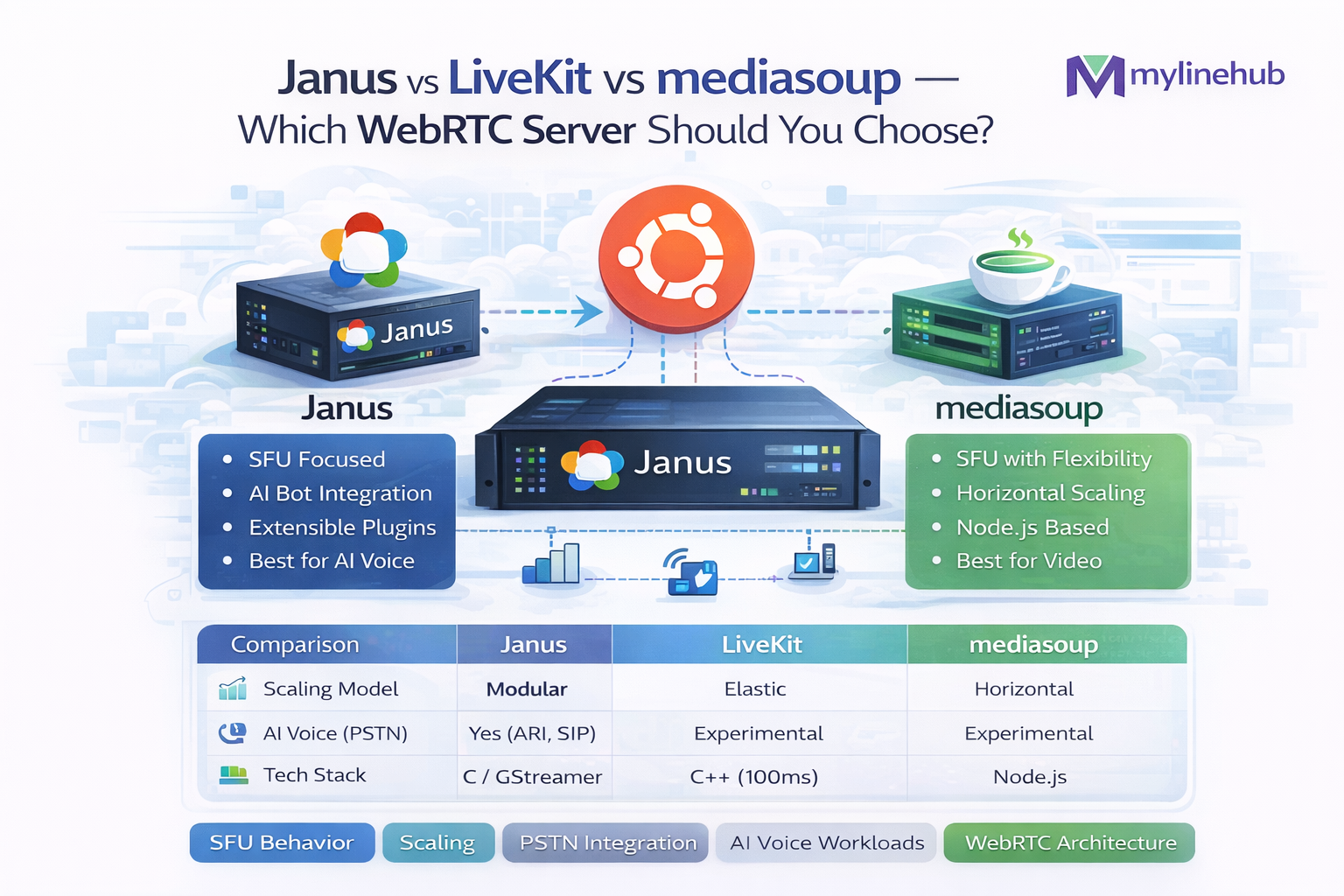
WebRTC • Click-to-Call • AI Voice Bot • SIP (Asterisk/FreeSWITCH)
Best Choice for Your “Click to Call” Button for an AI Bot (Janus vs LiveKit vs mediasoup)
You want a button on your website that says “Talk to our AI”. A visitor clicks it, their browser connects, and they hear a natural voice conversation. Behind the scenes you may also need: SIP (Asterisk / FreeSWITCH), routing rules, call recording, PSTN, queues, transfers, or agent takeover.
This guide compares Janus, LiveKit, and mediasoup specifically for this “public click-to-call + AI bot + SIP backend” use case, and it explains the decision in a way that a non-telecom person can still follow.
Simple takeaway (before we go deep):
- Janus is usually the best fit if your core is SIP/PBX (Asterisk/FreeSWITCH) and you need a WebRTC ⇄ SIP bridge with minimal reinvention.
- LiveKit is usually the best fit if your primary world is WebRTC rooms / SFU and you want a modern real-time stack first, then later add telephony.
- mediasoup is usually the best fit if you want to build a custom SFU-based product and you are okay owning more engineering complexity.
We will still cover edge cases where the “usual” recommendation is not correct.
Contents
1) What you’re actually building (in plain words) 2) Fast decision: pick in 2 minutes 3) WebRTC basics you must know (ICE/STUN/TURN) 4) What Janus / LiveKit / mediasoup really are 5) Architecture patterns for Click-to-Call + AI + SIP 6) Big comparison tables 7) SIP/PBX fit: Asterisk & FreeSWITCH 8) NAT/TURN reality (why demos fail in production) 9) Scaling: 100 → 10,000 users 10) Security & compliance basics 11) Recommended stacks (copy/paste blueprints) 12) Common mistakes and how to avoid them 13) References & further readingQuick links (your site routing format)
- How to Add a Public Website Button That Connects to Your AI Voice Bot
- ICE vs STUN vs TURN — Complete WebRTC Networking Guide
- Janus WebRTC Gateway Installation on Ubuntu (Production Guide)
- How to Connect Janus to Asterisk Extension 7000 (SIP Plugin + ARI)
This page is the “why choose which server” comparison. The links above are “how to implement”.
1) What you’re actually building (in plain words)
Think of your system like a call center… but the agent is a bot. The visitor uses their browser microphone/speaker. That is WebRTC. Your existing telecom system (Asterisk or FreeSWITCH) speaks SIP/RTP. The hard part is: making these two worlds talk reliably on real networks.
The user’s world
Browser (Chrome/Safari/Edge) connects with WebRTC.
- No SIP credentials
- Works behind home Wi-Fi and mobile networks
- Requires ICE + (often) TURN to succeed
Your telecom world
PBX (Asterisk / FreeSWITCH) routes calls, records, queues, etc.
- SIP signaling for call setup
- RTP audio for media
- Often deployed on a server with strict firewall rules
Key concept: your “click-to-call” button is not just a UI feature. It is a real-time networking problem (NAT traversal) and a media routing problem (who sends audio where).
That’s why people can “make it work on localhost” and then fail in production.
2) Fast decision: pick in 2 minutes
Pick Janus if:
- You already have Asterisk/FreeSWITCH or will use one.
- You need a WebRTC ⇄ SIP bridge for a click-to-call button.
- You want a “telecom gateway” style product: plugins, stable, predictable.
- You value clear integration boundaries: browser ↔ gateway ↔ PBX.
Janus is widely used as a WebRTC gateway, and its SIP plugin is explicitly meant to register/call against SIP servers like Asterisk. :contentReference[oaicite:0]{index=0}
Pick LiveKit if:
- Your product is primarily WebRTC (rooms, sessions, “SFU-first”).
- You want a modern developer experience and built-in real-time features.
- You expect high concurrency and want a scaling story built around SFU.
LiveKit is SFU-based and documents self-hosted SFU architectures. :contentReference[oaicite:1]{index=1}
Pick mediasoup if:
- You want to build a custom media server product and own the internals.
- You have strong WebRTC engineering and can invest in long-term maintenance.
- You need maximum flexibility, even if it costs engineering time.
mediasoup is often used as an SFU building block (library-style), not a turnkey product.
When NOT to pick Janus / LiveKit / mediasoup
- If your goal is only PSTN calling without web browsers: you may only need SIP trunks + PBX + a bot bridge (no WebRTC server).
- If you need “Zoom-like meetings” with huge feature surface: you might use LiveKit + a separate telephony bridge rather than Janus.
- If your team is small and time is limited: avoid building SFU internals from scratch (mediasoup-heavy approach).
A realistic rule for business teams:
If you want your click-to-call button to land inside your existing SIP call flows (IVR, queue, agent takeover, recording, compliance), Janus is usually the shortest path.
3) WebRTC basics you must know (ICE / STUN / TURN)
If you only remember one thing: most users are behind NAT. NAT is the “router magic” that hides many devices behind one public IP. WebRTC must “punch through” that reality using ICE, often with STUN and TURN.
Layman explanation (no jargon)
- STUN is like asking a public “mirror” website: “What is my public address?”
- TURN is like renting a public “relay phone line” when direct connection fails.
- ICE is the negotiation process that tries all possible paths and picks one that works.
If your audience includes mobile users, corporate Wi-Fi, or strict firewalls, TURN becomes “not optional” for reliability.
Technical explanation (still readable)
- ICE gathers candidates: host (local), srflx (STUN), relay (TURN).
- The peers test connectivity pairs and select a working route.
- Without TURN, symmetric NAT and strict enterprise networks commonly break calls.
Full deep-dive: ICE vs STUN vs TURN
Reality check: a “WebRTC server comparison” is meaningless if you ignore TURN. Many teams blame the media server when the real problem is that the network requires a relay.
In production, you usually run coturn (TURN server) alongside your WebRTC gateway/media stack.
4) What Janus / LiveKit / mediasoup really are
Janus (WebRTC Gateway)
Janus is a gateway with plugins. In “click-to-call + SIP”, you typically use the SIP plugin to register to a SIP server (Asterisk/FreeSWITCH) and bridge a browser WebRTC session into a SIP call. :contentReference[oaicite:2]{index=2}
- Feels like a “router” between protocols: WebRTC ↔ SIP, WebRTC ↔ streaming, etc.
- Often simpler for PBX integration than SFU-centric stacks.
- Great when your core call logic lives in SIP/PBX.
LiveKit (SFU-first real-time platform)
LiveKit is an SFU-based real-time platform. SFU means it forwards media streams efficiently without mixing/decoding in the same way as an MCU. LiveKit documents SFU architectures (single-home and mesh). :contentReference[oaicite:3]{index=3}
- Excellent for “rooms”, multi-party sessions, and built-in real-time features.
- Telephony/PBX integration typically requires additional bridging logic.
- When WebRTC is the product, LiveKit is a strong default.
mediasoup (SFU building block)
mediasoup is commonly used as a lower-level SFU component that you build around. You get flexibility, but you also own a lot of plumbing: signaling, auth, scaling, operational tooling, and telephony bridging.
- Great when you need a customized media pipeline and you can invest engineering.
- Not the fastest path if you mainly need “WebRTC to SIP gateway”.
Where Asterisk/FreeSWITCH fit
Asterisk/FreeSWITCH are SIP/PBX systems. They are excellent at: IVR, queues, ring groups, transfers, recording, trunking, compliance rules, and all the “telecom business logic”.
Your WebRTC server choice is mostly about: “How do browsers enter this SIP world reliably and safely?”
5) Architecture patterns for Click-to-Call + AI + SIP
There are a few “repeatable” patterns that work in production. Below are the most common ones. Each has tradeoffs.
Pattern A is simplest for PBX teams: Janus is the “WebRTC door” into SIP.
Pattern B/C shine when your product is fundamentally a WebRTC application (sessions, rooms, many participants), and SIP is “just one kind of endpoint” you integrate later.
6) Big comparison tables
6.1 Quick scoring table for Click-to-Call + SIP
| Topic | Janus | LiveKit | mediasoup |
|---|---|---|---|
| Fastest path to WebRTC → SIP (Asterisk/FreeSWITCH) | Excellent (gateway + SIP plugin) | Medium (needs bridging layer) | Medium (you build bridging) |
| Best for “rooms / SFU-first product” | Medium | Excellent (SFU platform) | Excellent (SFU core) |
| Operational simplicity for small teams | High (clear gateway boundary) | High (platform approach) | Lower (more custom ops) |
| Customization flexibility | Medium (plugin-based) | Medium (platform conventions) | Very high (build what you want) |
| Time-to-production for “AI click-to-call into PBX” | Fast | Medium | Slowest (if building from scratch) |
6.2 “Who owns what?” (A practical responsibility table)
| Responsibility | Janus-based approach | LiveKit-based approach | mediasoup-based approach |
|---|---|---|---|
| WebRTC session handling | Janus handles gatewaying | LiveKit handles SFU sessions | You build signaling + use mediasoup core |
| SIP interop (register/call/DTMF) | Typically built-in via SIP plugin | Usually needs additional service | You implement / integrate a SIP bridge |
| Call routing (IVR/queues/transfers) | Your PBX (Asterisk/FreeSWITCH) or your control layer | ||
| ICE/TURN policy | You must design it (TURN is critical for reliability) | ||
| Observability (metrics, traces) | Gateway metrics + PBX metrics | Platform telemetry + PBX metrics | You build most of it |
| Scaling strategy | Scale gateways horizontally + PBX media scaling | SFU scaling model + telephony bridge scaling | Custom scaling design |
Important: All three options still require you to handle: TURN capacity, firewall rules, and real-world NAT behavior. This is not optional engineering.
7) SIP/PBX fit: Asterisk & FreeSWITCH
If your company already runs Asterisk/FreeSWITCH (or plans to), then your website “click-to-call” should ideally be treated like: another kind of endpoint that enters your existing routing.
What the PBX is great at
- Inbound routing logic (DIDs, departments, time conditions)
- IVR menus
- Queues & ring groups
- Recording and compliance prompts
- Agent takeover and transfers
- PSTN integration via SIP trunks / gateways
For AI voice, PBX gives you business-safe call flows. The WebRTC layer is just the “browser entry”.
Why a gateway (Janus) usually fits PBX teams
- You can make the browser appear as a SIP endpoint (via Janus SIP plugin), so the PBX keeps its mental model: “it’s just another endpoint/call leg.” :contentReference[oaicite:4]{index=4}
- You keep WebRTC-specific complexity (DTLS/SRTP, ICE candidates, TURN) outside the PBX.
- You can scale the gateway separately from the PBX media servers.
Practical recommendation:
If you want the AI call to be recorded, queued, transferred, or supervised like normal calls, keep the PBX in charge of routing, and use a WebRTC gateway to safely bring browsers into SIP.
8) NAT/TURN reality: why demos fail in production
The “hardest bug” in WebRTC is not code. It’s: some users can call, others cannot. Usually that means TURN/ICE was not designed properly.
Layman examples
- Home Wi-Fi: usually works with STUN (but not always).
- Corporate Wi-Fi: often blocks UDP; TURN/TCP or TURN/TLS is needed.
- Mobile networks: NAT is aggressive; TURN becomes important.
- International users: latency spikes if TURN is too far away.
If your business depends on “every lead can call”, TURN is part of your product.
Technical truths
- ICE tries direct paths first, but many networks require relay.
- TURN means your server relays media — plan bandwidth cost.
- Deploy TURN close to users (regions) if you need low latency.
- Use safe firewall rules and monitor TURN allocations.
Read: ICE vs STUN vs TURN
8.1 What to plan (table)
| Item | What you should decide | Common mistake |
|---|---|---|
| TURN transport | UDP + TCP + TLS (443) for best reach | Only UDP → fails in strict corporate networks |
| TURN regions | At least 2 regions if you have distributed users | Single region → high latency / unstable calls |
| Credentials | Time-limited credentials (not static) | Hard-coded TURN username/password leaked in frontend |
| Firewall | Explicitly open needed ports only | “Open everything” or “block everything” |
| Monitoring | Track allocations, bandwidth, failures | No visibility → random user failures become mysteries |
If someone tells you “TURN is optional”, ask:
“Does it work from corporate Wi-Fi, behind symmetric NAT, and on mobile networks reliably?” If not, it’s not production-ready.
9) Scaling: 100 → 10,000 users
Scaling “click-to-call” isn’t only CPU. It’s: encryption cost, TURN bandwidth, port ranges, and how you distribute users across gateways.
Scaling with Janus (gateway model)
- Scale Janus horizontally behind a load balancer.
- Scale TURN horizontally and regionally.
- PBX scaling depends on your call concurrency and architecture.
- For “AI bot calls”: plan where the bot media processing runs (close to PBX / close to Janus / close to TURN).
A gateway model is often easier to reason about when SIP is central.
Scaling with LiveKit/mediasoup (SFU model)
- SFUs are designed for forwarding streams efficiently.
- Good for multi-party sessions or many listeners.
- Telephony bridging can become the “special edge” you must scale carefully.
- When the bot is the “other participant”, SFU benefits can be smaller unless you have multi-party or fan-out use cases.
LiveKit documents SFU scaling architectures. :contentReference[oaicite:5]{index=5}
9.1 Scaling questions checklist
| Question | Why it matters | What to measure |
|---|---|---|
| How many concurrent “click-to-call” sessions? | Defines gateway/SFU capacity planning | Peak concurrent sessions (p95/p99) |
| How many users require TURN? | TURN is bandwidth heavy | % of sessions that end up relay |
| Do you need agent takeover? | PBX routing & mixing change | Transfer success rate + audio quality |
| Do you need recording + compliance prompts? | PBX features often required | Recording integrity + storage cost |
| Where does AI audio processing run? | Latency and stability | Round-trip audio latency |
10) Security & compliance basics
“Click-to-call” is public-facing. Assume attackers will test it. Security is not just HTTPS — it’s also: TURN abuse, SIP abuse, and resource exhaustion.
Minimum safe practices
- Use time-limited TURN credentials (dynamic auth).
- Rate limit session creation per IP / per token.
- Put WebRTC gateway behind a WAF where appropriate.
- Keep SIP servers (Asterisk/FreeSWITCH) not directly exposed to the public internet.
- Separate “public edge” (Janus/TURN) from “PBX core” with firewall rules.
Practical compliance notes (non-legal advice)
- Disclose recording if required by your region.
- Store recordings securely with access logs.
- Mask or tokenize sensitive data if AI sees transcripts.
- Keep audit logs for who accessed what.
The most common security mistake:
Putting static TURN credentials in frontend JavaScript. Attackers can harvest them and use your TURN relay bandwidth for their own traffic.
11) Recommended stacks (copy/paste blueprints)
Stack A: Best default for SIP-first businesses (Asterisk/FreeSWITCH + AI bot)
- Edge: NGINX (HTTPS) + WAF rules
- WebRTC Gateway: Janus
- TURN: coturn (UDP + TCP + TLS 443)
- PBX: Asterisk or FreeSWITCH (routing, recording, queues)
- AI bot bridge: your bot service (or a VoiceBridge-style RTP/ARI bridge if bot is on SIP side)
- Observability: metrics + logs for TURN allocations, Janus sessions, PBX calls
Implementation paths: install Janus → connect Janus to Asterisk → deploy TURN correctly
Stack B: Best for WebRTC-first products (rooms, sessions, many participants)
- Core: LiveKit SFU (sessions)
- TURN: coturn (or managed TURN)
- Telephony bridge: a separate service that connects to SIP/PBX when needed
- PBX: optional or used for PSTN + compliance flows
LiveKit documents SFU architecture options for self-hosting. :contentReference[oaicite:6]{index=6}
Stack C: Custom product, maximum control
- Core: mediasoup (SFU building block)
- Your control plane: auth, signaling, routing, scaling, session lifecycle
- TURN: coturn
- SIP bridge: you implement or integrate a gateway
- PBX: optional or central depending on your business features
12) Common mistakes and how to avoid them
Mistake #1: No TURN (or TURN only UDP)
Works for the developer at home, fails for customers. Fix: deploy TURN with UDP + TCP + TLS 443, and use time-limited credentials.
Mistake #2: Putting PBX on the public internet
PBX exposure leads to scanning and brute force. Fix: keep PBX private; expose only gateway/TURN edge with strict rules.
Mistake #3: Mixing “WebRTC media server” and “PBX routing” responsibilities
Teams try to recreate IVR/queues inside WebRTC server code. Fix: keep PBX for telecom logic; keep gateway/SFU for browser connectivity.
Mistake #4: No observability
Without metrics, you can’t tell if failures are TURN, ICE, gateway, or SIP. Fix: track allocation failures, ICE selected candidate type (host/srflx/relay), call setup timing.
A simple debug rule:
If calls fail for “some networks”, check ICE candidate type. If many sessions are stuck without relay candidates, your TURN policy is the problem, not your media server.
13) References & further reading
Below are sources that explain core properties used in this comparison:
- LiveKit SFU self-hosting overview (architecture options): docs.livekit.io/transport/self-hosting :contentReference[oaicite:7]{index=7}
- Janus WebRTC gateway performance paper (notes SIP plugin capability statement): dl.acm.org/doi/pdf/10.1145/2749215.2749223 :contentReference[oaicite:8]{index=8}
- MYLINEHUB implementation guides (site format links):
If your end goal is a stable “Talk to AI” experience with real telecom features (routing, recording, transfers), start with a PBX-first architecture and use a WebRTC gateway (Janus) plus TURN. If your end goal is a WebRTC-first product (rooms and sessions), start with an SFU platform (LiveKit) and add telephony bridging later.
Want to see API-driven CRM + Telecom workflows in action? Try the WhatsApp bot or explore the demos.
Comments (0)
Be the first to comment.