Why Asterisk Alone Struggles Beyond 200 Concurrent Calls (And How to Design a Scalable Architecture)
Understand real scalability limits of standalone Asterisk and FreePBX, why databases and SIP handling become bottlenecks, and how modern telecom architectures handle hundreds of concurrent calls reliably.
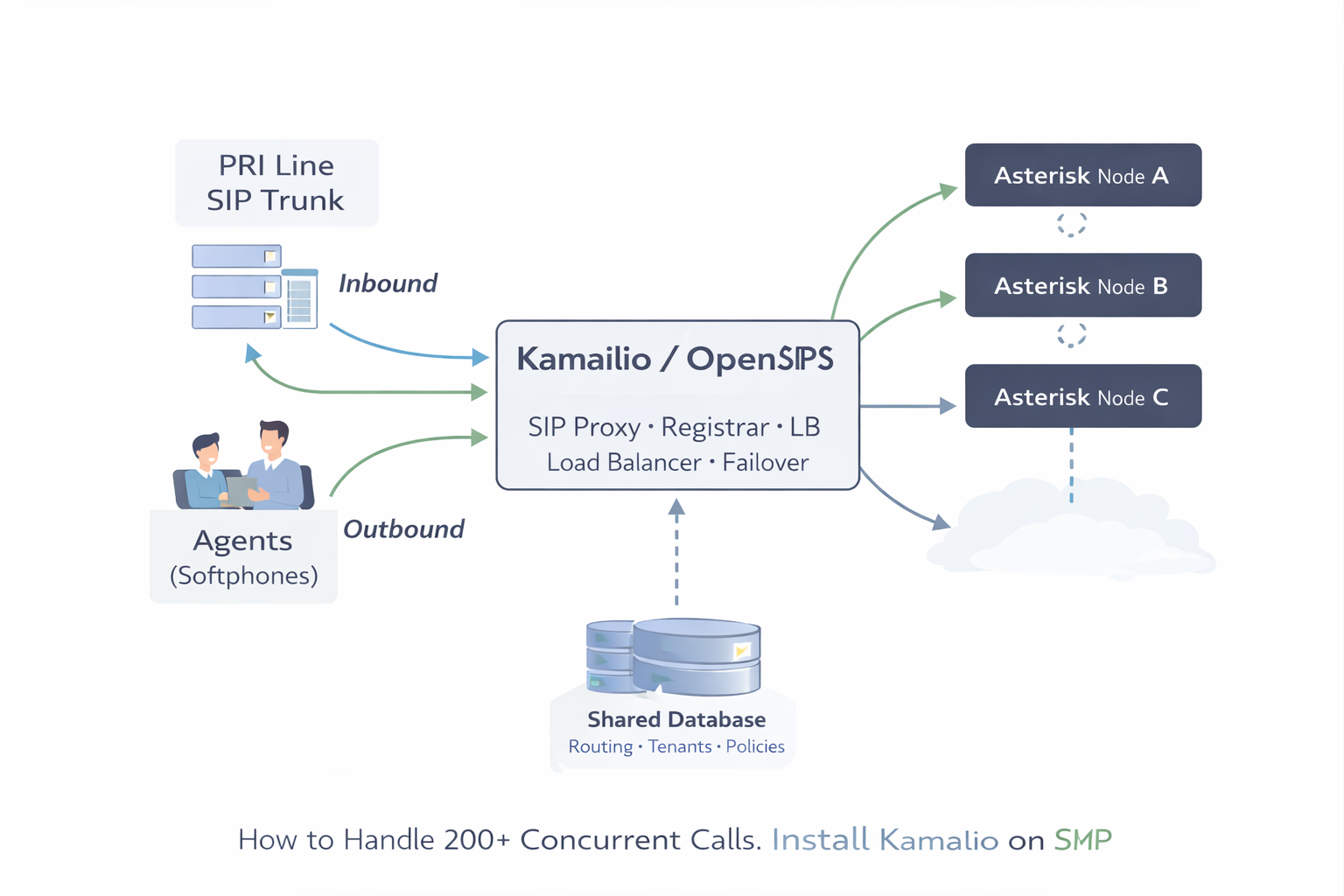
When teams say “Asterisk can’t handle 200+ concurrent calls”, most of the time the real issue is not Asterisk itself — it is the architecture around it: NAT/RTP exposure, SIP transaction load, registration churn, single-server bottlenecks, and weak separation of signaling vs media vs application logic.
This guide explains a production-grade approach for 200–800+ concurrent calls using Asterisk as media/app servers and a SIP proxy layer (Kamailio or OpenSIPS) in front. You’ll learn why FreePBX is not the right choice for this scale, how a shared database fits, and how inbound calls flow so Asterisk selects the correct dialplan and tenant.
Date: 2026-02-17
Problem People Search: “FreePBX can’t scale beyond 200 concurrent calls”
FreePBX is great for small-to-medium PBX needs, but for high concurrency and multi-node scaling it becomes a constraint because it assumes a single PBX brain with its own internal database-driven management model. You can make it bigger vertically, but scaling horizontally (multiple Asterisk nodes with clean distribution) becomes messy and fragile.
Common pain points that appear before/around 200+ concurrent calls:
- Registration load spikes (many agents, softphones, reconnect storms)
- Single PBX signaling bottleneck (INVITE flood, OPTIONS keepalives, retransmits)
- NAT + RTP issues (one-way audio, random no-audio, RTP port exhaustion)
- Dialplan routing becomes “server-specific” instead of central policy
- No clean load balancing without breaking inbound DID logic or agent registrations
- Hard to isolate failure domains (one overloaded PBX impacts everything)
The fix is almost always architectural: put a SIP proxy layer in front, keep Asterisk nodes stateless(ish), centralize routing policy, and let Asterisk focus on what it’s excellent at: media, IVR, queues, recording, conferencing, ARI apps.
Solution Overview: SIP Proxy + Multiple Asterisk Nodes + Shared DB
The proven pattern for high concurrency is:
- Kamailio or OpenSIPS = SIP proxy / registrar / load balancer / routing policy
- Multiple Asterisk nodes = media + application workers (queues/IVR/ARI/recording)
- Shared database = users/tenants/routing tables/campaign policy (not PBX GUI state)
This gives you horizontal scaling: if you need 800 concurrent calls, you don’t “pray one PBX survives” — you add Asterisk nodes, and the proxy distributes load.
Architecture Diagram (Signaling vs Media Separation)
Key idea: keep SIP transactions and registrations on the proxy layer, and keep Asterisk nodes focused on media + applications. That’s how concurrency scales cleanly.
What Exactly Breaks First at High Concurrency?
1) SIP signaling becomes the bottleneck (not RTP)
200+ concurrent calls often means thousands of SIP messages per minute (INVITE, 200 OK, ACK, BYE, OPTIONS, retransmits during packet loss). Asterisk can do a lot, but if you mix: registrations + NAT traversal + ITSP inbound + queue logic + recordings on one box, it becomes a single overloaded brain.
2) NAT and RTP ports cause “random” call failures
One-way audio and “call connects but silence” are usually RTP routing, firewall, conntrack, or port exhaustion. Proxies help by stabilizing signaling; you still must tune RTP ranges and OS network limits (covered later).
3) Uncontrolled failover causes outages
Without a proxy, “PBX down” = everything down. With a proxy: inbound can be re-routed to a healthy node using dispatcher/load-balancer logic.
How Inbound Calls Flow at Scale (Example: 800 Concurrent Calls)
Let’s assume:
- You have 3 Asterisk nodes (A/B/C)
- One or two SIP proxy nodes (active/standby or active/active)
- Inbound traffic from ITSP hits the proxy first
- Proxy chooses target Asterisk node based on DID routing policy + node health
Inbound call flow (conceptual)
Important: the proxy can route based on DID, tenant, time-of-day, campaign, or capacity. Asterisk does not need to “know all routing globally” — it handles the call it receives.
How Asterisk Knows “Which Customer / Dialplan” to Run
In multi-tenant deployments, you must reliably answer: when the call hits Asterisk, how does it select the right context?
There are three standard (and clean) approaches:
Approach A (Recommended): Proxy sets a header, Asterisk routes by header
Proxy adds a tenant header like X-Tenant: acme or X-Route: sales-inbound.
Asterisk reads it and jumps into the correct context.
; extensions.conf (Asterisk)
[from-proxy]
exten => _X.,1,NoOp(Inbound from proxy)
 same => n,Set(TENANT=${SIP_HEADER(X-Tenant)})
 same => n,Set(ROUTE=${SIP_HEADER(X-Route)})

 ; Safety defaults
 same => n,ExecIf($["${TENANT}"=""]?Set(TENANT=default))
 same => n,ExecIf($["${ROUTE}"=""]?Set(ROUTE=inbound))

 ; Jump to tenant-specific context
 same => n,Goto(${TENANT}-${ROUTE},${EXTEN},1)
This scales extremely well because tenant routing policy stays in the proxy/database.
Approach B: Proxy routes to different Asterisk IP:port per tenant
Simple, but becomes harder when tenants grow or you need dynamic distribution.
Approach C: Asterisk queries DB (ODBC/HTTP) on every call to decide tenant
Works, but pushes global policy back into Asterisk and increases DB dependency per call. Prefer header-based routing for speed and clarity.
Shared Database: What It Stores (and What It Should NOT Store)
Your shared DB should store business routing policy, not “PBX UI state”. Keep it stable and predictable.
Minimal tables you typically need
- tenants: tenant_id, name, status
- dids: did_number, tenant_id, route_key
- routes: route_key, target_type (queue/ivr/app), target_value
- nodes: node_id, ip, status, max_calls, region
- node_metrics: node_id, active_calls, cpu, last_seen
The proxy reads this to decide where to send calls. Asterisk only needs enough information to execute the route it receives.
DB relationship diagram (conceptual)
Why You Need Kamailio or OpenSIPS (and What Each One Does)
Both Kamailio and OpenSIPS solve the same class of problems:
- Registrar: handle REGISTER at scale without overloading Asterisk
- Location service: map user → contact (where the phone is currently reachable)
- Load balancing: distribute INVITEs across Asterisk nodes
- NAT help: keep NAT bindings alive, reduce random “not reachable” issues
- Security: rate limiting, anti-flood, auth control
- Failover: reroute if a node is down or full
Choose one. Don’t run both unless you have a very specific reason.
Mapping Proxy Concepts to Asterisk (So It’s Not Confusing)
People often get stuck because they don’t know how the pieces connect. Here is the clean mapping:
- Proxy “users / subscribers” = SIP accounts that REGISTER (agents, devices)
- Proxy “location table” = where each user is currently reachable
- Proxy “dispatcher” = list of backend Asterisk nodes + health
- Proxy “route logic” = decides which Asterisk gets the call
- Asterisk endpoints = trunks between proxy ↔ Asterisk (not every agent)
- Asterisk dialplan = apps: IVR/queues/recording/ARI logic
The best pattern is: Agents register to proxy, not directly to Asterisk. Asterisk sees the proxy as the “SIP neighbor”.
Kamailio: Minimal Install + Config That Solves 200+ Call Scaling
This is not a full Kamailio book — it’s the practical baseline people need: registrar + dispatcher + header injection for tenant routing.
Install Kamailio (Ubuntu/Debian)
# Ubuntu/Debian (typical)
sudo apt update
sudo apt install -y kamailio kamailio-mysql-modules kamailio-extra-modules

# Enable and start
sudo systemctl enable kamailio
sudo systemctl start kamailio
Define backend Asterisk nodes (dispatcher)
Kamailio uses a dispatcher list. Example: Node A/B/C.
# /etc/kamailio/dispatcher.list
1 sip:10.10.10.21:5060 0
1 sip:10.10.10.22:5060 0
1 sip:10.10.10.23:5060 0
Inject tenant headers + dispatch inbound trunk calls
In production, you compute tenant/route by DID (DB lookup or map). Here’s the concept: set headers, then send to selected node.
# kamailio.cfg (conceptual snippets)

# If inbound from ITSP:
# - Identify DID
# - Lookup tenant/route policy
# - Add headers
# - dispatch to Asterisk pool

append_hf("X-Tenant: acme\r\n");
append_hf("X-Route: inbound\r\n");

# Then pick an Asterisk node from group 1
# ds_select_dst(group, algorithm)
# algorithm 4/9 etc depending on your policy
ds_select_dst("1", "4");
t_relay();
Result: Asterisk receives INVITE with X-Tenant/X-Route and runs the correct context.
OpenSIPS: Minimal Install + Config That Solves 200+ Call Scaling
OpenSIPS provides similar modules: registrar, usrloc, dispatcher, load balancing. The goal is identical: keep REGISTER load off Asterisk, distribute INVITEs, enable failover.
Install OpenSIPS (Ubuntu/Debian)
# Ubuntu/Debian (package availability varies by distro)
sudo apt update
sudo apt install -y opensips opensips-mysql-module

sudo systemctl enable opensips
sudo systemctl start opensips
Dispatcher (Asterisk pool)
OpenSIPS dispatcher can be DB-driven or file-driven depending on your build. Conceptually, you keep a list of Asterisk nodes and health-check them.
# Conceptual dispatcher entries
sip:10.10.10.21:5060
sip:10.10.10.22:5060
sip:10.10.10.23:5060
Header injection for tenant routing
# opensips.cfg (conceptual)
append_hf("X-Tenant: acme\r\n");
append_hf("X-Route: inbound\r\n");

# Select destination from dispatcher set and relay
# (Exact function names depend on your OpenSIPS version/modules)
route_to_dispatcher();
t_relay();
Asterisk Side: Trunk From Proxy + Context Routing
Asterisk should treat the proxy as a trunk/peer. You do not want thousands of agent registrations on Asterisk when the proxy exists for that purpose.
PJSIP trunk (proxy → asterisk)
; pjsip.conf (simplified concept)
[proxy-trunk]
type=endpoint
transport=transport-udp
context=from-proxy
disallow=all
allow=ulaw,alaw
aors=proxy-trunk

[proxy-trunk]
type=aor
contact=sip:10.10.10.10:5060  ; proxy IP
Dialplan route by header
; extensions.conf
[from-proxy]
exten => _X.,1,NoOp(Inbound)
 same => n,Set(TENANT=${SIP_HEADER(X-Tenant)})
 same => n,Set(ROUTE=${SIP_HEADER(X-Route)})
 same => n,ExecIf($["${TENANT}"=""]?Set(TENANT=default))
 same => n,ExecIf($["${ROUTE}"=""]?Set(ROUTE=inbound))
 same => n,Goto(${TENANT}-${ROUTE},${EXTEN},1)

; Example tenant context
[acme-inbound]
exten => _X.,1,NoOp(ACME inbound for ${EXTEN})
 same => n,GotoIf($["${EXTEN}"="1800123456"]?sales,1:main,1)

exten => sales,1,Queue(acme-sales,tT)
 same => n,Hangup()

exten => main,1,Gosub(acme-ivr,s,1)
 same => n,Hangup()
OS-Level Limits That Cause “200 Calls and Everything Breaks”
Many “Asterisk scaling” failures are Linux limits. Minimum things to validate:
- ulimit / open files (SIP sockets, RTP, logs)
- conntrack limits (NAT state tables, especially on firewalls)
- RTP port range sizing (ensure enough ports for peak concurrency)
- NIC + IRQ tuning (on busy media servers)
If you haven’t already, also read: Ports Required for FreePBX + Asterisk: Complete Firewall Guide and Increase Linux ulimit (Fix Too Many Open Files).
Common “It Still Fails” Problems (What People Actually Google)
“Calls connect but there’s no audio”
- RTP ports not open end-to-end
- NAT mismatch (external media address wrong)
- Firewall/SIP ALG rewriting packets
See: Protocols Used for Call Legs (SIP/SDP/RTP/SRTP/TLS/WebRTC) and Wireshark Live Monitoring for SIP & RTP.
“Random 408 / timeout under load”
- SIP retransmits explode when the system is near CPU/IO limit
- Proxy missing rate-limits or health checks
- Kernel conntrack/queue overflow
“My agents keep unregistering”
- NAT keepalive missing
- Wrong timers (registration too short)
- Proxy not persisting usrloc correctly
“How does Asterisk know which tenant to use?”
- Use proxy header injection (X-Tenant/X-Route)
- Route into
${TENANT}-${ROUTE}contexts - Keep tenant mapping policy in shared DB + proxy
Capacity Planning: How to Think About “800 Concurrent Calls”
A realistic scaling plan is:
- Proxy layer: focus on SIP TPS (transactions per second) and registrations
- Asterisk nodes: focus on codec (CPU), recording (disk), and feature load (queues/IVR/ARI)
- Network: ensure RTP ports and throughput are sized for peak
Typical approach:
- Start with 2–3 Asterisk nodes
- Measure active calls, CPU, disk IO, RTP loss
- Add nodes horizontally instead of scaling one PBX forever
Key Takeaway
Scaling beyond 200+ concurrent calls is rarely about “Asterisk limitation”. It’s about building the correct layers: Kamailio/OpenSIPS for SIP scale + multiple Asterisk nodes for media/apps + shared DB for routing policy.
If you implement header-based tenant routing and dispatcher-based node selection, you can grow from 200 to 800+ calls without rewriting your entire system.
Want to see API-driven CRM + Telecom workflows in action? Try the WhatsApp bot or explore the demos.
Comments (0)
Be the first to comment.