Build a Scalable VoIP Core with OpenSIPS and Asterisk (Installation, Routing Logic, and Shared DB Explained)
Learn how OpenSIPS enables distributed SIP routing, shared user databases, and large-scale inbound call handling when combined with Asterisk media servers.
Last updated: 2026-02-17
If your VoIP setup starts breaking when you cross 150–200 concurrent calls, the reason is usually not “Asterisk is bad”. The real issue is that a single Asterisk box (or a single FreePBX box) is doing too many jobs at once: registrations, NAT traversal, routing, authentication, and call processing (IVR/queues/recording) — all under heavy SIP signaling pressure.
This guide solves the scaling problem using a proven architecture: OpenSIPS as the SIP edge (registrar + proxy + load balancer), and Asterisk as the media/call engine (queues, IVR, dialplan, recordings).
You will learn how to install OpenSIPS on Ubuntu or Debian, create a basic but production-safe configuration, and connect it to one or more Asterisk servers. We will also cover how calls route when you have 800 concurrent calls, how OpenSIPS and Asterisk can share database logic, and how Asterisk “knows” which dialplan/context to use.
If you are still fighting NAT / RTP / one-way audio problems, read these first: Router Configuration for SIP/VoIP: NAT, Port Forwarding, and SIP ALG, Protocols Used for Your Call Legs Using Asterisk, and Wireshark Live Monitoring for SIP & RTP.
Problem: “Asterisk works fine until 200 calls… then registrations fail, calls drop, or CPU spikes”
The most common scaling failures look like this:
- SIP REGISTER storms (phones re-register together, especially after ISP hiccups)
- Authentication pressure (lots of 401/407 challenges + DB lookups)
- NAT keepalive spam (OPTIONS/CRLF keepalives across hundreds or thousands of endpoints)
- Single Asterisk doing “edge proxy” work while also running queues/recordings/IVR
- One-way audio from incorrect NAT/RTP exposure (often confused as “capacity issue”)
OpenSIPS fixes this by taking over the “SIP edge” role. Asterisk becomes what it’s best at: call applications (IVR, queueing, recording, AMD, etc.).
What OpenSIPS Solves (In One Line)
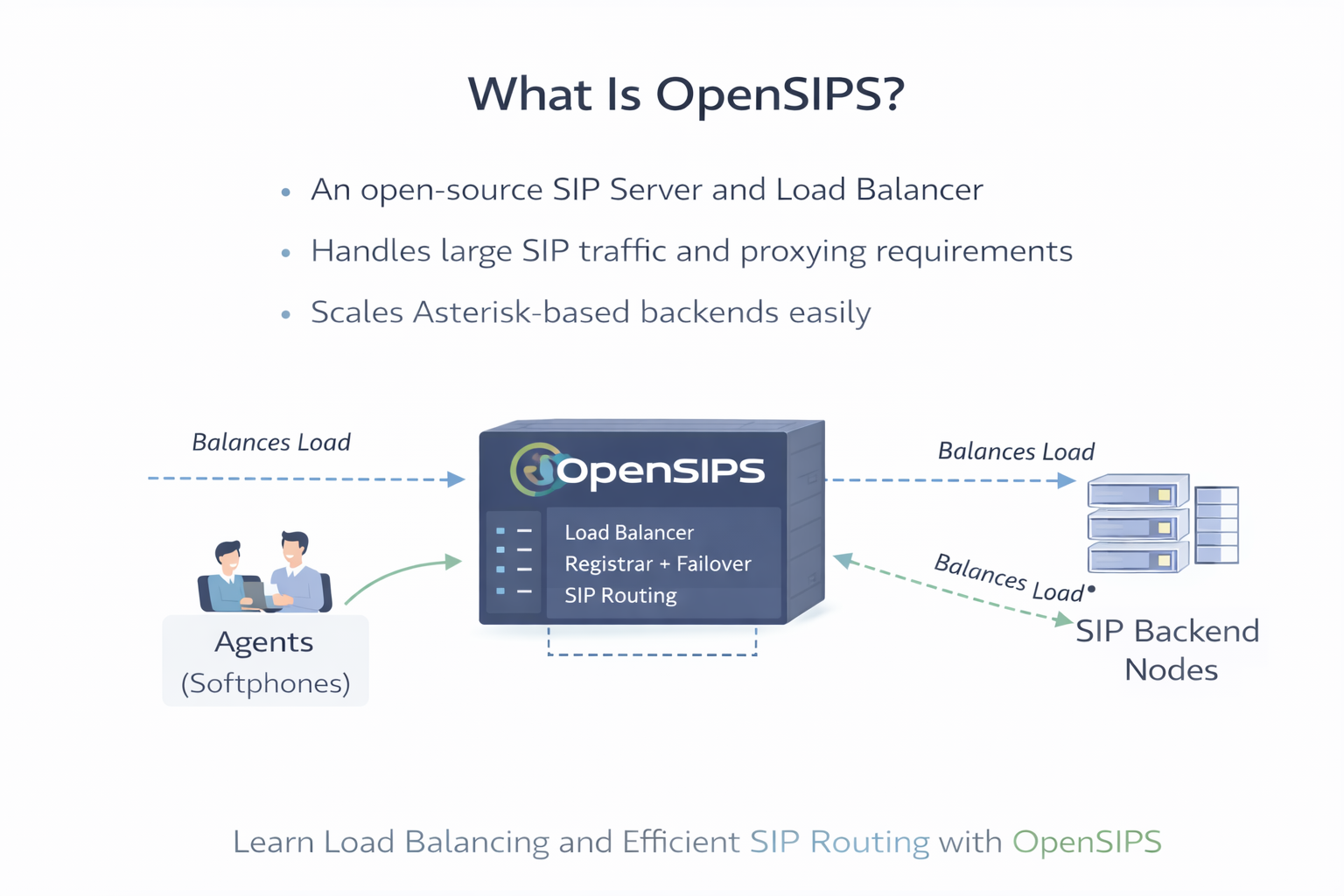
OpenSIPS is the traffic controller for SIP: it registers endpoints, authenticates them, keeps NAT bindings stable, and routes calls to the right backend Asterisk — even when you add more servers later.
- Registrar + Location: stores “which IP:port is extension 101 currently using?”
- Proxy + Routing: decides where INVITE should go (which Asterisk)
- Load balancing: distributes calls across multiple Asterisk backends
- Topology hiding: prevents exposing internal Asterisk IPs
- Rate limits / protections: defends against floods, brute force, misbehaving endpoints
Architecture: OpenSIPS in Front, Asterisk Behind
OpenSIPS sits at the public SIP edge. Phones register to OpenSIPS. OpenSIPS routes calls to one or many Asterisk servers. RTP (audio) usually flows endpoint ↔ Asterisk (or via RTPengine if needed).
For required ports and firewall rules across SIP/RTP/WebRTC/ARI/AMI, use: Ports Required for FreePBX + Asterisk: Complete Firewall Guide.
When FreePBX Becomes a Problem (And Why Scaling Needs Decoupling)
FreePBX is excellent for small/medium PBX and call center deployments. But when you want large-scale SIP edge routing, you typically hit limitations:
- FreePBX is designed as a single PBX system with its own internal state and configuration model
- Scaling by “cloning FreePBX” is messy because PBX logic, routing logic, and user state are tightly coupled
- At high concurrency, you want the SIP edge to be a stateless proxy layer (OpenSIPS), not your PBX
The clean approach is: OpenSIPS handles SIP registrations + routing, while Asterisk handles call applications. That’s how you scale without chaos.
Ubuntu vs Debian: What’s Different?
The steps are nearly identical. The differences are mostly package availability and service tooling:
- Ubuntu: generally newer packages, common in cloud deployments
- Debian: stable baseline, often preferred for predictable upgrades
Everything below is written to work on both. Replace versions only if your repo provides newer builds.
Step 1 — Install OpenSIPS on Ubuntu / Debian
We will install OpenSIPS with database support and core modules needed for: registrar, auth, nat handling, and dispatcher.
Option A: Install from OpenSIPS Packages (Recommended)
# Ubuntu/Debian baseline
sudo apt update
sudo apt install -y gnupg2 ca-certificates curl lsb-release
If your environment already uses OpenSIPS official repo packages, follow that method. If your org prefers distro packages, use Option B.
Option B: Install from Distro Packages (Simpler, but may be older)
sudo apt update
sudo apt install -y opensips opensips-mysql-module opensips-postgresql-module
You only need one DB module: MySQL/MariaDB or PostgreSQL. Pick one and remove the other later.
Step 2 — Install and Prepare the Database (MySQL/MariaDB or PostgreSQL)
OpenSIPS uses DB tables for subscribers, location (registrations), dispatcher targets, etc. For production, keep DB on a stable server and ensure backups.
MySQL / MariaDB (Most common)
sudo apt install -y mariadb-server mariadb-client
sudo systemctl enable --now mariadb
# Set root password and secure defaults
sudo mysql_secure_installationPostgreSQL (If you prefer PG)
sudo apt install -y postgresql
sudo systemctl enable --now postgresql
If you already use PostgreSQL in your stack (and want consistent tooling), PostgreSQL is perfectly valid. Just ensure DB tuning for write-heavy registration churn.
Step 3 — Create OpenSIPS Database Schema
OpenSIPS provides a tool to create tables. The exact command name varies slightly by packaging, but the workflow is always: create DB → create tables → set DB URL in config.
Typical OpenSIPS DB setup flow (MariaDB example)
# Create DB and user
sudo mysql -u root -p <<SQL
CREATE DATABASE opensips;
CREATE USER 'opensips'@'localhost' IDENTIFIED BY 'CHANGE_ME_STRONG';
GRANT ALL PRIVILEGES ON opensips.* TO 'opensips'@'localhost';
FLUSH PRIVILEGES;
SQL
Then create schema using the OpenSIPS DB tool shipped with your package. Common options:
# One of these tools will exist depending on package:
# - opensipsdbctl
# - opensips-dbctl

sudo opensipsdbctl create
# or
sudo opensips-dbctl create
If the tool prompts for DB URL, use:
mysql://opensips:CHANGE_ME_STRONG@localhost/opensips
(For PostgreSQL, it would be similar: postgres://user:pass@host/db.)
Step 4 — The Minimum Production-Sane OpenSIPS Config
Your OpenSIPS config must explicitly address real-world problems: authentication, NAT handling, registrar, and routing to Asterisk backends.
Below is a practical baseline that:
- Accepts REGISTER from phones
- Authenticates using DB subscribers
- Saves registrations (location)
- Routes INVITE to Asterisk pool using dispatcher
- Handles NAT flags to reduce common one-way audio symptoms
File: /etc/opensips/opensips.cfg
// ---- Core settings (adjust to your IPs) ----
listen=udp:YOUR_PUBLIC_IP:5060
# If behind NAT, also set advertised address appropriately:
# listen=udp:YOUR_PRIVATE_IP:5060 advertise YOUR_PUBLIC_IP:5060

# Domain your users register against:
alias="sip.yourdomain.com"

# Database URL (MariaDB example)
modparam("db_mysql", "ping_interval", 60)
modparam("usrloc", "db_url", "mysql://opensips:CHANGE_ME_STRONG@localhost/opensips")
modparam("auth_db", "db_url", "mysql://opensips:CHANGE_ME_STRONG@localhost/opensips")
modparam("dispatcher", "db_url", "mysql://opensips:CHANGE_ME_STRONG@localhost/opensips")

# Registrar saves location to DB (important for restarts / HA)
modparam("usrloc", "db_mode", 2)
modparam("registrar", "max_expires", 3600)

# NAT handling basics
modparam("nathelper", "natping_interval", 30)
modparam("nathelper", "ping_nated_only", 1)

# Dispatcher (backend Asterisk pool)
modparam("dispatcher", "table_name", "dispatcher")
modparam("dispatcher", "flags", 2)

route {

  # Sanity check
  if (!mf_process_maxfwd_header("10")) {
    send_reply("483","Too Many Hops");
    exit;
  }

  # Handle REGISTER (phones)
  if (is_method("REGISTER")) {

    # Optional: detect NAT and mark it
    if (nat_uac_test("19")) {
      setflag(5);        # NAT flag
      fix_nated_register();
    }

    # Authenticate REGISTER
    if (!www_authorize("", "subscriber")) {
      www_challenge("", "0");
      exit;
    }

    if (!save("location")) {
      send_reply("500", "Registration failed");
      exit;
    }

    send_reply("200", "OK");
    exit;
  }

  # Authenticate inbound requests from users (INVITE, etc.)
  if (is_method("INVITE|SUBSCRIBE|MESSAGE|OPTIONS")) {
    if (!proxy_authorize("", "subscriber")) {
      proxy_challenge("", "0");
      exit;
    }
    consume_credentials();
  }

  # NAT handling for non-REGISTER traffic
  if (nat_uac_test("19")) {
    setflag(5);
    fix_nated_contact();
  }

  # Route calls to Asterisk pool (dispatcher set 1)
  if (is_method("INVITE")) {
    if (!ds_select_dst("1", "4")) {
      send_reply("503", "No available Asterisk backends");
      exit;
    }

    # Optional: mark chosen backend in a header for debugging
    append_hf("X-Backend: $du\r\n");

    t_relay();
    exit;
  }

  # Default relay
  t_relay();
}
This is intentionally minimal but realistic. In production you add: rate limits, IP ACLs, TLS, topology hiding, anti-flood, and monitoring.
Step 5 — Add Asterisk Backends to OpenSIPS (Dispatcher)
Dispatcher tells OpenSIPS where Asterisk servers are. For example: 3 Asterisk servers behind OpenSIPS.
Insert dispatcher destinations (MariaDB example):
sudo mysql -u root -p opensips <<SQL
INSERT INTO dispatcher (setid, destination, socket, state, weight, description)
VALUES
(1, 'sip:10.10.10.21:5060', 'udp:YOUR_PUBLIC_IP:5060', 0, 50, 'Asterisk-1'),
(1, 'sip:10.10.10.22:5060', 'udp:YOUR_PUBLIC_IP:5060', 0, 50, 'Asterisk-2'),
(1, 'sip:10.10.10.23:5060', 'udp:YOUR_PUBLIC_IP:5060', 0, 50, 'Asterisk-3');
SQL
You can use different weights if one box is stronger. If you want strict failover instead of load balancing, use different dispatcher algorithms.
Step 6 — Configure Asterisk to Accept Calls from OpenSIPS
On each Asterisk server, create a PJSIP endpoint for OpenSIPS. The simplest robust approach is: OpenSIPS → Asterisk as a trusted trunk (IP-based identify).
File: /etc/asterisk/pjsip.conf
; --- OpenSIPS trunk into Asterisk ---
[opensips-trunk]
type=endpoint
transport=transport-udp
context=from-opensips
disallow=all
allow=ulaw,alaw
aors=opensips-trunk
direct_media=no
rewrite_contact=yes
force_rport=yes
rtp_symmetric=yes

[opensips-trunk]
type=aor
max_contacts=1
contact=sip:YOUR_OPENSIPS_PRIVATE_IP:5060

[opensips-trunk]
type=identify
endpoint=opensips-trunk
match=YOUR_OPENSIPS_PRIVATE_IP
Then create a dialplan context [from-opensips] in extensions.conf
(or your include structure) and route DIDs/extensions to the correct logic.
[from-opensips]
exten => _X.,1,NoOp(Inbound from OpenSIPS: ${EXTEN})
 same => n,Goto(app-routing,${EXTEN},1)

[app-routing]
; Example: DID 1800123456 goes to IVR
exten => 1800123456,1,Goto(ivr-main,s,1)

; Example: Internal extension range 1xx to local SIP endpoints
exten => _1XX,1,Dial(PJSIP/${EXTEN},30)
 same => n,Hangup()
If you need help with RTP/NAT settings and why one-way audio happens, use: Router Configuration for SIP/VoIP: NAT, Port Forwarding, and SIP ALG and Wireshark Live Monitoring for SIP & RTP.
How Asterisk “Knows” Which Dialplan to Use (Three Real Approaches)
People often ask: “If OpenSIPS routes calls to Asterisk, how does Asterisk know which customer/dialplan to run?” This is a real scaling question in multi-tenant deployments.
Approach 1: Use Different Asterisk Contexts Based on DID / Extension Pattern
The simplest: route by called number. Example:
- DID 1800-AAA-AAAA → customer A context
- DID 1800-BBB-BBBB → customer B context
This is easiest when each tenant has dedicated DID ranges.
Approach 2: Use Different OpenSIPS Dispatcher Sets (Per Tenant)
You can keep tenants separated by routing them to different Asterisk pools. Example:
- Dispatcher set 1 → Asterisk cluster for Customer A
- Dispatcher set 2 → Asterisk cluster for Customer B
That’s useful for capacity isolation.
Approach 3: Add a Routing Header from OpenSIPS (Then Read It in Asterisk)
OpenSIPS can attach a header like X-Tenant: customerA.
Asterisk dialplan can read SIP headers and route accordingly.
// OpenSIPS (before t_relay)
append_hf("X-Tenant: customerA\r\n");
; Asterisk dialplan example
exten => _X.,1,NoOp(Tenant header: ${PJSIP_HEADER(read,X-Tenant)})
same => n,GotoIf($["${PJSIP_HEADER(read,X-Tenant)}"="customerA"]?custA,1)
same => n,GotoIf($["${PJSIP_HEADER(read,X-Tenant)}"="customerB"]?custB,1)
same => n,Goto(default,s,1)
exten => custA,1,Goto(customerA-ivr,s,1)
exten => custB,1,Goto(customerB-ivr,s,1)This is extremely powerful for multi-tenant systems where DIDs are not enough.
How Calls Flow at 800 Concurrent Calls (Where the Load Actually Goes)
At 800 concurrent calls, your system must handle two kinds of load:
- SIP signaling load (REGISTER, INVITE, 100/180/200, BYE, keepalives)
- Media load (RTP packets, transcoding if any, recording, mixmonitor)
OpenSIPS mostly carries signaling. Asterisk carries media and application logic. That’s why separating them is the scaling trick.
If RTP does not behave, it is usually NAT or firewall. Use: Ports Required for FreePBX + Asterisk: Complete Firewall Guide and Router Configuration for SIP/VoIP: NAT, Port Forwarding, and SIP ALG.
Step 7 — Create Subscribers (Extensions) in OpenSIPS DB
Your “extensions” (subscribers) live in OpenSIPS subscriber table. Phones register to OpenSIPS using these credentials.
MariaDB example (insert extension 101):
sudo mysql -u root -p opensips <<SQL
INSERT INTO subscriber (username, domain, password, ha1)
VALUES ('101', 'sip.yourdomain.com', 'PlainPasswordNotRecommended', '');

-- Better: store HA1/HA1b hashes, not plain passwords.
SQL
In production, do not store plain passwords. Use HA1/HA1b hashing workflows. (Your security model determines how strictly you enforce this.)
How an Extension Registered in OpenSIPS Gets Answered by Asterisk
This is the key mental model:
- Phone registers to OpenSIPS as
101@sip.yourdomain.com - OpenSIPS stores the phone’s current contact IP:port in
location - When someone dials 101 (or a DID mapping to 101), OpenSIPS decides where to send INVITE
- OpenSIPS forwards INVITE to an Asterisk backend (dispatcher)
- Asterisk runs dialplan and either:
- terminates to PSTN/queue/IVR, or
- dials out to the endpoint via OpenSIPS again (depending on your design)
There are two common patterns:
Pattern A (Common in Call Centers): Asterisk dials agents locally, endpoints register to Asterisk
This is simpler but centralizes SIP load back into Asterisk. You do it if you have fewer endpoints or LAN-based agents.
Pattern B (Scalable Edge): Endpoints register to OpenSIPS, Asterisk focuses on apps
This keeps high REGISTER load out of Asterisk and scales better.
Hard Problems People Face (And How This Setup Fixes Them)
1) “After ISP flap, 500 phones re-register and Asterisk becomes unresponsive”
Fix: OpenSIPS absorbs that registration churn and keeps Asterisk stable.
2) “Calls start failing randomly under load”
Fix: Dispatcher routes around a failing backend and spreads calls across multiple Asterisk servers.
3) “One-way audio, works sometimes, fails sometimes”
Fix: NAT and firewall correctness. Confirm with: Wireshark Live Monitoring for SIP & RTP and Ports Required for FreePBX + Asterisk.
4) “We need to scale to 800 concurrent calls without downtime”
Fix: Add Asterisk nodes behind OpenSIPS. No endpoint changes needed. You scale horizontally.
Testing Checklist (Do This Before Production)
- Confirm phones can REGISTER to OpenSIPS from outside
- Confirm INVITE routes to an Asterisk backend (check
X-Backendheader) - Confirm RTP works both directions
- Simulate backend failure: stop Asterisk #2 and verify OpenSIPS routes to others
- Test call setup time under load
For packet-level verification: Wireshark Live Monitoring for SIP & RTP.
Common Troubleshooting (Exact Symptoms People Search)
“403 Forbidden” on REGISTER
- Subscriber not created in DB
- Wrong domain in subscriber row
- Auth module not configured to use correct table
“No available Asterisk backends”
- Dispatcher table empty
- Asterisk not reachable on private network
- Firewall blocks OpenSIPS → Asterisk SIP port
“Calls connect but no audio / one-way audio”
- RTP ports not open
- NAT incorrect (public IP mismatch)
- SIP ALG enabled on router
Fix using: Router Configuration for SIP/VoIP: NAT, Port Forwarding, and SIP ALG and Ports Required for FreePBX + Asterisk.
Key Takeaway
If you want high concurrency (200+, 800+ calls) without instability, do not force Asterisk (or FreePBX) to be your SIP edge proxy. Put OpenSIPS in front to handle registration/auth/routing/load-balancing, and keep Asterisk for call applications.
This architecture scales by adding more Asterisk nodes — without changing endpoints, without rewriting the PBX every time, and without risking “one box does everything” collapse.
Want to see API-driven CRM + Telecom workflows in action? Try the WhatsApp bot or explore the demos.
Comments (0)
Be the first to comment.