Nginx Reverse Proxy Configuration for MYLINEHUB Services
Configure NGINX with HTTPS, frontend hosting, and reverse proxy routing for multiple MYLINEHUB backend services.
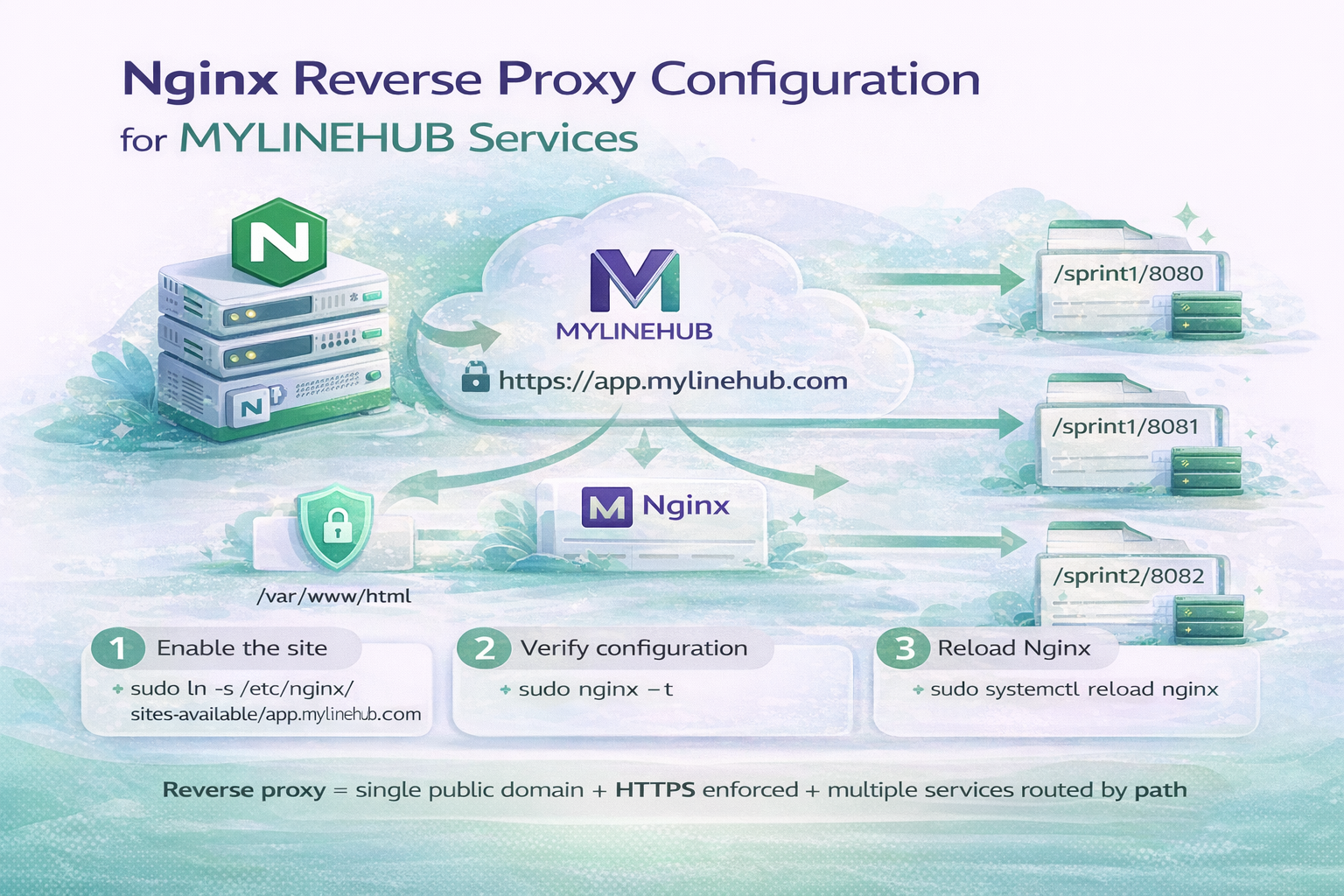
NGINX is the entry gate of a production MYLINEHUB deployment. It handles HTTPS, serves the frontend, and routes traffic to multiple backend services running on different ports.
This guide explains how reverse proxy works, how to configure sites-available vs sites-enabled, and how to deploy a clean, scalable NGINX configuration for MYLINEHUB.
Why Reverse Proxy Is Required in MYLINEHUB
- Expose a single public domain (
app.mylinehub.com) - Terminate HTTPS securely
- Serve Angular frontend
- Route APIs to multiple Spring Boot services
- Hide internal ports from the internet
Without reverse proxy, users would need to access many different ports directly, which is insecure and difficult to manage.
Understanding sites-available vs sites-enabled
NGINX uses two important folders:
- /etc/nginx/sites-available → stores all virtual host configs (enabled or disabled).
- /etc/nginx/sites-enabled → contains symlinks to active configs.
Enabling a site = creating a symlink.
Disabling a site = removing the symlink.
This approach keeps configuration organized and avoids deleting files.
Create MYLINEHUB NGINX Configuration
Create a new config file:
sudo nano /etc/nginx/sites-available/app.mylinehub.comComplete Production Configuration
# Redirect HTTP → HTTPS
server {
    listen 80;
    listen [::]:80;
    server_name app.mylinehub.com www.app.mylinehub.com;

    location / {
        return 301 https://$host$request_uri;
    }
}

# Main HTTPS server
server {
    listen 443 ssl http2;
    listen [::]:443 ssl http2;

    server_name app.mylinehub.com www.app.mylinehub.com;

    root /var/www/html/dist;
    index index.html index.htm;

    # SSL (Certbot managed)
    ssl_certificate /etc/letsencrypt/live/app.mylinehub.com/fullchain.pem;
    ssl_certificate_key /etc/letsencrypt/live/app.mylinehub.com/privkey.pem;
    include /etc/letsencrypt/options-ssl-nginx.conf;
    ssl_dhparam /etc/letsencrypt/ssl-dhparams.pem;

    # Angular frontend
    location / {
        try_files $uri $uri/ /index.html;
    }

    error_page 404 /index.html;

    # Reverse proxy → backend services
    location /sprint1/8080/ {
        proxy_pass http://127.0.0.1:8080/;
        include proxy_params;
    }

    location /sprint1/8081/ {
        proxy_pass http://127.0.0.1:8081/;
        include proxy_params;
    }

    location /sprint2/8082/ { proxy_pass http://127.0.0.1:8082/; include proxy_params; }
    location /sprint2/8083/ { proxy_pass http://127.0.0.1:8083/; include proxy_params; }
    location /sprint2/8084/ { proxy_pass http://127.0.0.1:8084/; include proxy_params; }
    location /sprint2/8085/ { proxy_pass http://127.0.0.1:8085/; include proxy_params; }
    location /sprint2/8086/ { proxy_pass http://127.0.0.1:8086/; include proxy_params; }
    location /sprint2/8087/ { proxy_pass http://127.0.0.1:8087/; include proxy_params; }
    location /sprint2/8088/ { proxy_pass http://127.0.0.1:8088/; include proxy_params; }
    location /sprint2/8089/ { proxy_pass http://127.0.0.1:8089/; include proxy_params; }

    client_max_body_size 50M;
}
Enable the Site
sudo ln -s /etc/nginx/sites-available/app.mylinehub.com /etc/nginx/sites-enabled/
sudo unlink /etc/nginx/sites-enabled/default
This activates MYLINEHUB and removes the default NGINX page.
Verify and Restart NGINX
sudo nginx -t
sudo systemctl reload nginx

sudo ufw allow 'Nginx Full'
sudo ufw status

sudo systemctl restart nginx
If nginx -t shows no errors, configuration is correct.
How Routing Works in This Architecture
- https://app.mylinehub.com/ → Angular frontend
- /sprint1/8080 → Backend service on port 8080
- /sprint2/8085 → Another microservice
Users see only one domain, while internally many services run independently.
Common Mistakes
1. NGINX fails to start
- Wrong SSL certificate path
- Port already in use
- Syntax error in config
2. Frontend loads but API fails
- Backend service not running
- Wrong proxy_pass port
- Firewall blocking localhost port
3. HTTPS not working
- Certbot not installed
- DNS not pointing to server
- Port 443 closed
Production Architecture Summary
Final MYLINEHUB deployment flow:
- User → HTTPS request → NGINX
- NGINX → Serves frontend OR routes to backend
- Backend → Processes request → returns response
This design provides:
- Security
- Scalability
- Clean architecture
- Single public entry point
Final Note
A correct NGINX reverse proxy setup is the foundation of a stable MYLINEHUB production system. Once this layer is reliable, backend scaling, AI services, VoiceBridge, and telephony integration all become predictable and maintainable.
Want to see API-driven CRM + Telecom workflows in action? Try the WhatsApp bot or explore the demos.
Comments (0)
Be the first to comment.