Open Source Telecommunication API for Your CRM
Discover an open-source telecommunication API layer for CRM systems that goes beyond calling—covering WhatsApp, email, AI calling, omnichannel workflows, frontend integrations, and enterprise control.
If you are looking for a telecom API layer that can truly become your own communication backend, you are at the right place. This is not just a small calling API or a limited click-to-call integration. It is a broader open-source telecommunication API foundation for CRM systems — covering calling, campaigns, customers, employees, queues, IVR, conferences, WhatsApp, scheduling, files, reports, notifications, and more.
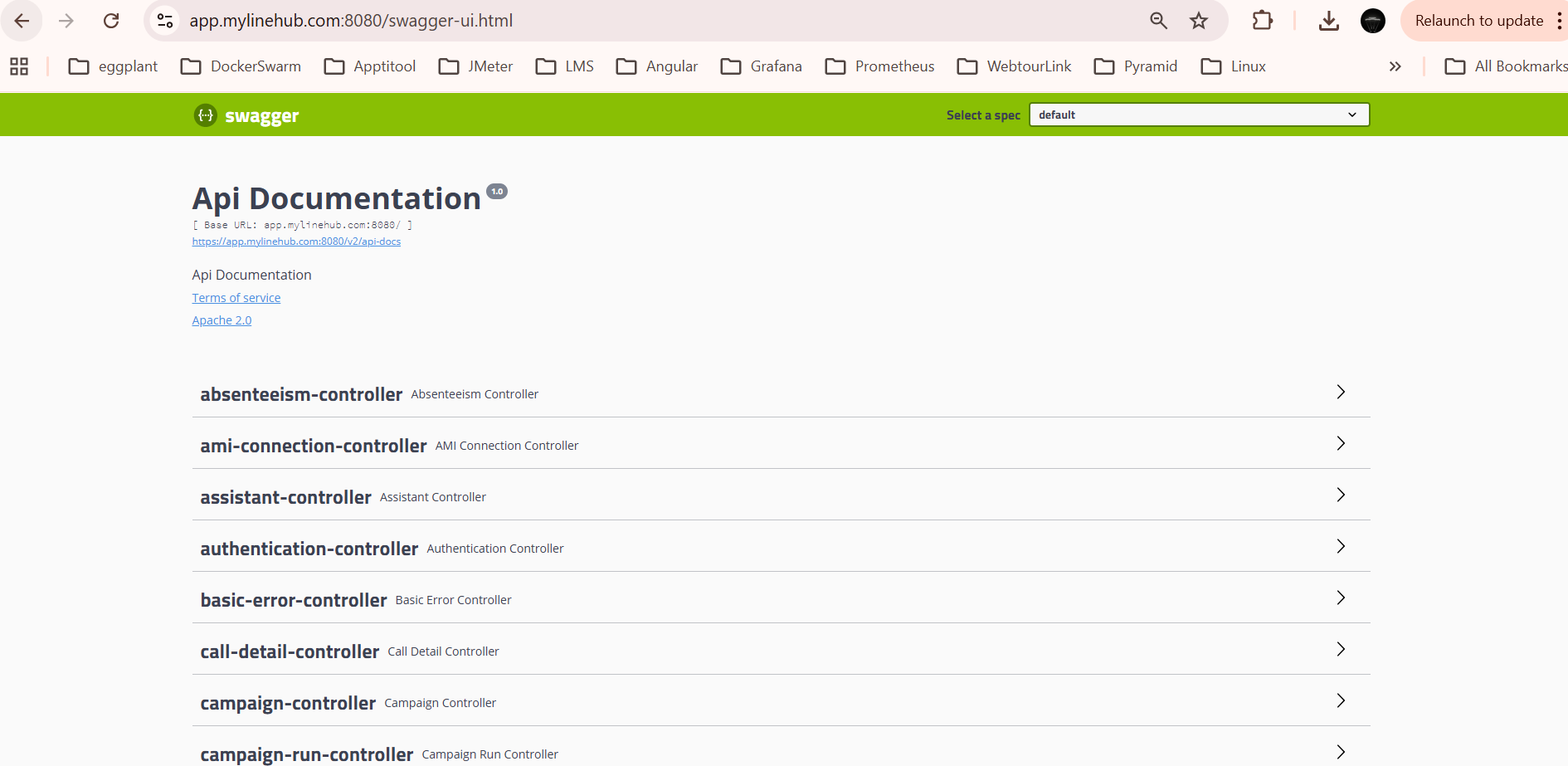
Below is the API screenshot view. It represents the backend API surface that powers MYLINEHUB’s CRM + telecom stack. The important thing to understand is that this is a multi-organization / multi-tenant backend. That is why many APIs include an organization parameter along with an Authorization header. In simple terms, the same backend can serve multiple businesses while keeping their data and operations logically separated. :contentReference[oaicite:0]{index=0}
Also note one important boundary: the APIs shown here are the primary MYLINEHUB backend APIs. VoiceBridge AI calling APIs and specialized AI email / assistant-side APIs are separate API surfaces and are not fully represented in this Swagger listing. So this article explains the backend CRM + telecom API layer shown here, not every API in the wider MYLINEHUB ecosystem. :contentReference[oaicite:1]{index=1}
📘 What this API layer really gives your CRM
Most CRMs are good at storing leads and notes, but weak at real telecom operations. Businesses then glue together many tools: one for calling, another for WhatsApp, another for scheduling, another for files, another for reports, and yet another for ad lead collection. That fragmentation slows teams down and breaks visibility.
A strong telecom API layer adds business value by giving your CRM the ability to:
• initiate and control live calls
• manage campaigns and campaign runs
• attach customers to campaigns and employees
• handle IVR, queues, conferences, and SIP provider logic
• run WhatsApp operations inside the same business system
• support automation, notifications, files, logs, and reporting
• keep all this organized per organization / tenant
In business terms, this means your CRM stops being just a record-keeping tool and becomes a real communication operating system.
🏢 Why the “organization” field matters so much
One of the most important design ideas in this API set is that it supports multiple organizations. In many endpoints, you will see both:
• Authorization header
• organization query parameter
This matters because the same backend can serve many customers or business units safely. One organization’s employees, campaigns, queues, customers, WhatsApp numbers, and reports do not have to mix with another organization’s data.
This is useful for:
• SaaS businesses serving many clients
• enterprises with multiple branches or brands
• agencies handling telecom operations for multiple customers
• implementation partners managing separate installations logically from one backend
So when you see the organization parameter repeatedly, it is not noise. It is a sign that the API is designed for multi-tenant business operations. :contentReference[oaicite:2]{index=2}
🔐 Basic API pattern: how requests are typically shaped
A large part of this API family follows a common structure:
• secure the call with an Authorization header
• pass the target organization
• send data through JSON body for create / update / action requests
• use GET for retrieval and export style operations
• use DELETE where logical deletion or cleanup is needed
A typical POST pattern looks like this:
POST /api/v1/customers/createCustomerByOrganization?organization=demo-org
Authorization: Bearer YOUR_TOKEN
Content-Type: application/json

{
  "firstName": "Rahul",
  "lastName": "Sharma",
  "phoneNumber": "9876543210",
  "email": "rahul@example.com"
}
A typical GET pattern looks like this:
GET /api/v1/queue/getAllQueueByOrganization?organization=demo-org
Authorization: Bearer YOUR_TOKEN
A typical action-oriented POST for telecom control looks like this:
POST /api/v1/asterisk/originateCall
Authorization: Bearer YOUR_TOKEN
Content-Type: application/json

{
  "organization": "demo-org",
  "callerId": "080XXXXXXX",
  "customerPhone": "9876543210",
  "employeeExtension": "1001"
}
Exact field names vary by DTO, but structurally this is the model you should expect.
🧭 How to think about the API categories
The Swagger listing contains a large number of controllers. The easiest way to understand them is not one endpoint at a time, but by grouping them into business capability categories.
1️⃣ Authentication, organization, and application onboarding APIs
These APIs help you identify users, refresh access, create or verify organizational context, and manage business-level application onboarding.
Main controllers in this area:
• authentication-controller — Google login, refresh token
• organization-controller — get / update organizational data, memory save, storage recalculation
• organization-application-controller — create organization from backend, verify identification, fetch existing org state
• registration-controller — registration and confirmation
Business use:
• onboarding a new company into your telecom CRM stack
• enabling multi-tenant SaaS style deployment
• connecting authentication with organizational scope
Example endpoints visible in the listing include:
• /api/v1/auth/googleLogin
• /api/v1/auth/refreshToken
• /api/v1/organization/getOrganizationalData
• /api/v1/organization/update
• /api/v1/organization-app/createOrgFromBackendWithoutGST
• /api/v1/organization-app/verifyBusinessIdentificationAndCreate
• /api/v1/registration
2️⃣ Customer, employee, department, and relationship APIs
This is one of the most important API groups because CRM value begins with structured entities: customers, employees, departments, and their relationships to campaigns.
Main controllers:
• customer-controller
• employee-controller
• department-controller
• customer-to-campaign-controller
• employee-to-campaign-controller
What they help with:
• create and manage customer records
• track customer conversion / diversion states
• create and manage employees
• organize employees by department and access logic
• attach customers to campaigns
• attach employees to campaigns
Business examples:
• an education business can push new leads into customer APIs, assign counselors through employee APIs, and attach both to a campaign
• a real estate company can store prospects as customers, sales callers as employees, and branch teams as departments
• a support organization can manage support agents, supervisors, and internal campaign-style outreach segments
Example visible endpoints:
• /api/v1/customers/createCustomerByOrganization
• /api/v1/customers/customerGotConverted
• /api/v1/employees/createEmployeeByOrganization
• /api/v1/departments/createDepartmentByOrganization
• /api/v1/customertocampaign/createCustomerToCampaignByOrganization
• /api/v1/employeetocampaign/createEmployeeToCampaignByOrganization
3️⃣ Campaign and campaign execution APIs
If your CRM needs outbound structure, this category is central. It is not enough to store leads; businesses need to organize dialing and operational execution through campaigns.
Main controllers:
• campaign-controller
• campaign-run-controller
• job-scheduling-controller
What they help with:
• create and manage campaigns
• export campaign data
• inspect live run logs
• merge campaign logs and recordings
• schedule campaign start / stop logic
• schedule customer callbacks or future actions
Example business use:
• coaching institute admission campaigns
• loan follow-up campaigns
• EMI reminder campaigns
• reactivation campaigns for old customers
• post-event callback campaigns
Example endpoints:
• /api/v1/campaign/createCampaignByOrganization
• /api/v1/campaign/deleteCampaignByIdAndOrganization
• /api/v1/campaign-run/getCurrentRunLiveLogsMemoryOnly
• /api/v1/campaign-run/getCallLogsMergedForRun
• /api/v1/scheduleJob/findIfScheduledCallJobToCustomer
• /api/v1/scheduleJob/removeScheduledCallToCustomer
4️⃣ Core telecom control APIs: dialer, call actions, conference, queue, IVR
This is where the backend becomes more than a CRM. These APIs give programmatic control over live telecom actions.
Main controllers:
• dialer-controller
• conference-controller
• queue-controller
• ivr-controller
The dialer controller is especially powerful because it includes action APIs like:
• originate call
• blind transfer
• attempted transfer
• bridge two active calls
• monitor / pause / unpause / stop monitor
• quiet listen
• extension state
• hangup
• park with timeout
• send anonymous text to channel
• conference room operations
Example visible endpoints:
• /api/v1/asterisk/originateCall
• /api/v1/asterisk/originateDataCall
• /api/v1/asterisk/blindTransferCall
• /api/v1/asterisk/bridgeTwoActiveCalls
• /api/v1/asterisk/hungUpCall
• /api/v1/asterisk/listenQuietly
• /api/v1/asterisk/confbridgeListRooms
• /api/v1/conference/createConferenceByOrganization
• /api/v1/queue/createQueueByOrganization
• /api/v1/ivr/createIvrByOrganization
Business examples:
• an internal CRM can trigger click-to-call from the lead page
• a supervisor UI can transfer or bridge calls without touching Asterisk manually
• an admin tool can create queues and IVRs per organization from the CRM itself
• a service workflow can park a call temporarily and resume structured handling
5️⃣ AMI, SSH, SIP provider, and infrastructure connectivity APIs
These APIs are important because telecom systems are not only about customers and agents; they also need live connections to PBX infrastructure.
Main controllers:
• ami-connection-controller
• ssh-connection-controller
• sip-provider-controller
• system-config-controller
What they help with:
• create and manage AMI connections per organization
• enable / disable live AMI connectivity
• create and manage SSH connections to telecom machines
• manage SIP provider definitions
• fetch and update system configs
Example endpoints:
• /api/v1/amiconnection/createAmiConnectionByOrganization
• /api/v1/amiconnection/connectAmiConnectionOnAmiUserAndOrganization
• /api/v1/ssh/createSshConnectionByOrganization
• /api/v1/sipprovider/createSipProviderByOrganization
• /api/v1/systemconfig/getAllSystemConfigsByOrganization
• /api/v1/systemconfig/updateSystemConfigByOrganization
Business use:
• managing telecom infrastructure from backend UI instead of manually editing many systems
• handling multiple trunks or PBX nodes across organizations
• connecting CRM logic with real telephony infrastructure
6️⃣ Call detail, reporting, logs, notifications, and operational visibility APIs
A telecom-enabled CRM becomes much more valuable when it can expose actual performance and call behavior.
Main controllers:
• call-detail-controller
• logs-controller
• notification-controller
• error-controller
• statement-reconciliation-controller
These help with:
• exporting call records to Excel / PDF
• filtering call detail by duration, customer, caller ID, conference state, timezone, context
• updating customer remarks or conversion logic from call outcomes
• showing system logs and notification streams
• reconciling uploaded statements
Example endpoints:
• /api/v1/calldetail/addCustomerIfRequiredAndConvert
• /api/v1/calldetail/addCustomerIfRequiredAndUpdateRemark
• /api/v1/calldetail/export/organization/excel
• /api/v1/logs/getAllLogsByOrganization
• /api/v1/notification/getAllNotificationsByExtensionAndOrganization
• /api/v1/error/getAllErrorsByOrganization
• /api/v1/statementreconciliation/uploadAndPerformStatementReconciliation
Business use:
• team performance dashboards
• call compliance review
• customer conversion analysis
• finance and operational reconciliation workflows
7️⃣ WhatsApp APIs: one of the strongest value-add areas
One major differentiator here is that the backend is not limited to calling APIs. It also exposes structured WhatsApp-related controllers.
Main controllers:
• message-controller
• whats-app-chat-history-controller
• whats-app-number-report-controller
• whats-app-number-template-variable-controller
• whats-app-open-ai-account-controller
• whats-app-phone-number-controller
• whats-app-phone-number-templates-controller
• whats-app-project-controller
• whats-app-prompt-controller
• whats-app-prompt-variable-controller
• whats-app-web-hook-controller
• whats-enum-controller
What this means in practical terms:
• send text and template messages
• manage WhatsApp numbers per organization
• manage templates and template variables
• manage prompts and prompt variables
• collect WhatsApp reports and dashboard counts
• read and manage WhatsApp chat history
• process WhatsApp webhook events
• manage project-level WhatsApp structures
Example endpoints:
• /api/v1/messagetoWhatsApp/sendTextMessage
• /api/v1/messagetoWhatsApp/sendTemplateMessage
• /api/v1/whatsappphonenumber/create
• /api/v1/whatsappphonenumbertemplate/create
• /api/v1/whatsappprompt/create
• /api/v1/whatsapp-chat-history/getAllChatHistoryByTwoPhoneNumbersAndOrganization
• /api/v1/whatsappwebhook/{supportPhoneNumber}/{appSecret}
Business value:
• CRM-triggered WhatsApp follow-up after missed calls
• template-based campaign communication
• multi-number support for different teams or brands
• prompt-driven automation logic for WhatsApp experiences
• unified customer communication history across voice and messaging
8️⃣ Files, inventory, products, purchases, suppliers, and business-side APIs
This backend is not only for telephony primitives. It also includes business-supporting APIs that connect telecom workflows with operational data.
Main controllers:
• file-controller
• product-controller
• product-units-controller
• purchases-controller
• supplier-controller
• customer-property-inventory-controller
• customer-franchise-inventory-controller
These help with:
• downloading and deleting user files by category
• managing product catalog structures
• purchase tracking
• supplier operations
• customer-linked inventory or property data
Business example:
• a real-estate CRM can combine calling + property inventory lookup
• a franchise sales operation can combine lead handling + franchise inventory flows
• a commercial CRM can combine product, purchase, and supplier context with customer communication
9️⃣ Assistant, RAG, and open API utility controllers
There are also a few developer-oriented API groups that point toward assistant and knowledge workflows.
Main controllers:
• assistant-controller
• rag-controller
Visible capabilities include:
• create / update / delete assistant-side resources
• create threads
• ingest data
• ingest URL content
• vector search
Important note again: these appear in the backend listing, but the broader specialized AI surfaces — especially VoiceBridge and dedicated AI email or assistant stacks — are not fully represented here in the same way.
🔟 Miscellaneous but important APIs
There are a few other controllers that should not be ignored:
• chat-history-controller — internal extension-to-extension chat history operations
• fb-ads-lead-collector-web-hook-controller — Facebook Ads lead webhook ingestion
• email-app-controller — payment confirmation email app flow
• gst-verification-engine-controller — GST detail update flow
• absenteeism-controller — attendance / absenteeism related operations
• operation-handler, web-mvc-links-handler, shutdown-controller — actuator and backend operations visibility
These are useful because they show the backend is not a narrow API toy. It is a larger business platform backend with telecom at its center.
🧪 Example GET and POST usage in real CRM scenarios
Here are a few practical mental models for how a CRM developer might use this API family.
Example A — New lead enters CRM
1. Create customer via customer API
2. Attach customer to campaign
3. Assign employee or employee group
4. Trigger click-to-call or scheduled callback
5. Update call detail outcome
6. Send WhatsApp or email follow-up
Example B — Support workflow
1. Route inbound call to queue or IVR
2. Notify available support employee
3. Monitor or transfer call if needed
4. Store chat / call detail context
5. Send confirmation message or template
Example C — Marketing to conversion tracking
1. Collect Facebook lead through webhook
2. Create CRM customer record
3. Start campaign run
4. Track call outcome and conversion state
5. Export run and performance data for analysis
📂 Complete controller list grouped for quick understanding
For completeness, here is the full API surface grouped by purpose based on the Swagger listing.
Auth / org / onboarding
authentication-controller, organization-controller, organization-application-controller, registration-controller
CRM entities and relationships
customer-controller, employee-controller, department-controller, customer-to-campaign-controller, employee-to-campaign-controller
Campaigns and scheduling
campaign-controller, campaign-run-controller, job-scheduling-controller
Telecom control
dialer-controller, conference-controller, queue-controller, ivr-controller, sip-provider-controller, ami-connection-controller, ssh-connection-controller
Call records, logs, notifications
call-detail-controller, logs-controller, notification-controller, error-controller, statement-reconciliation-controller
WhatsApp and messaging
message-controller, whats-app-chat-history-controller, whats-app-number-report-controller, whats-app-number-template-variable-controller,
whats-app-open-ai-account-controller, whats-app-phone-number-controller, whats-app-phone-number-templates-controller,
whats-app-project-controller, whats-app-prompt-controller, whats-app-prompt-variable-controller, whats-app-web-hook-controller,
whats-enum-controller
Files, inventory, and business support
file-controller, product-controller, product-units-controller, purchases-controller, supplier-controller,
customer-property-inventory-controller, customer-franchise-inventory-controller
AI / assistant / knowledge
assistant-controller, rag-controller
Other business or platform controllers
absenteeism-controller, chat-history-controller, email-app-controller, fb-ads-lead-collector-web-hook-controller,
gst-verification-engine-controller, system-config-controller, operation-handler, web-mvc-links-handler,
shutdown-controller, basic-error-controller
💼 What kind of businesses benefit from these APIs?
This API layer is especially valuable when a business wants telecom to become part of its own CRM logic instead of living in a separate vendor silo.
Strong-fit use cases include:
• admission and counseling CRMs
• real-estate lead systems
• finance and collections workflows
• support and service management platforms
• agencies building custom communication dashboards
• SaaS products that need built-in telecom + WhatsApp capability
• multi-branch or multi-brand business operations
✅ Final takeaway
If you are looking for an API layer that you can realistically treat as your telecom backend for CRM operations, this backend is the right kind of architecture to study. It is not limited to click-to-call. It spans customers, employees, campaigns, call control, queues, IVRs, conferences, WhatsApp, reporting, onboarding, files, scheduling, infrastructure connections, and organizational isolation. :contentReference[oaicite:3]{index=3}
The Swagger view is the right place to skim and inspect individual endpoints quickly, but the bigger strategic point is this: these APIs make it possible to build a CRM that does not merely store data, but actually runs communication operations.
And once again, for technical clarity: this listing represents the primary MYLINEHUB backend API layer. Specialized VoiceBridge APIs and separate AI-email / assistant-side API sets are broader adjacent surfaces and should be understood separately from this backend Swagger scope. :contentReference[oaicite:4]{index=4}
Want to see API-driven CRM + Telecom workflows in action? Try the WhatsApp bot or explore the demos.
Comments (0)
Be the first to comment.