What Does It Really Cost to Set Up an On-Premise AI Calling & Telecom System?
A clear, honest breakdown of what it actually costs to set up an on-premise AI calling and telecom system—hardware, internet, static IP, GSM gateways, security, and expert guidance explained simply.
Many businesses want the benefits of AI calling, autodialers, and omnichannel communication — but hesitate when they hear the word “on-premise”. The assumption is that on-premise systems are complex, expensive, and hard to manage.
In reality, modern on-premise telecom and AI calling setups are far simpler — and far more affordable — than most people expect. This guide explains exactly what you need, what you may already have, and where the real costs actually are.
What You Already Have (Most of the Time)
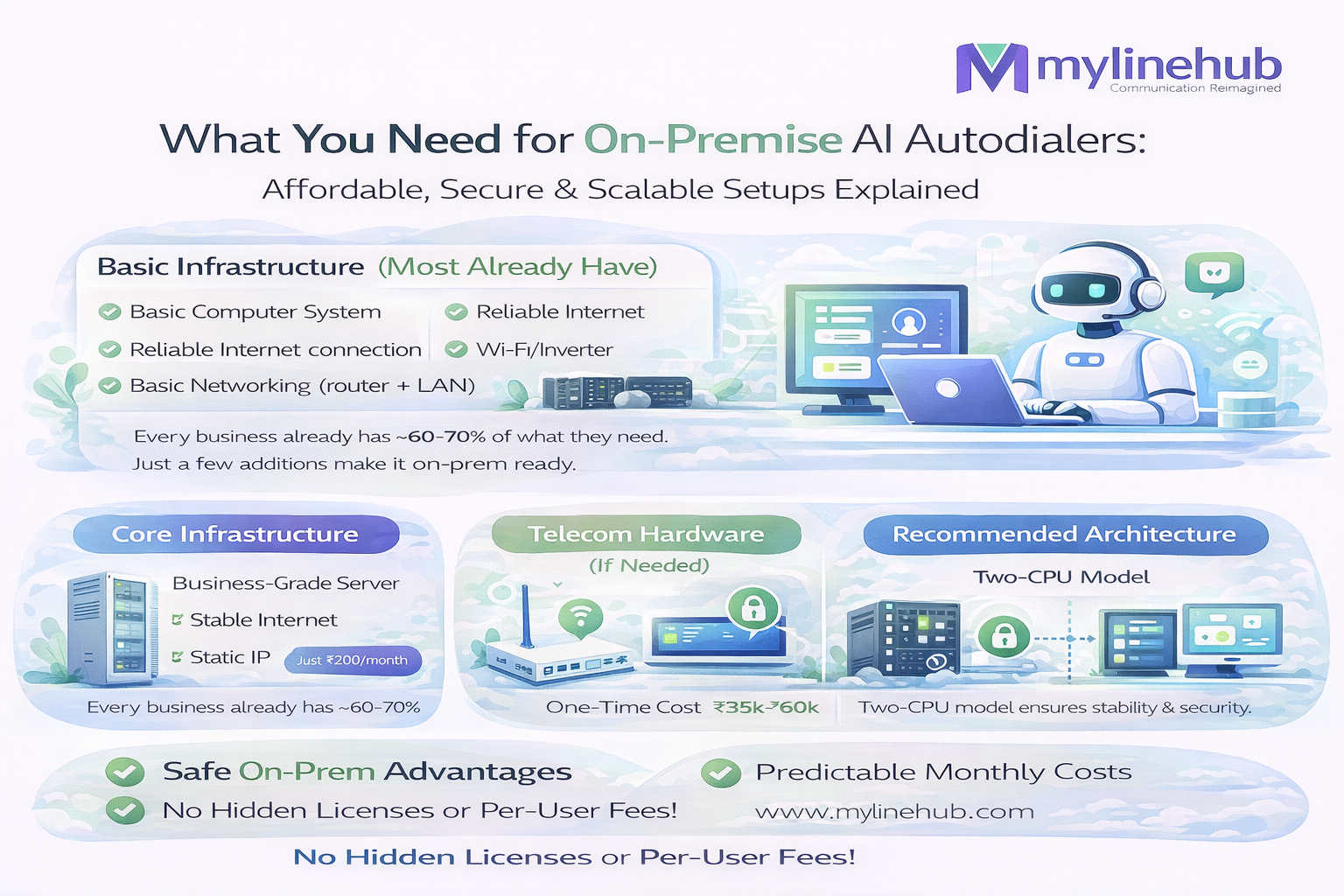
Many businesses already own most of the required infrastructure.
- A basic computer system or server
- Reliable internet connection
- Office electricity backup (UPS / inverter)
- Basic networking (router + LAN)
If your office runs computers daily, you are already 60–70% ready.
Core Infrastructure Required
1. Computer / Server System
- Standard business-grade system (not gaming hardware)
- Minimum 16 GB RAM recommended
- SSD storage for fast performance
This can be a physical system in your office or a cloud VM.
2. Internet Connection
- Stable broadband or leased line
- Consistent upload speed is important for voice
3. Static IP
- Required for secure telecom and API access
- Typical cost: ₹200 per month
Telecom Hardware (Only If Required)
GSM Gateway
GSM gateways are used when businesses want SIM-based calling instead of SIP trunks.
- Typical cost: ₹35,000 – ₹60,000
- One-time hardware investment
- No recurring license cost
If you are using SIP or cloud voice, GSM hardware may not be required at all.
Recommended Architecture (Two-CPU Model)
For stability, security, and scalability, a two-CPU setup is recommended:
- CPU 1: Handles Asterisk / telephony execution
- CPU 2: Handles AI calling, CRM, automation, and dashboards
This separation ensures that voice performance is never impacted by automation or analytics workloads.
Important: For WhatsApp-only automation, only the second system is required. No Asterisk server is needed in that case.
Cloud vs Office Hosting
You have full flexibility in deployment:
- Host both systems in your office
- Host both systems on cloud
- Hybrid setup (one on cloud, one on-prem)
Many businesses start with a single system and scale later.
Security & Data Ownership
On-premise setups provide full control over:
- Call recordings
- Customer data
- Interview responses
- AI interaction logs
No third-party platform owns your data. Access is restricted to your internal team and defined IPs.
Expert Guidance, Setup & Training
Technology alone does not solve problems — correct setup and training do.
Expert involvement typically covers:
- System installation and configuration
- Call flow and IVR design
- AI calling logic setup
- Employee training
- Operational best practices
Businesses usually pay a one-time setup and training fee to ensure their teams can run the system confidently and independently.
Ongoing Costs (What You Actually Pay Monthly)
- Internet connection
- Static IP (~₹200/month)
- Electricity
- Optional cloud hosting (if chosen)
There are no hidden usage licenses for on-premise systems.
Why Businesses Choose This Model
- Predictable costs
- Full data control
- No vendor lock-in
- High security
- Long-term savings
Once set up, the system becomes a long-term operational asset — not a recurring dependency.
Key Takeaway
Setting up an on-premise AI calling and telecom system is not complex — it simply requires clarity.
When businesses understand what they already have, what is actually required, and where expert guidance fits in, on-premise systems become one of the most secure and cost-effective choices available.
Want to see API-driven CRM + Telecom workflows in action? Try the WhatsApp bot or explore the demos.
Comments (0)
Be the first to comment.