Asterisk Bridge Types Explained and Their Impact on Media Flow
Understand Asterisk bridge types (mixing, holding, etc.) and how they affect RTP paths, talk/listen direction, and duplex AI audio behavior.
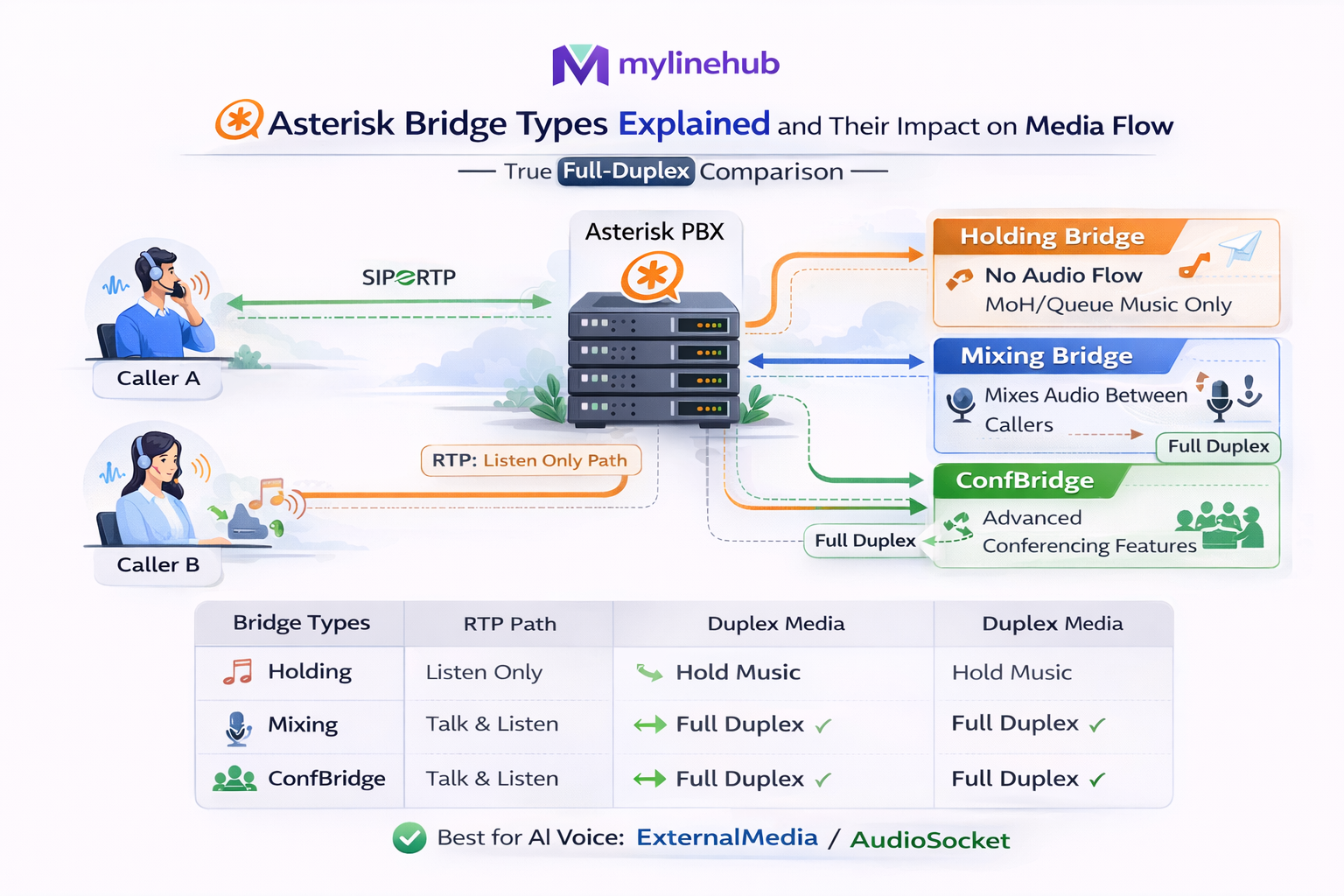
Asterisk Bridge Types Explained (and Their Impact on Media Flow for AI Voice)
If you are building real-time AI voice on Asterisk/FreePBX, bridge selection is not a “nice-to-know”. It directly decides whether you will get clean full-duplex audio or painful issues like one-way voice, talk-over glitches, broken barge-in, and unstable RTP.
This article explains bridge types in practical terms, then shows how MYLINEHUB VoiceBridge uses two mixing bridges to create a predictable duplex media graph (Asterisk ↔ RTP ↔ AI ↔ RTP ↔ Asterisk).
Project (open-source):
mylinehub-voicebridge
Architecture reference:
MYLINEHUB VoiceBridge Architecture
Why bridge types matter more than ARI endpoints
Most “Asterisk AI voice” attempts focus on ARI APIs like /channels, /bridges,
and externalMedia. That’s necessary, but not sufficient.
The real production difficulty is: how Asterisk routes and mixes RTP after you attach channels.
A bridge is not just a container. It is a media decision: does Asterisk mix audio, does it “hold” channels, does it optimize direct media, does it become a hub that changes RTP directionality, and does it create a stable surface for duplex audio injection?
If you want a bot that can: listen while speaking, handle interruptions, and keep audio timing stable, bridge choices become the foundation.
Asterisk bridge types in real deployments (what they “do” to audio)
1) Mixing bridge (the “conference mixer” behavior)
A mixing bridge mixes media from multiple channels and produces a combined output. This is the most useful bridge type for AI voice because it creates a predictable “hub”: you can attach a caller channel and an injected-audio channel and Asterisk will mix them correctly.
- Best for: AI voice injection, duplex audio graphs, barge-in support, and “hub-style” media routing.
- Tradeoff: CPU cost (mixing), but predictable behavior.
- In AI voice: mixing bridges help keep RTP direction stable and avoid “direct media surprises”.
2) Holding bridge (the “parking / holding pattern” behavior)
A holding bridge is designed to hold channels (park/hold) rather than mix multiple audio streams. In AI voice experiments, holding bridges often cause confusion: audio may not be mixed as expected, or injection patterns don’t behave like you want.
- Best for: parking, holding, call waiting patterns.
- Not ideal for: duplex AI injection graphs.
3) “Direct media” / native bridging behavior (why it can hurt AI duplex)
In some call paths, Asterisk tries to optimize by minimizing mixing and keeping endpoints talking directly. That’s great for basic telephony efficiency, but it can break AI voice assumptions. For real-time AI, you typically want a consistent media hub so your bot can reliably listen and speak.
- Best for: endpoint-to-endpoint calls where Asterisk should stay out of the media path.
- Not ideal for: cases where you must inject audio and still capture caller audio.
4) ConfBridge vs ARI mixing bridge (practical distinction)
ConfBridge is a dialplan app designed for conferencing. ARI bridges (type = mixing) are what you control programmatically. In production AI voice, you typically want ARI mixing bridges because you need dynamic channel attachments: caller channel, external media channels, snoop channels, and bot injection legs.
The key AI voice lesson: you don’t build “one bridge” — you build a media graph
Full-duplex AI voice is not “Asterisk + externalMedia”. It is a graph with: caller, capture leg, inject leg, and a controlled mixing point.
MYLINEHUB VoiceBridge uses a two-bridge pattern to keep each direction clean:
- Talk Bridge: Where the caller hears audio (AI → caller). Caller channel + extMediaOut are attached here so Asterisk mixes injected audio to the caller cleanly.
- Tap Bridge: Where VoiceBridge captures only the caller’s speech (caller → AI). A snoop-inbound channel + extMediaIn are attached here to produce a stable RTP stream for ASR/AI.
This is the difference between a demo and production: production needs separation of concerns in the media graph.
How VoiceBridge uses mixing bridges (real code reference)
In the VoiceBridge implementation, two bridges are explicitly created as mixing.
This is not accidental — it ensures predictable audio behavior.
Source file: AriBridgeImpl.java
In the call start flow, VoiceBridge creates:
talkBridge and tapBridge as mixing bridges, then attaches channels accordingly.
(You can find this in the “Build ARI media graph (2 bridges)” section in the file.)
// VoiceBridge: 2 mixing bridges for predictable duplex media graph
Mono<String> talkBridgeMono = ext.createBridge(p, "mixing", talkBridgeName);
Mono<String> tapBridgeMono  = ext.createBridge(p, "mixing", tapBridgeName);

// talkBridge: caller + extMediaOut (AI audio injection back to caller)
// tapBridge : snoop inbound + extMediaIn (caller speech capture to VoiceBridge)
That two-bridge layout is one of the reasons VoiceBridge can achieve true duplex behavior instead of “turn-based IVR style bots”.
Bridge types and RTP direction: what breaks “full duplex” in real life
Many teams assume duplex is only about sending RTP both ways. In reality, duplex fails because of:
- RTP direction flipping when channels are attached to the wrong bridge type.
- Unexpected media optimization (Asterisk trying to remove itself from the media path).
- Audio injection not being mixed (so the caller never hears bot speech).
- Snoop vs direct channel capture confusion (capturing the wrong leg, or capturing silence).
- NAT / firewall making the graph appear correct but RTP never returns.
A mixing bridge reduces surprises: it behaves like a known “audio hub”. That is why VoiceBridge chooses mixing bridges even when simpler bridges might “work” in a lab.
Visual: the two-bridge duplex media graph (Asterisk ↔ VoiceBridge ↔ AI)
Below is a simplified view of the production graph VoiceBridge constructs. It is designed so caller → AI and AI → caller remain independent and stable.
Practical bridge rules for AI voice (what to do, what to avoid)
Use a mixing bridge when you must inject audio
If your bot must speak to the caller, you need a reliable mixing point. A mixing bridge gives you that. It also helps you avoid “it works sometimes” behavior that shows up when Asterisk chooses direct paths.
Separate “capture” from “inject”
Duplex systems fail when capture and inject are attached in a single messy graph. VoiceBridge separates them (Tap Bridge for capture, Talk Bridge for injection). This separation also makes debugging easier: you can isolate which direction is broken.
Snoop is not a replacement for a correct bridge
Snoop is a powerful tool for observing media, but it does not magically solve injection and duplex behavior. Use snoop to capture the correct direction of caller audio, then use a controlled bridge to route it.
Be careful with “holding” semantics for bots
Holding/parking style bridges are for hold-like flows, not for real-time duplex AI. For conversational bots, prefer predictable mixing behavior.
How this connects back to VoiceBridge “first-in-world” duplex goal
The hardest part of “Asterisk AI voice” is not calling an AI API. The hardest part is building a stable, real duplex media path inside Asterisk without breaking your existing PBX.
VoiceBridge is designed as a single Java application you can deploy alongside your current Asterisk/FreePBX, using ARI + RTP to connect your telephony to an AI bot layer — while keeping the PBX clean. That design philosophy is explained in the architecture article: MYLINEHUB VoiceBridge Architecture.
Once you understand bridges, the rest of the system becomes easier: ARI events, ExternalMedia legs, RTP timing, codec conversion, and bot integration. But bridges are the foundation.
Next reads (recommended internal links)
- VoiceBridge Architecture (canonical) — the full end-to-end view of ARI, RTP, and AI.
- Why ExternalMedia becomes one-way (root causes & fixes) — bridge + RTP + NAT realities.
- How to send audio back to caller (working RTP guide) — injection rules, timing, payload discipline.
Open-source project:
MYLINEHUB VoiceBridge
If you’re integrating an external bot (OpenAI Realtime, ChatGPT models, or a custom vendor bot),
the safest approach is to keep telephony stable and treat the AI as a replaceable layer —
bridges + duplex RTP are what make that possible.
Want to see API-driven CRM + Telecom workflows in action? Try the WhatsApp bot or explore the demos.
Comments (0)
Be the first to comment.