FreePBX Outbound Routes: Patterns, Trunks, and CallerID
Screenshots + clean steps to configure this FreePBX module in a production-safe way.
FreePBX Outbound Routes: Patterns, Trunks, and CallerID
Outbound Routes control how calls leave your PBX. Every external call must match:
- A dial pattern
- An outbound route
- A trunk/provider
If outbound routing is wrong, calls may:
- Fail completely
- Use the wrong SIP provider
- Send incorrect Caller ID
- Create billing or fraud risks
Where Outbound Routes Fit in Call Flow
Extension / Queue / IVR
        → Dial Pattern Match
            → Outbound Route
                → Trunk
                    → Provider Network
FreePBX evaluates routes top to bottom. The first matching route wins.
Step 1: Route Settings (Define Where Calls Go)
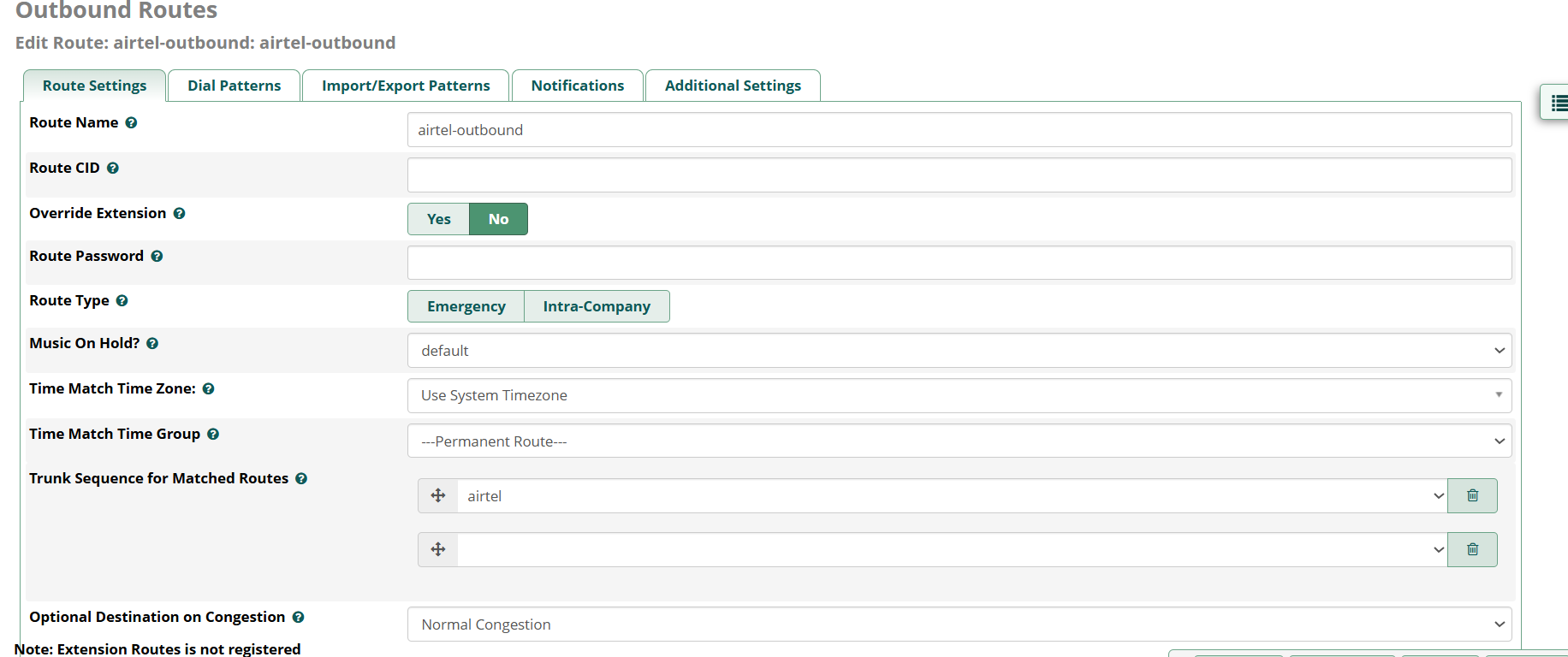
Important Fields Explained
- Route Name → Logical label (example:
airtel-outbound) - Route CID → Caller ID forced for this route
- Override Extension → If enabled, trunk/route CID replaces extension CID
- Music On Hold → Played before trunk answers
- Time Match Group → Restricts route to working hours
- Trunk Sequence → Provider priority order (failover logic)
- Optional Destination → Where call goes if trunk fails
In production systems, trunk sequence is critical:
Primary trunk → Secondary trunk → Backup trunkStep 2: Dial Patterns (Most Important Concept)
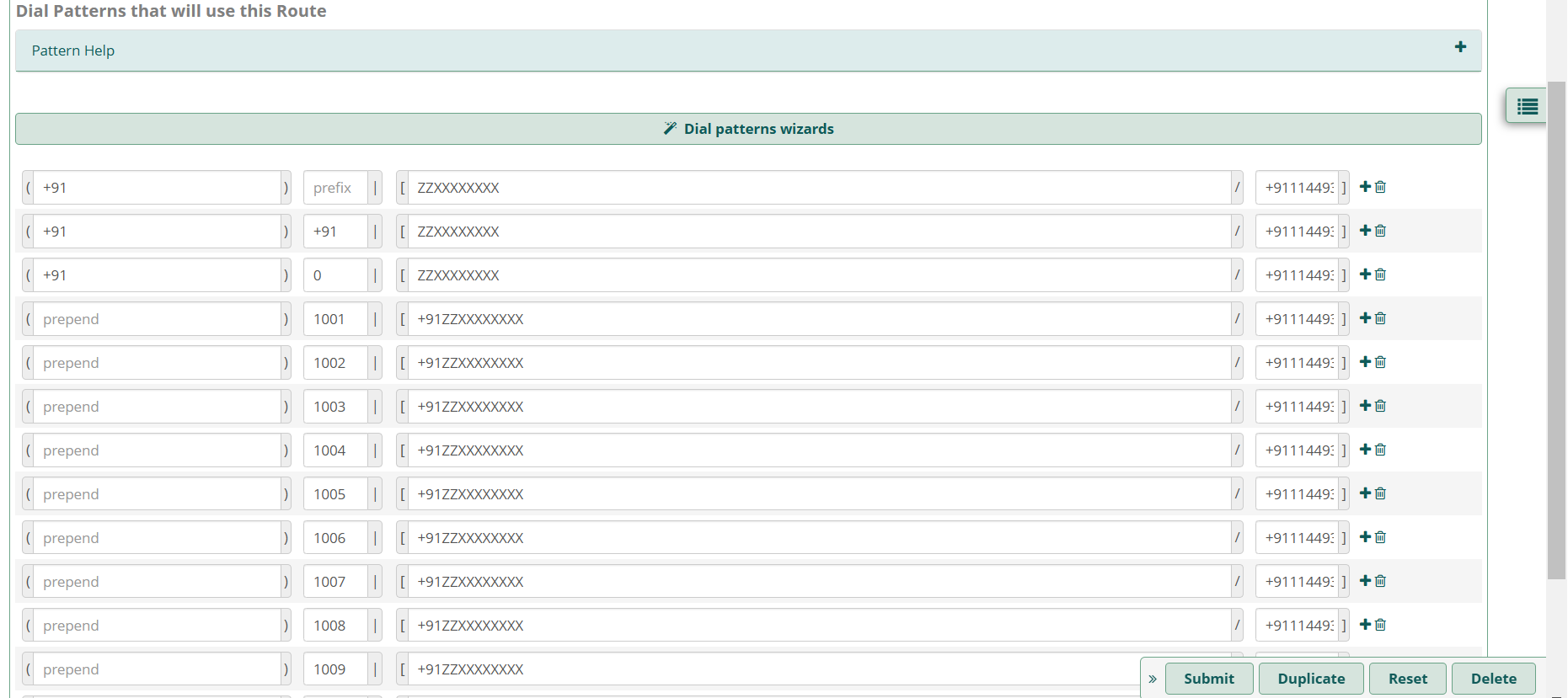
A dial pattern decides: Which numbers are allowed and how they are modified before reaching the provider.
Three Core Columns in Dial Patterns
- Prefix → Digits user dials first (removed before sending)
- Match Pattern → Structure of allowed phone number
- Prepend → Digits automatically added before sending to trunk
Real Meaning Using the Screenshot Example
The image shows normalization for Indian numbers:
User may dial:
+91XXXXXXXXXX
XXXXXXXXXX
0XXXXXXXXXX
1001 + number (internal prefix case)

Route converts all formats → +91XXXXXXXXXX
before sending to trunk.
This ensures:
- Users can dial in different formats
- Provider always receives one clean standardized number
- Billing and routing stay correct
Prefix vs Prepend (Critical Difference)
Prefix  → REMOVED from dialed number
Prepend → ADDED before sending to trunk
Example:
User dials:   9 9876543210
Prefix:        9   → removed
Prepend:       +91 → added
Sent to trunk: +919876543210
This is called number normalization, and it is essential for multi-provider environments.
Caller ID Behavior in Outbound Routes
Caller ID priority typically works like this:
Extension CID
   → Route CID (if override enabled)
       → Trunk CID
           → Provider enforced CID
Many providers allow only pre-approved numbers. If CID is invalid, calls may fail or appear anonymous.
Security & Fraud Protection
- Restrict international dialing
- Use PIN sets for expensive routes
- Allow only required dial patterns
- Monitor abnormal call spikes
Misconfigured outbound routes are a top cause of VoIP fraud worldwide.
Troubleshooting Outbound Calls
Call not going out
- Dial pattern mismatch
- Wrong trunk
- Provider authentication issue
Wrong Caller ID
- Provider override
- Route CID misconfigured
Wrong trunk used
- Route order incorrect
- Overlapping dial patterns
asterisk -rvvvvv
pjsip set logger on
Production Checklist
- Routes ordered correctly
- Dial patterns normalized
- Caller ID approved by provider
- Failover trunk configured
- International dialing secured
Next step in production: Queues, Recording, and Analytics to measure real business performance.
Want to see API-driven CRM + Telecom workflows in action? Try the WhatsApp bot or explore the demos.
Comments (0)
Be the first to comment.