How Asterisk Architecture Processes a Call
Asterisk processes a call by turning signalling from a device or provider into a channel, placing that channel into a dialplan context, executing ordered applications, and creating or joining additional channels when the call needs another party.
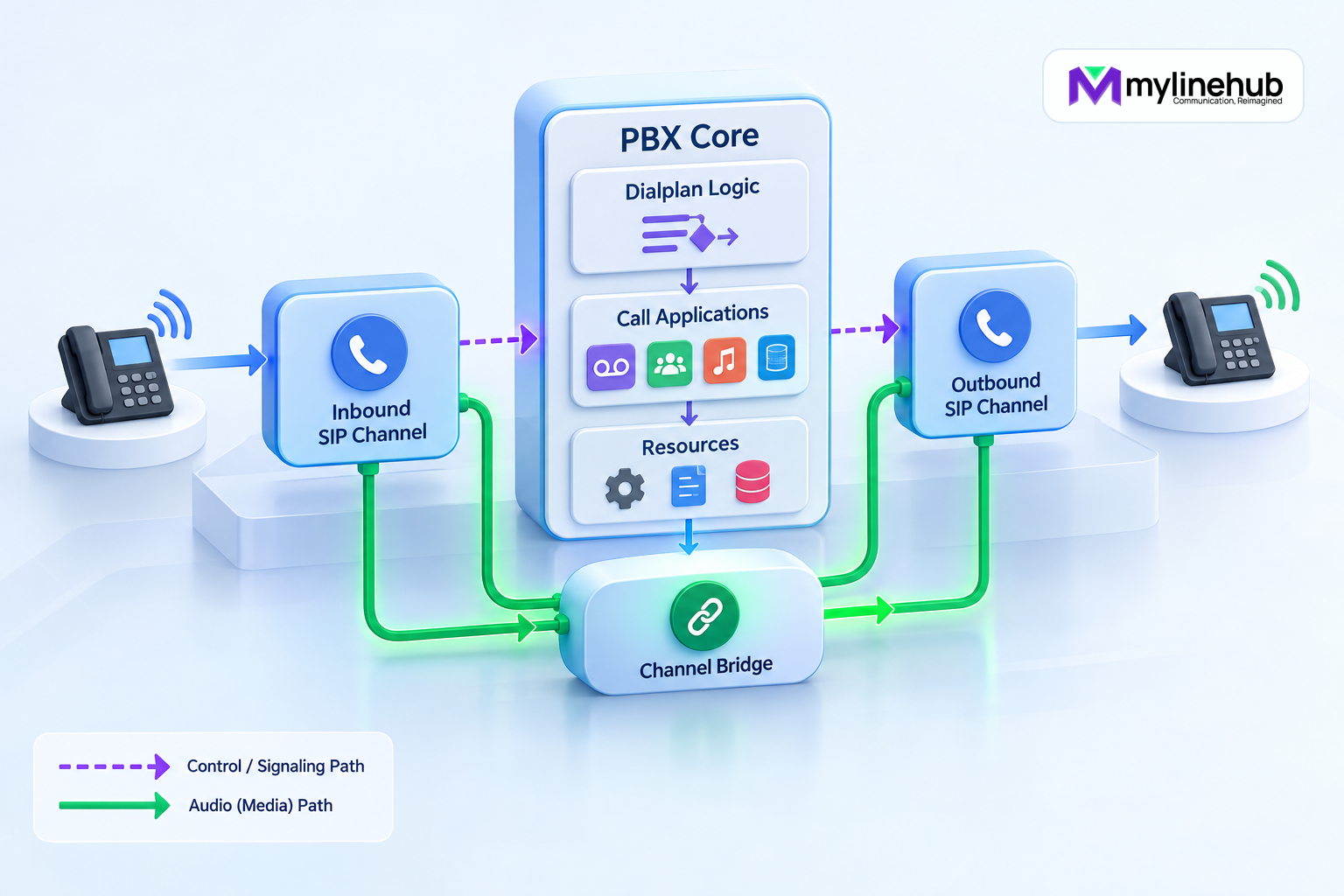
Asterisk processes a call by turning signalling from a device or provider into a channel, placing that channel into a dialplan context, executing ordered applications, and creating or joining additional channels when the call needs another party. Media negotiation and bridging happen alongside that control flow. Understanding those stages makes troubleshooting much faster because each symptom can be tied to the component that owns it.
This article explains the architectural path rather than one vendor configuration. Exact modules, commands and defaults depend on the installed Asterisk branch and build. Review the documentation for the deployed version and inspect the running system before making changes.
The main building blocks
Asterisk is modular. Channel drivers connect it to communication technologies; PJSIP is the usual SIP stack in current deployments. The core manages channels, frames, timing and bridges. The dialplan supplies call-routing logic. Applications such as Dial(), Playback() and Queue() act on the channel. Resource modules provide capabilities such as music, recording, RTP support and protocol services.
An endpoint, trunk, route and call are not interchangeable. A PJSIP endpoint describes SIP behaviour and links to other objects. An address of record, or AoR, tells Asterisk where an endpoint can be contacted. An auth object holds authentication details. An identify object can associate inbound traffic from an address with an endpoint. A live call uses channels created from these configured relationships.
Stage 1: signalling reaches a channel driver
For a SIP call, a request arrives at a configured PJSIP transport. Asterisk must identify which endpoint the request belongs to and decide whether authentication applies. Identification can use mechanisms such as source address or SIP identity according to loaded modules and configuration. Authentication and endpoint identification solve different questions and should not be confused.
If the request is acceptable, the channel driver creates a channel representing that call leg. The channel has a name, state, variables and a unique identifier. Signalling details are translated into information the Asterisk core and dialplan can use. A rejected or unidentified request may never reach the intended dialplan context, so endpoint matching is an early troubleshooting boundary.
Stage 2: the channel enters a context
The endpoint configuration selects a dialplan context for incoming calls. Contexts separate sets of extensions and can act as security boundaries. A provider-facing endpoint should reach only routes intended for provider traffic; a registered internal phone may receive a different class of service.
Within a context, Asterisk looks for an extension matching the dialed value. An extension is a named sequence of priorities. Each priority invokes an application. Exact extensions, patterns, includes and switches can all participate in matching, and careless broad patterns or includes can expose routes that were not intended.
In extensions.conf, a simple path may begin with priority 1 and then use same => n for following steps. Labels, subroutines and conditionals make richer flows possible. The official dialplan documentation should be checked for the deployed branch because application arguments and behaviour can evolve.
Stage 3: applications act on the channel
Applications perform work in sequence. Answer() answers the leg. Playback() sends audio. Digit collection can route an IVR. Dial() requests one or more outbound channels. An application can set variables, jump to another location, invoke a subroutine, return a result or end the channel.
Channel variables carry call-specific values such as the current context, extension, priority, caller information and identifiers. Some variables influence channel drivers or bridge behaviour. Treat their scope carefully: inherited variables, leg-specific values and global configuration serve different purposes.
The dialplan is executable routing logic, not merely a telephone-number list. Keep contexts narrow, validate external input and avoid allowing untrusted inbound traffic to reach unrestricted outbound routes.
Stage 4: a destination creates another leg
When Dial() calls a PJSIP endpoint or provider, Asterisk resolves how that destination can be contacted. For a registered phone, the AoR may contain a dynamic contact. For a static upstream, it may contain a configured contact. An outbound registration to a carrier is a separate object and is not automatically the same as endpoint routing.
A new outbound channel becomes the B-leg. The original caller is commonly called the A-leg. The B-leg proceeds through its own signalling states: created, ringing, answered, rejected, unavailable or timed out. The application returns a result that the dialplan can use for follow-up logic.
If a phone is registered but cannot be dialed, inspect endpoint-to-AoR relationships and contacts. If a provider registration is active but calls fail, inspect the endpoint, route, address/URI construction, caller ID and provider response rather than treating registration as proof of complete service.
Stage 5: media is negotiated
SIP signalling describes media using SDP. Each leg may offer codecs, addresses and ports. Asterisk negotiates compatible media according to endpoint settings, capabilities and topology. RTP normally carries audio separately from SIP signalling, which is why a call can ring and answer yet have one-way or no audio.
Asterisk may remain in the media path and bridge frames, translate codecs when supported, or use direct-media behaviour where configuration and endpoints permit it. Network address translation, advertised SDP addresses, RTP port rules and endpoint reachability all affect the result.
Troubleshoot signalling and media as related but distinct planes. A SIP success response proves signalling progress, not that RTP packets travel both directions or that the audio payload is usable.
Stage 6: channels enter a bridge
After the called party answers, Asterisk places channels into an appropriate bridge so media and control can flow between them. Bridge technology is selected according to channel capabilities and required features. Recording, DTMF handling, transcoding, monitoring or application control can affect how the bridge operates.
A two-party call is therefore not one indivisible object. It is at least two channels plus their relationship. Conferences, queues and application-controlled calls may involve more channels and bridges. Use stable identifiers and timestamps to correlate them rather than assuming every event with a phone number describes the same leg.
Stage 7: hang-up and final handling
Either endpoint, the provider, the dialplan or an application can end a leg. Asterisk propagates signalling as appropriate, removes channels from bridges and releases resources. Dialplan hang-up handling, call detail records, channel events or external applications may record results.
A hang-up cause is evidence, not always a complete business explanation. For example, a busy response, timeout and rejected caller ID have different owners and follow-up. Preserve the provider response, Asterisk channel result and application outcome separately.
Where AMI and ARI fit
The Asterisk Manager Interface exposes actions and events useful for management, monitoring and call control. The Asterisk REST Interface exposes channels, bridges, endpoints and media primitives for developers building communications applications, with REST operations and WebSocket events. They are not interchangeable with the dialplan.
Use AMI when the application primarily observes or operates Asterisk through manager actions and events. Use ARI when application logic intentionally controls communications primitives in Stasis. In either case, restrict credentials, permissions and network access, handle reconnect and event ordering, and keep authoritative telephony evidence in Asterisk.
Trace an inbound call
- The carrier sends an INVITE to the permitted transport and address.
- PJSIP identifies the configured provider endpoint.
- Asterisk creates the inbound channel and assigns its context.
- The dialed number matches an exact extension or permitted pattern.
- Dialplan applications set policy, play media or select a destination.
Dial()creates one or more destination channels.- The selected destination answers and a bridge connects the legs.
- RTP carries media according to negotiated addresses and codecs.
- Hang-up ends the bridge and produces final events and records.
At every step, confirm observed values rather than relying on a diagram written for another provider.
Production troubleshooting sequence
Begin with one precise call: time with timezone, direction, source, destination, expected context and observed outcome. Inspect whether the request arrived, which endpoint identified it, which context and extension matched, which applications ran, whether a destination channel was created, what signalling response occurred and whether RTP flowed both ways.
Use the CLI and logs carefully in a controlled window. Commands such as PJSIP endpoint/contact inspection, dialplan inspection, active channel views and appropriately scoped logging can expose secrets or customer data, so restrict and redact evidence. Packet capture is powerful but requires authorization and secure handling.
Change and verification rules
Observe the live configuration first. Prepare a narrow proposal, obtain approval, back up the affected scope, validate configuration and use the supported reload mechanism. Then place a real test call through the relevant provider. Check number representation, routing, ringing, answer, two-way audio, DTMF where used, hang-up and records.
Do not declare success because the file parsed or the service stayed running. Do not overwrite provider credentials or unrelated objects when changing a route. If evidence conflicts, stop and identify the authoritative layer.
Version note and official reference
This architecture overview was reviewed in September 2026 against the official Asterisk dialplan documentation, PJSIP object relationships, and ARI overview. Confirm behaviour against the exact installed Asterisk version, its generated configuration reference and loaded modules.
Continue planning
Continue with MYLO Appliance vs MyLineHub Open Source: Which Path Fits?; How FreeSWITCH Architecture Processes a Call; FreeSWITCH vs Asterisk: A Business Decision Guide. For deeper implementation context, use MyLineHub technical architecture guidance.
For a requirement outside the prepared MYLO scope, discuss the exact outcome with MyLineHub.
Want to see API-driven CRM + Telecom workflows in action? Try the WhatsApp bot or explore the demos.
Comments (0)
Be the first to comment.