How FreeSWITCH Architecture Processes a Call
FreeSWITCH processes a call by creating a session and channel for an endpoint, attaching variables and state, locating configuration and identity information, evaluating dialplan instructions, running applications, and often creating or bridging another channel.
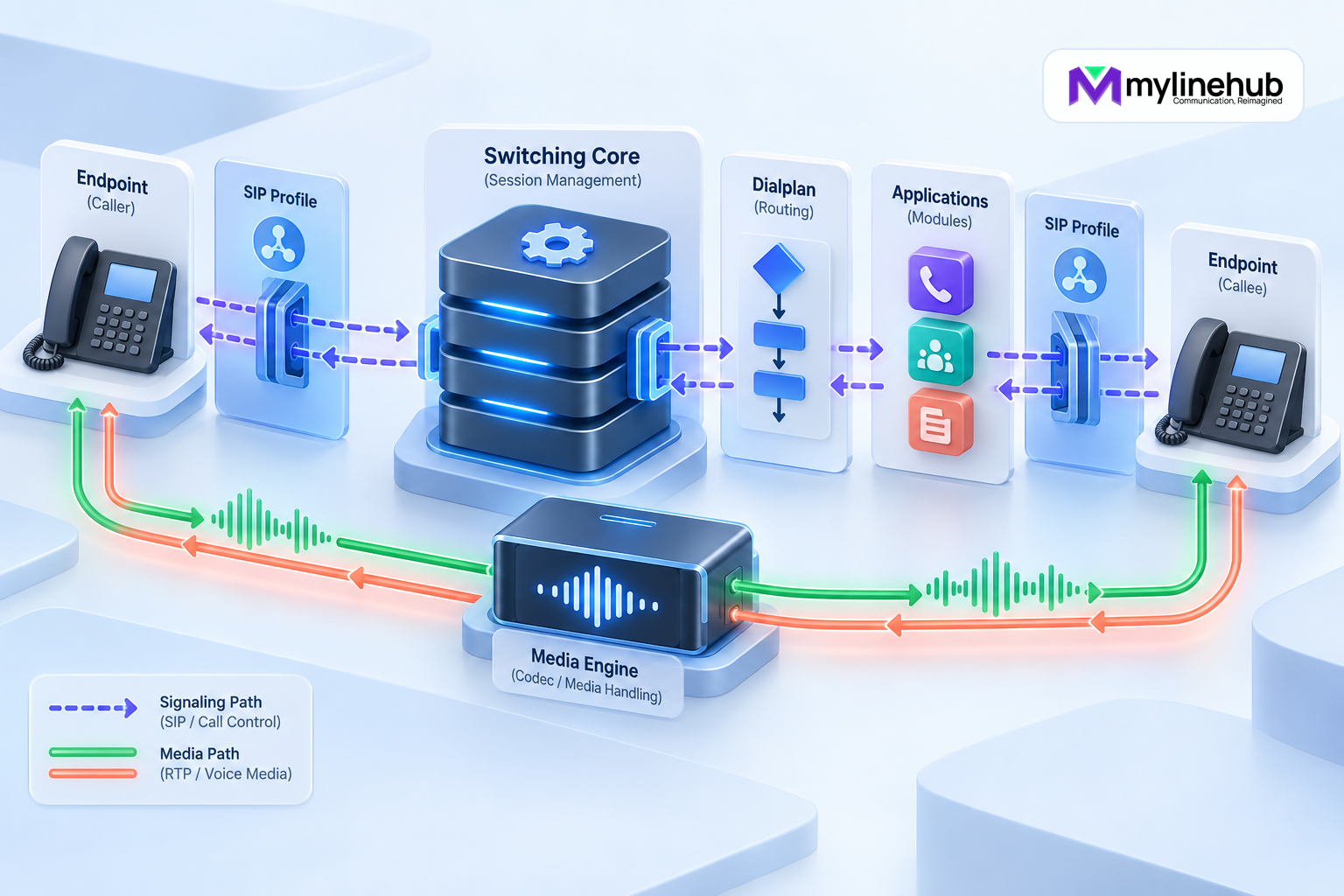
FreeSWITCH processes a call by creating a session and channel for an endpoint, attaching variables and state, locating configuration and identity information, evaluating dialplan instructions, running applications, and often creating or bridging another channel. Understanding that path helps a business interpret routing, audio, events, and reports without reducing every issue to “FreeSWITCH failed.” This overview was reviewed against the official FreeSWITCH Users Manual on 27 September 2026; exact module parameters and defaults must be checked against the installed release.
An Endpoint Module Receives Signalling
A protocol endpoint module accepts or originates the first leg. For SIP, mod_sofia uses a SIP profile bound to a particular address and port. The profile defines transport behaviour, authentication policy, codec preferences, ACLs, and the dialplan context used for accepted calls.
An external provider and an internal phone may use separate profiles. Arrival at a listening socket does not mean the call is authorised or correctly routed; profile and network policy still apply.
FreeSWITCH Creates a Session and Channel
The core creates a session containing the channel and application state for that leg. The channel has a UUID, call state, media state, caller and destination data, and channel variables. These values may originate from signalling, the directory, configuration, or applications.
A channel is one leg, not automatically the whole conversation. A two-party call commonly has two channels. Preserve both identities in event processing and CDR reporting.
The Directory Answers Who and What
For registered users and domains, the directory supplies authentication and properties. A user’s variables can influence routing, including the selected context. Gateways and domain information may also participate according to configuration.
The directory should not be confused with the dialplan. Successful authentication identifies an allowed endpoint; it does not by itself authorise every destination or define the final route.
The Dialplan Selects a Route
The dialplan evaluates the selected context, then extensions and conditions, to decide which actions run. Conditions can inspect the destination and other channel fields. Actions can set variables, answer, play media, collect DTMF, invoke applications, bridge, transfer, record, or hang up.
Order and context matter. A broad match placed early can prevent a later route from running. Secure designs place external and internal sources in appropriate contexts and validate any value that could influence a destination.
Applications Perform Work
Applications are provided by loaded modules. The default tools module supplies many common dialplan actions, while conference, voicemail, recording, and other functions have their own modules and configuration. An application can modify channel state, consume input, create media, or initiate another leg.
Only installed and loaded modules are available. A copied configuration from another server may reference a module, codec, path, or parameter absent from the current build.
Bridging Creates the Other Side
A bridge action can originate a new outbound channel through an endpoint such as Sofia. The outbound profile or gateway then handles SIP signalling toward a phone or provider. When the destination answers and policy permits, FreeSWITCH joins channels so media can flow.
The originating and outbound legs can have different states and results. The customer may answer while an agent leg fails, or a provider may reject the outbound leg before the original party hears normal ringing.
Media Has Its Own Path
SIP negotiates sessions; RTP commonly carries audio. Codec offers, addresses, ports, NAT, firewall behaviour, early media, transcoding, and endpoint capabilities determine whether sound works. Signalling success cannot prove two-way media.
Depending on configuration and features, FreeSWITCH may remain in the media path to bridge, mix, record, transcode, or run applications. Architecture and capacity testing should reflect the real media mode, codecs, and concurrency.
Events Describe Runtime Transitions
The core emits events for channel lifecycle and many module-specific activities. Channel events commonly carry the channel UUID and relevant caller, destination, state, and variable fields. Consumers can subscribe through the Event Socket or other event-handler modules.
External applications must tolerate duplicates, delay, and restarts, preserve event identity, and reconcile against durable records. Do not let a late intermediate event overwrite a confirmed terminal outcome.
CDRs Record Per-Leg Results
Selected CDR modules can export records for each channel leg. These records support billing, reporting, and investigation, but an application must correlate them into business calls and flows. A bridge involving several attempts may create several related records.
Define which timestamp and result fields support each metric. “Answered” on one leg is not automatically a successful customer-agent conversation. Keep operational fields before deriving simplified categories.
External Control Changes the Path
The Event Socket can let an application issue commands, originate calls, and receive events. In outbound socket mode, the dialplan can hand a specific leg to an external controller. XML-CURL and scripting modules offer other integration patterns.
Every external controller needs authentication, network restriction, input validation, timeouts, idempotent business logic, and failure handling. If the controller disappears mid-call, the dialplan must have a defined outcome rather than leaving customer experience to chance.
Reload, Restart, and Runtime State Differ
Configuration files are assembled into runtime XML and modules maintain live state. A file edit does not prove the running process loaded it. Some changes can be reloaded; others affect a profile, module, or process and need a controlled operation. Consult installed-version documentation.
Before changes, observe current state and back up. Afterward, inspect the loaded result and place a real authorised call through the affected route. Restarting everything is not a substitute for understanding scope.
Trace a Call Systematically
- Identify direction, profile, source, destination, time zone, and channel UUID.
- Confirm acceptance, authentication, ACL, and context.
- Follow dialplan matches and actions in order.
- Identify every originated channel and bridge relationship.
- Separate signalling results from RTP media evidence.
- Correlate events and per-leg CDRs.
- Verify external provider and network evidence where ownership leaves FreeSWITCH.
- Repeat the real journey after correction.
The architecture becomes understandable when each leg, authority, and transition is kept distinct.
Follow an Inbound Provider Example
A provider sends SIP to the external profile. Network and profile policy accept or reject it, then the profile places the channel in an intended context. The dialplan matches the received number, sets business variables, and may answer, play an IVR, or bridge to an internal user through another profile. Each leg emits events and later produces its own CDR evidence.
If the phone rings without audio, the route and signalling partly worked; inspect RTP negotiation and network path. If the provider never reaches the profile, dialplan edits are unlikely to help.
Follow an Outbound Endpoint Example
An authenticated endpoint creates an internal channel. Its directory properties select a context. The dialplan validates and normalises the destination, applies permissions and caller identity, then bridges through an approved gateway or external profile. Provider rejection affects the outbound leg and must be translated carefully for the caller and report.
Keep endpoint identity, gateway authentication, business DID, and presented caller ID separate. They can legitimately differ, and conflating them leads to insecure or rejected configurations.
Understand IVR Timing
An IVR may answer or provide early media, play a prompt, collect DTMF, validate input, repeat, time out, and transfer. Each action changes channel variables and state. Test valid digits, invalid digits, no input, early hangup, and downstream failure through the real path.
DTMF can use RTP events, SIP INFO, or in-band audio depending on endpoints and configuration. A prompt being audible does not prove digit signalling works.
Observe Without Creating New Failure
Use bounded logs, channel UUIDs, profile status, events, and packet capture only with authority. Avoid global debug during busy periods when a narrow trace answers the question. Diagnostic output can expose numbers, addresses, authentication information, and call behaviour.
State what the evidence proves and which layer owns the next check. FreeSWITCH data cannot prove a provider’s internal route, and a provider success message cannot prove the business dialplan or audio after handoff.
Build an Evidence Map Before Troubleshooting
A production team should decide in advance which identifiers connect the layers. Start with the business transaction or customer reference, then retain the FreeSWITCH channel UUID for every leg, the direction, profile, context, destination, gateway, bridge relationship and terminal cause. Event consumers should store enough raw information to explain a derived outcome without copying credentials or unrestricted personal data into logs.
The evidence map should name the authority for each question. FreeSWITCH can show that a profile received a SIP request, which context and dialplan actions ran, which channels were created and which cause ended a leg. Packet evidence can show negotiated addresses and observed RTP. The carrier must explain routing inside its own network, and the business application must explain why it requested a call or chose a destination. No single log proves the entire customer journey.
During an incident, follow one known call by time and UUID rather than searching broad logs for a phone number alone. Compare the intended route with the loaded runtime, correlate both legs, then inspect media only after signalling and bridging are understood. This sequence produces a defensible diagnosis and reduces the risk of several teams making unrelated changes at once.
Design Recovery Around Call State
Recovery planning must account for active channels and external controllers. A configuration reload, profile restart, module reload or full process restart can have different effects. The safest action depends on the failed component, the installed release and the business tolerance for interrupted calls. Document the smallest corrective action, its expected customer impact, the evidence that authorises it and the rollback path.
The official FreeSWITCH core-concepts documentation explains the relationship among endpoints, sessions, channels, bridges, modules and configuration domains. The Event Socket chapter explains the inbound and outbound control models. Review the corresponding pages for the deployed release before relying on a command, parameter or default.
After recovery, validate the business result, not merely process status. Place authorised inbound and outbound calls, confirm the intended route, test DTMF and two-way audio, verify event and CDR delivery, and ensure monitoring has returned to normal. Record the cause, action, result and any follow-up improvement. That closes the architecture loop from signalling through media, external control and operational evidence.
Continue planning
Continue with MYLO Appliance vs MyLineHub Open Source: Which Path Fits?; How to Install FreeSWITCH on Debian or Ubuntu; How Asterisk Architecture Processes a Call. For deeper implementation context, use MyLineHub technical architecture guidance.
For a requirement outside the prepared MYLO scope, discuss the exact outcome with MyLineHub.
Want to see API-driven CRM + Telecom workflows in action? Try the WhatsApp bot or explore the demos.
Comments (0)
Be the first to comment.