Reset Angular Setup for MYLINEHUB UI (Clean Rebuild & Fix Broken Builds)
Fix broken Angular builds and do a clean reset—node_modules cleanup, cache reset, version alignment, and rebuild steps.
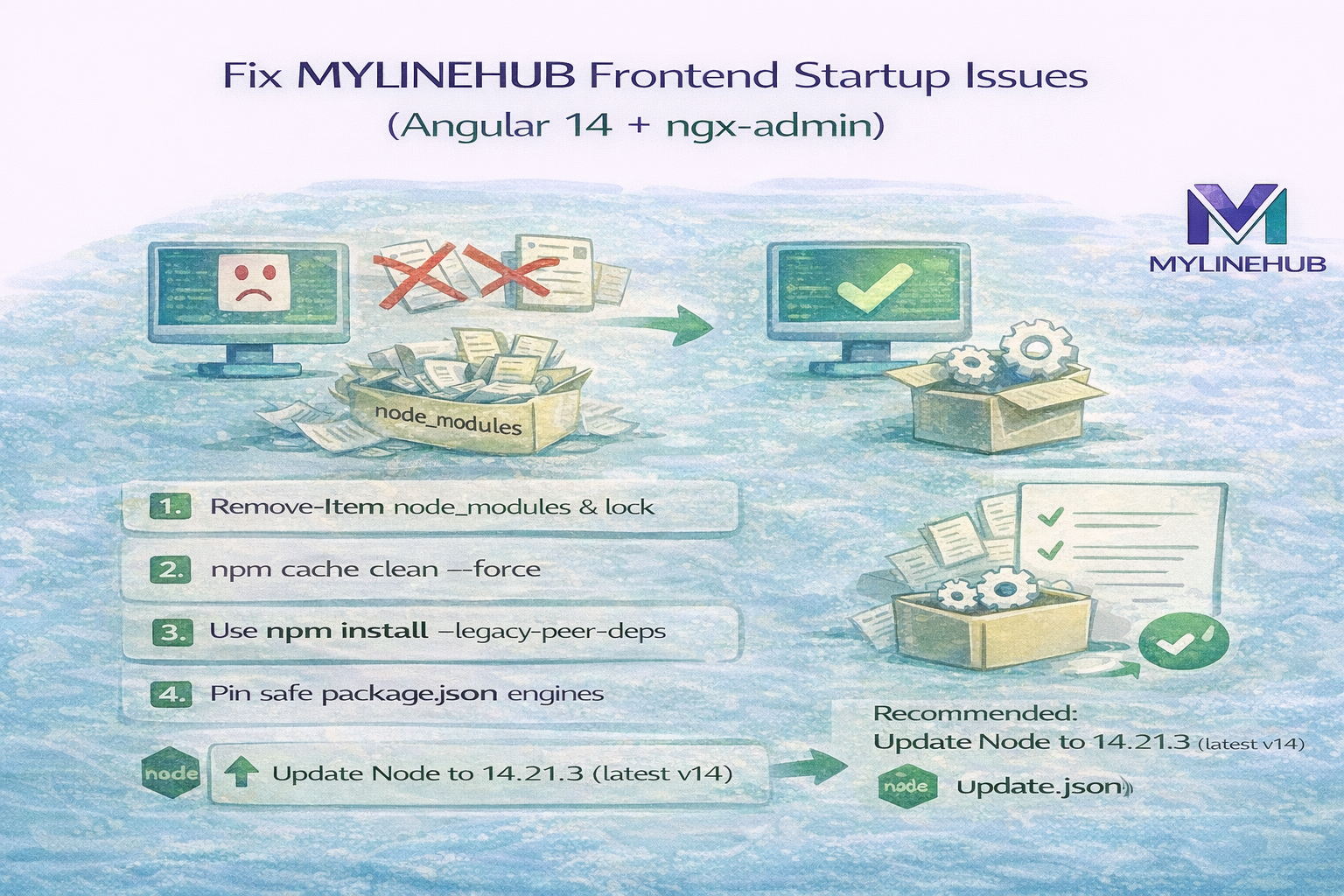
Fix MYLINEHUB Frontend Startup Issues (Angular 14 + ngx-admin) — Clean Install & Package Safety Guide
If your MYLINEHUB Angular frontend does not start correctly, the root cause is usually a broken node_modules tree, a wrong Node/NPM combination, or a dependency graph that got updated beyond Angular 14 support.
MYLINEHUB CRM frontend is built on Angular 14 and ngx-admin / Nebular. That stack is very sensitive to:
- Node version mismatches
- Auto-updated transitive packages (especially when using npm 8+ without pinning)
- Old / inconsistent lock files created on another machine
- Mixed installs (some dependencies installed earlier with different Node versions)
This article shows the safest approach to reset and reinstall dependencies without breaking your system, and explains which files are required vs optional.
What You Are Seeing and Why It Happens
You installed on: Node v14.17.3 with npm 8.19.4. Your project is Angular 14, and that part is okay.
But your install output shows EBADENGINE warnings like:
- cheerio@1.1.2 requires Node >= 20
- undici@7.x requires Node >= 20
- send@1.2.0 requires Node >= 18
This means some dependency in your tree pulled a newer major version than Angular 14-era tools were designed for. This usually happens when:
- package-lock.json was created using a newer Node/NPM machine
- dependencies were installed earlier with Node 18/20 and then reused
- lockfile is missing or deleted and npm resolved latest transitive versions
Result: build might still install, but runtime/serve can break, or ng build fails randomly.
Correct Target Runtime for This Project
For Angular 14 + ngx-admin, safest combinations are:
- Node 14.20.x + npm 6/7 (most stable)
- Node 16.20.x + npm 8 (also stable)
Your Node is 14.17.3 which is slightly old for some modern transitive packages. Even though your package.json says "node >= 14", many new packages now require 14.18+, 16+, 18+ or 20+.
✅ Best quick fix: upgrade Node within v14 line to 14.21.3 (still Node 14, but latest patch).
Step 1 — Clean Install (Required Before Any Fix)
Run these commands in PowerShell from the project root:
# Delete node_modules (removes corrupted dependency tree)
Remove-Item -Recurse -Force .\node_modules\

# Delete lock file (forces fresh dependency resolution)
Remove-Item -Force .\package-lock.json

# Clear npm cache (removes cached broken packages)
npm cache clean --force
Why this is important:
- node_modules may contain packages compiled for another Node version
- package-lock.json can force incompatible versions to install
- npm cache sometimes keeps corrupted tarballs
Step 2 — Install Using a Safe Command
After cleanup, install dependencies with:
npm install --legacy-peer-deps
Why:
- Angular 14 + Nebular often has strict peer dependency graphs
- npm 8+ becomes aggressive and may refuse correct older versions
- legacy-peer-deps keeps it installable without forcing upgrades
Then start:
npm run start
Why You Get So Many Deprecated Warnings
Most deprecation warnings are not your direct packages. They come from old tools in the Angular ecosystem such as:
- protractor (deprecated by Angular)
- tslint (deprecated in favor of eslint)
- rimraf v2/v3 (older versions)
These warnings do not always prevent startup. But they indicate the dependency tree is old (which is expected in Angular 14 projects).
What About the 63 Vulnerabilities?
You saw:
63 vulnerabilities (10 low, 19 moderate, 32 high, 2 critical)
For older Angular stacks, this is common because many tools are frozen.
✅ Recommended approach:
- Do NOT run npm audit fix --force (it will upgrade major versions and break Angular 14)
- If you must reduce risk: patch only selected packages manually after verifying builds
If the app runs correctly, keep it stable first, then harden later.
Fixing Your package.json Without Breaking the System
Your package.json is mostly correct for Angular 14. The two real risks causing your install warnings are:
- Some transitive dependencies pulling Node 18/20-required packages
- Very old dev tools like karma-cli 1.0.1
Below is a safe version of your package.json with minimal changes:
- ✅ Keep Angular 14 versions same
- ✅ Remove karma-cli (not required; use "karma" from devDependencies)
- ✅ Pin a safer Node range (14.20.x or 16.20.x)
- ✅ Add "packageManager" field (helps future stability)
Complete Copy-Paste package.json (Safe for Angular 14)
{
  "name": "mylinehub-crm-frontend",
  "version": "0.0.1",
  "license": "Mylinehub-Commercial",
  "repository": {
    "type": "git",
    "url": "git+https://github.com/anandgoel1/mylinehub-crm-frontend"
  },
  "bugs": {
    "url": "https://github.com/anandgoel1/mylinehub-crm-frontend/issues"
  },
  "scripts": {
    "ng": "ng",
    "conventional-changelog": "conventional-changelog",
    "start": "ng serve",
    "build": "ng build",
    "build:prod": "npm run build -- --configuration production --aot",
    "test": "ng test",
    "test:coverage": "rimraf coverage && npm run test -- --code-coverage",
    "lint": "ng lint",
    "lint:fix": "ng lint --fix",
    "lint:styles": "stylelint ./src/**/*.scss",
    "lint:ci": "npm run lint && npm run lint:styles",
    "pree2e": "webdriver-manager update --standalone false --gecko false",
    "e2e": "ng e2e",
    "docs": "compodoc -p src/tsconfig.app.json -d docs",
    "docs:serve": "compodoc -p src/tsconfig.app.json -d docs -s",
    "prepush": "npm run lint:ci",
    "release:changelog": "npm run conventional-changelog -- -p angular -i CHANGELOG.md -s",
    "postinstall": "ngcc --properties es2015 es5 browser module main --first-only --create-ivy-entry-points --tsconfig ./src/tsconfig.app.json",
    "px-to-rem": "node convert-px-to-rem.js"
  },
  "dependencies": {
    "@angular/animations": "14.2.12",
    "@angular/cdk": "14.2.7",
    "@angular/common": "14.2.12",
    "@angular/compiler": "14.2.12",
    "@angular/core": "14.2.12",
    "@angular/forms": "14.2.12",
    "@angular/google-maps": "14.2.7",
    "@angular/material": "14.2.7",
    "@angular/platform-browser": "14.2.12",
    "@angular/platform-browser-dynamic": "14.2.12",
    "@angular/router": "14.2.12",

    "@asymmetrik/ngx-leaflet": "3.0.1",
    "@auth0/angular-jwt": "5.1.2",
    "@babel/runtime": "^7.28.4",

    "@nebular/auth": "10.0.0",
    "@nebular/eva-icons": "10.0.0",
    "@nebular/security": "10.0.0",
    "@nebular/theme": "10.0.0",

    "@stomp/rx-stomp": "2.0.0",
    "@stomp/stompjs": "7.0.0",
    "@types/file-saver": "2.0.7",

    "bootstrap": "4.3.1",
    "ckeditor": "4.7.3",
    "classlist.js": "1.1.20150312",
    "core-js": "^3.46.0",
    "crypto-js": "4.1.1",
    "echarts": "4.9.0",
    "eva-icons": "1.1.3",
    "fast-xml-parser": "4.3.2",
    "file-saver": "2.0.5",
    "hammerjs": "2.0.8",
    "intl": "1.2.5",
    "ionicons": "2.0.1",
    "jwt-decode": "3.1.2",
    "leaflet": "1.2.0",
    "nebular-icons": "1.1.0",
    "net": "1.0.2",
    "ng2-completer": "9.0.1",
    "ngx-echarts": "4.2.2",
    "ngx-export-as": "1.14.0",
    "normalize.css": "6.0.0",
    "pace-js": "1.0.2",
    "roboto-fontface": "0.8.0",
    "rxjs": "7.8.1",
    "sass": "^1.66.1",
    "sip.js": "0.21.2",
    "socicon": "3.0.5",
    "style-loader": "1.3.0",
    "tinymce": "4.5.7",
    "tslib": "2.3.1",
    "typeface-exo": "0.0.22",
    "web-animations-js": "2.3.2",
    "websocket": "1.0.34",
    "zone.js": "0.11.4"
  },
  "devDependencies": {
    "@angular-devkit/build-angular": "14.2.10",
    "@angular-eslint/builder": "14.4.0",
    "@angular-eslint/eslint-plugin": "14.4.0",
    "@angular-eslint/eslint-plugin-template": "14.4.0",
    "@angular-eslint/schematics": "14.4.0",
    "@angular-eslint/template-parser": "14.4.0",
    "@angular/cli": "14.2.10",
    "@angular/compiler-cli": "14.2.12",
    "@angular/language-service": "14.2.12",

    "@compodoc/compodoc": "1.0.1",
    "@fortawesome/fontawesome-free": "5.15.4",

    "@types/crypto-js": "4.1.1",
    "@types/d3-color": "1.0.5",
    "@types/hammerjs": "2.0.46",
    "@types/jasmine": "3.10.0",
    "@types/jasminewd2": "2.0.3",
    "@types/leaflet": "1.2.3",
    "@types/node": "12.12.70",
    "@types/stompjs": "2.3.9",
    "@types/strophe.js": "1.4.5",

    "@typescript-eslint/eslint-plugin": "5.36.2",
    "@typescript-eslint/parser": "5.36.2",

    "codelyzer": "6.0.2",
    "conventional-changelog-cli": "1.3.4",
    "eslint": "8.23.0",
    "husky": "8.0.0",
    "jasmine-core": "3.10.1",
    "jasmine-spec-reporter": "5.0.0",
    "karma": "6.4.0",
    "karma-coverage-istanbul-reporter": "3.0.2",
    "karma-jasmine": "4.0.2",
    "karma-jasmine-html-reporter": "1.7.0",
    "npm-run-all": "4.0.2",
    "protractor": "7.0.0",
    "rimraf": "2.6.1",
    "ts-node": "3.2.2",
    "typescript": "4.8.4"
  },
  "overrides": {
    "ngx-export-as": "1.14.0",
    "web3-providers-ws": {
      "@types/ws": "8.5.4"
    }
  },
  "engines": {
    "node": "14.20.x || 16.20.x",
    "npm": "6.x || 7.x || 8.x"
  },
  "packageManager": "npm@8.19.4"
}
What changed?
- Angular versions pinned to avoid npm floating ranges.
- karma-cli removed because it is ancient and causes EBADENGINE warnings.
- engines adjusted to recommended stable runtime for Angular 14.
What Might Break With These Changes?
Most installs will be stable. But two things can break depending on your usage:
-
If you were using "karma-cli" directly from terminal.
Fix: use
npx karmaor simplynpm run test. - If your environment is locked to Node 14.17.3 and you cannot upgrade to 14.20+, you may still see transitive engine warnings.
How to Revert Safely
Before editing, backup your existing file:
copy package.json package.json.backup
To revert:
copy package.json.backup package.json
Then reinstall:
Remove-Item -Recurse -Force .\node_modules\
Remove-Item -Force .\package-lock.json
npm cache clean --force
npm install --legacy-peer-deps
Which Files Are Required vs Optional?
Required (Do Not Delete)
- angular.json
- package.json
- tsconfig.json
- src/* (index.html, main.ts, polyfills.ts, tsconfigs)
- karma.conf.js (if you run tests)
Optional (Safe to Keep / Not Required for Build)
- .editorconfig
- .prettierignore
- .stylelintrc.json
- .travis.yml
- CHANGELOG.md / CODE_OF_CONDUCT.md / CONTRIBUTING.md / DEV_DOCS.md
Legacy (Can Be Removed If You Fully Moved to ESLint)
- tslint.json (only if you are no longer using TSLint anywhere)
Extra Recommendation (Optional but Strong)
If you want the most stable install for Angular 14:
- Upgrade Node to 14.21.3 (still Node 14)
- Keep npm at 8.19.4 or downgrade to npm 6/7
- Always use npm install --legacy-peer-deps
Final Thought
Most MYLINEHUB frontend startup issues are not Angular bugs — they are caused by dependency mismatch.
If you clean install using the correct Node runtime and stable package.json pinning, ngx-admin + Nebular projects become predictable again.
Want to see API-driven CRM + Telecom workflows in action? Try the WhatsApp bot or explore the demos.
Comments (0)
Be the first to comment.