FreePBX Dynamic Routes: Build Smart Routing Logic
Screenshots + clean steps to configure this FreePBX module in a production-safe way.
FreePBX Dynamic Routes: Smart Routing with Caller Input, Variables, and Real Call Flows
Dynamic Routes is a “decision layer” in FreePBX. It takes a call, optionally collects digits, optionally looks up a value (from an internal/external source), and then routes the call to different destinations based on a match table.
Use it when you want routing rules that are easy to maintain in one place—without rewriting IVRs, inbound routes, or custom dialplan every time your routing logic changes.
What Dynamic Routes is good for
- Single menu → multiple targets: map input like 1/2/3 to IVR, queue, extension, announcement, conference, etc.
- Central routing table: update routing decisions in one screen (instead of editing multiple IVRs).
- Variable-based routing: route using a value stored in a channel variable (when your flow sets one).
- Integration routing: if another app sets a value (AGI/ARI/VoiceBridge), Dynamic Routes can map that value to destinations.
What Dynamic Routes is NOT
- It does not replace Inbound Routes (DID matching still starts there).
- It does not replace IVR/Queues/Ring Groups—those are destinations; Dynamic Routes decides which destination to use.
Where Dynamic Routes Fits in Real Call Flow
Most common placement patterns:
Trunk
  → Inbound Route (DID match)
     → (optional) Announcement / IVR / Time Condition
        → Dynamic Route (decision layer)
           → Final Destination (Queue / IVR / Extension / Conference / Voicemail)
Extension / Feature Code
→ IVR / Custom Destination
→ Dynamic Route
→ Final DestinationRule of thumb: put Dynamic Routes where you want centralized routing decisions. Keep your DID handling in Inbound Routes and your “customer experience” in IVR/Queue modules.
Dynamic Routes vs Misc Destination vs Misc Application
Dynamic Routes
- Purpose: decision-based routing using a match table
- Input: digits and/or variables
- Output: routes to a chosen destination (queue/extension/ivr/etc.)
- Best for: “If X then go to A else go to B” logic maintained in GUI
Misc Destination
- Purpose: create a destination that points to a custom Asterisk dialplan target
- Input: none (it’s just a pointer)
- Output: jumps to a dialplan context/extension/priority
- Best for: linking FreePBX modules to custom dialplan you wrote
Misc Application
- Purpose: run a specific Asterisk application with custom arguments
- Input: the application + arguments you configure
- Output: executes the app (Playback, AGI, System, etc.)
- Best for: advanced custom actions; use carefully in production
If you need routing decisions, use Dynamic Routes. If you need to jump into your own dialplan, use Misc Destination. If you need to execute an Asterisk app, use Misc Application.
Where to Find Dynamic Routes
Applications → Dynamic Routes
Screenshot 1 — Dynamic Routes List (Overview)

This page is your overview. Each row represents one Dynamic Route definition (a routing rule set). Click the edit icon to change routing rules, or Add Dynamic Route to create a new one.
Screenshot 2 — Create/Edit a Dynamic Route (Fields Explained)
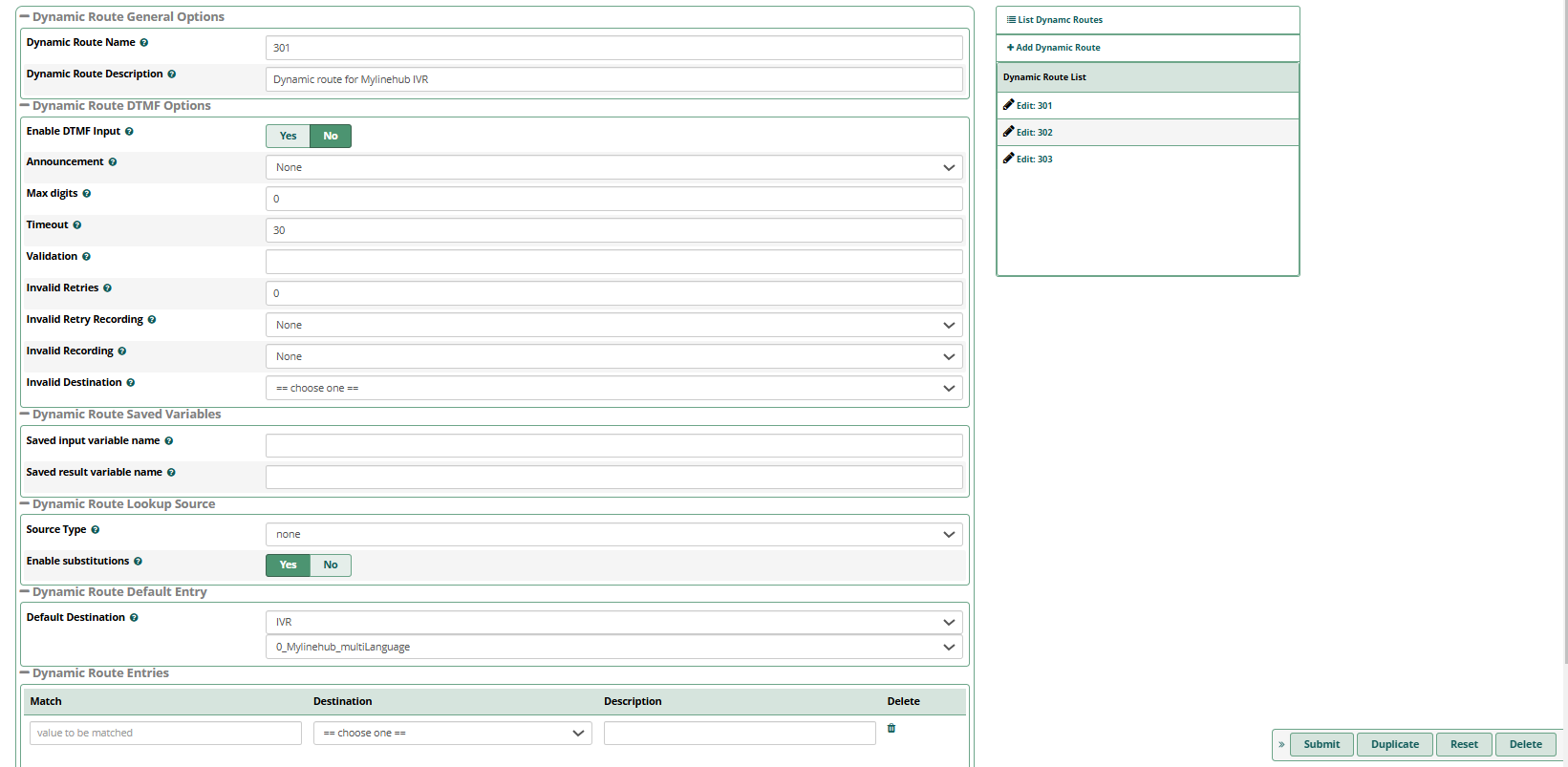
1) Dynamic Route General Options
- Dynamic Route Name: an identifier (example:
301orsales-router) - Dynamic Route Description: human-friendly explanation (example:
Dynamic route for Mylinehub IVR)
2) Dynamic Route DTMF Options (Caller Input)
This section controls digit collection when you want callers to enter something (like 1/2/3 or an account number).
- Enable DTMF Input: turn ON if you want to collect digits inside this Dynamic Route
- Announcement: optional prompt to play before collecting digits (example: “Enter your choice”)
- Max digits: how many digits to collect (for menu: 1; for account number: 6–12)
- Timeout: how many seconds to wait for input
- Validation: optional pattern/rule if your setup uses validation logic
- Invalid Retries: how many times to retry on invalid input
- Invalid Retry Recording: prompt played on retry
- Invalid Recording: prompt played on invalid input
- Invalid Destination: where to send the call if input fails (always set something safe)
Production tip: If your IVR already collects digits, you can keep Enable DTMF Input OFF here, and use Dynamic Routes purely as a routing table (decision layer).
3) Dynamic Route Saved Variables
You can store values into Asterisk variables so they can be used later in the call flow (logging, reporting, or routing elsewhere).
- Saved input variable name: where the collected input is stored (example:
MLH_INPUT) - Saved result variable name: where the chosen route result is stored (example:
MLH_ROUTE)
4) Dynamic Route Lookup Source (Optional)
- Source Type: the lookup backend (in your screenshot it is set to
none) - Enable substitutions: enables variable substitution features when using a lookup source
If you don’t use external lookups, keep Source Type as none. Many deployments only use Dynamic Routes as a simple decision table.
5) Dynamic Route Default Entry (Fallback)
Default Destination is mandatory in production. If no match happens, the call goes here.
In your screenshot, the default destination is set to an IVR (example: 0_Mylinehub_multiLanguage).
Recommended fallback targets:
- an IVR repeat / language IVR
- an operator extension
- a main queue
- an announcement (“Invalid option, please try again”)
6) Dynamic Route Entries (Match Table)
This table is the heart of Dynamic Routes:
- Match: the value you expect (e.g.,
1,2,VIP) - Destination: where to send the call when it matches
- Description: optional note for admin clarity
Example routing table (common):
1→ Sales Queue2→ Support Queue3→ Announcements / Office Address- (no match) → Default Destination (main IVR)
Real Example: How to Use It With an IVR
Clean approach:
Inbound Route (DID)
  → IVR (plays menu + collects digit)
     → Dynamic Route (routes based on digit)
        → Queue / Ring Group / Extension
Why this is useful: you can change the routing table (Sales → Queue A, Support → Queue B) without editing the IVR every time. The IVR stays stable; the Dynamic Route becomes your decision table.
Common Mistakes (And Exact Fix)
1) Everything goes to Default Destination
- Cause: no input/variable is being provided for matching
- Fix: enable DTMF input here, or ensure the upstream IVR/app provides the expected value
2) Match values don’t trigger
- Cause: mismatch like leading zeros, spaces, or different expected digits
- Fix: make match values exactly what callers will enter (or what your upstream app sets)
3) No invalid destination set
- Cause: invalid input has nowhere safe to go
- Fix: set Invalid Destination + Default Destination to something safe (IVR repeat or operator)
MYLINEHUB / VoiceBridge Note (Practical)
If your VoiceBridge / ARI app sets a channel variable (example: intent, language, customer type), Dynamic Routes can map that value to a FreePBX destination. Example mapping ideas:
MLH_INTENT=SALES→ Sales queueMLH_INTENT=SUPPORT→ Support queueMLH_LANG=HI→ Hindi IVR
This keeps your AI logic and your PBX routing clean: AI decides the tag/value, FreePBX decides the destination.
Next Steps
Want to see API-driven CRM + Telecom workflows in action? Try the WhatsApp bot or explore the demos.
Comments (0)
Be the first to comment.